Agentic workflow - Orchestrator
Situation:
The technology became available for user to not have to think what Moody's Copilot skill to use. But for the Copilot to figure out what skills are most appropriate to engage, based on user's prompt. In other words, agentic workflow arrived.
MVP features
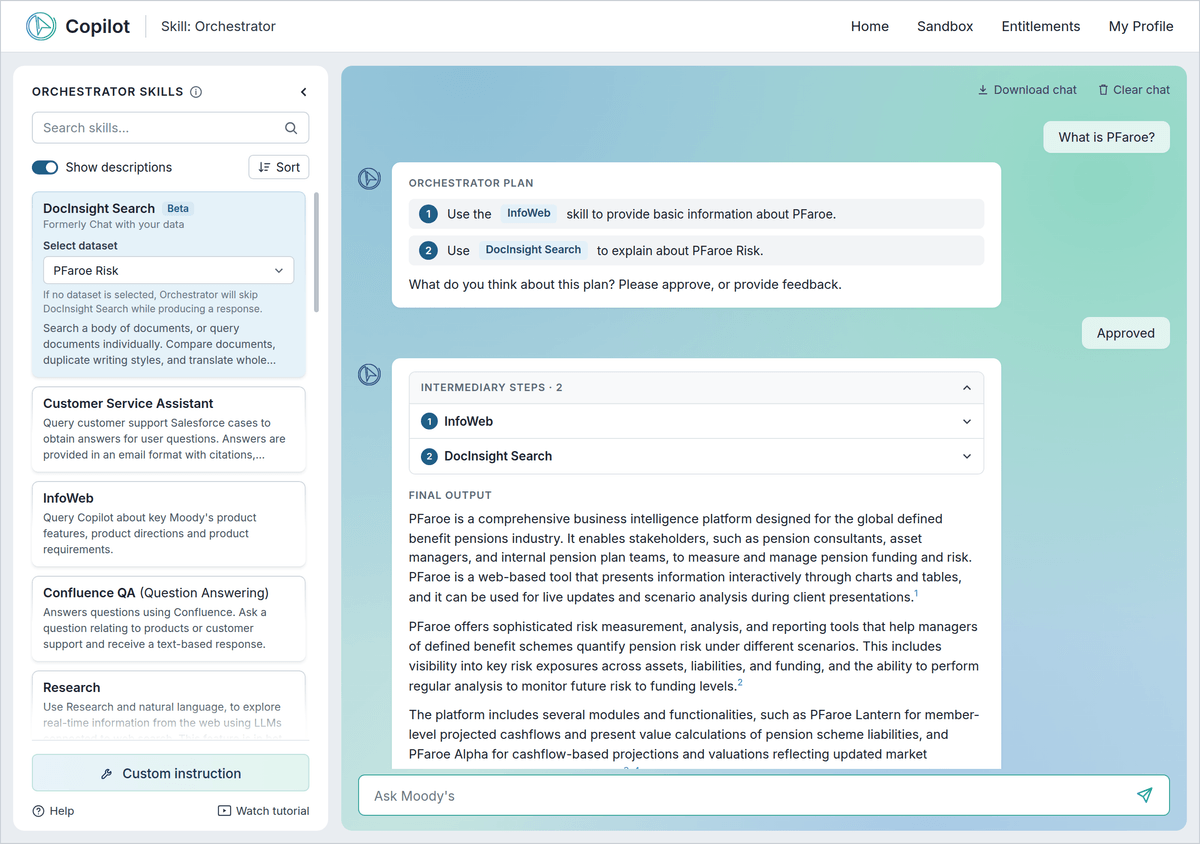
● Landing screen with pre-canned prompts. I don't have the visual.
● All 14 skills are available and engaged by default. Some skills are SMEs on their own. Other skills call particular source to fetch data. And some provide logistics for user to upload data themselves.
● Orchestrator detects intent from user's prompt.
● Orchestrator outlines its plan on how to execute the response.
● HITL (Human in the Loop): user needs to approve this plan. Or can provide some additional instruction.
● Orchestrator shows its thinking and inner workings in Intermediary Steps. Steps then collapse.
● Final output (response) is displayed. With citations.
● Skills have descriptions, so users can understand skills they are unfamiliar with. Descriptions were actually a direct user request. When we launched Build Your Own Assistant, users told us:
"I'd love to use all of these skills, but I am only familiar with few of them that are relevant to my workflow. Can you put some descriptions on them please?"
So we kept them in Orchestrator.
- They may be useful to the user in the beginning but then become unnecessary.
- They get lengthy.
So, I added this feature that can hide them: the eye icon and word "Descriptions".
● The skill panel collapses into a spine, to reduce visual noise and enable maximum amount of chat exchange to be shown.
Value Proposition
User does not have to do any extensive manual set up, and they don't have to figure out what skills to engage.
What's unique about Orchestrator:
Autonomy, adaptability and dynamic decision-making. Orchestrator is task-driven, capable of planning independently and executing multi-step tasks. It also learns from feedback continuously. Orchestrator integrates external skills.
Task:
Agent that selects skills, plus references from a body of documents and files user uploaded. With HITL (Human in the Loop) input and able to adapt to that input instantaneously.
Why:
We needed a shift from reactive to proactive.
When:
Started January 20, 2025. Launched mid-February 2025. Kickoff to launch - 5 weeks. I am a genuine proponent of MVPs and fast launches. We were able to add most of our Day #2 features in just the next release.
Team:
Product Manager, Data Scientist and Back End developer, Front End Developer and me, as the only UX resource.
Action:
My role:
● I designed everything Orchestrator needs. And then with the Product Manager, we decided what was MVP and what was Day #2.
● Rapid prototyping: I created 1 prototype for MVP and another for Day #2.
● We presented together to senior leaders, and established buy-in.
Where:
On Moody's premises. On Moody's Copilot web platform.
Who:
All Moody's employees. Agentic workflows enable adoption because they are much easier to use than previous generation of LLMs. In general, users had to learn how to prompt and we had the concept of prompt engineering. Which quickly got old and users got tired of it.
With Moody's Copilot in particular, users had to learn what each one of the 14 skills does, and what are good use cases for it. That was fatiguing for some users.
Results:
Impact:
Increased adoption and ease of use.
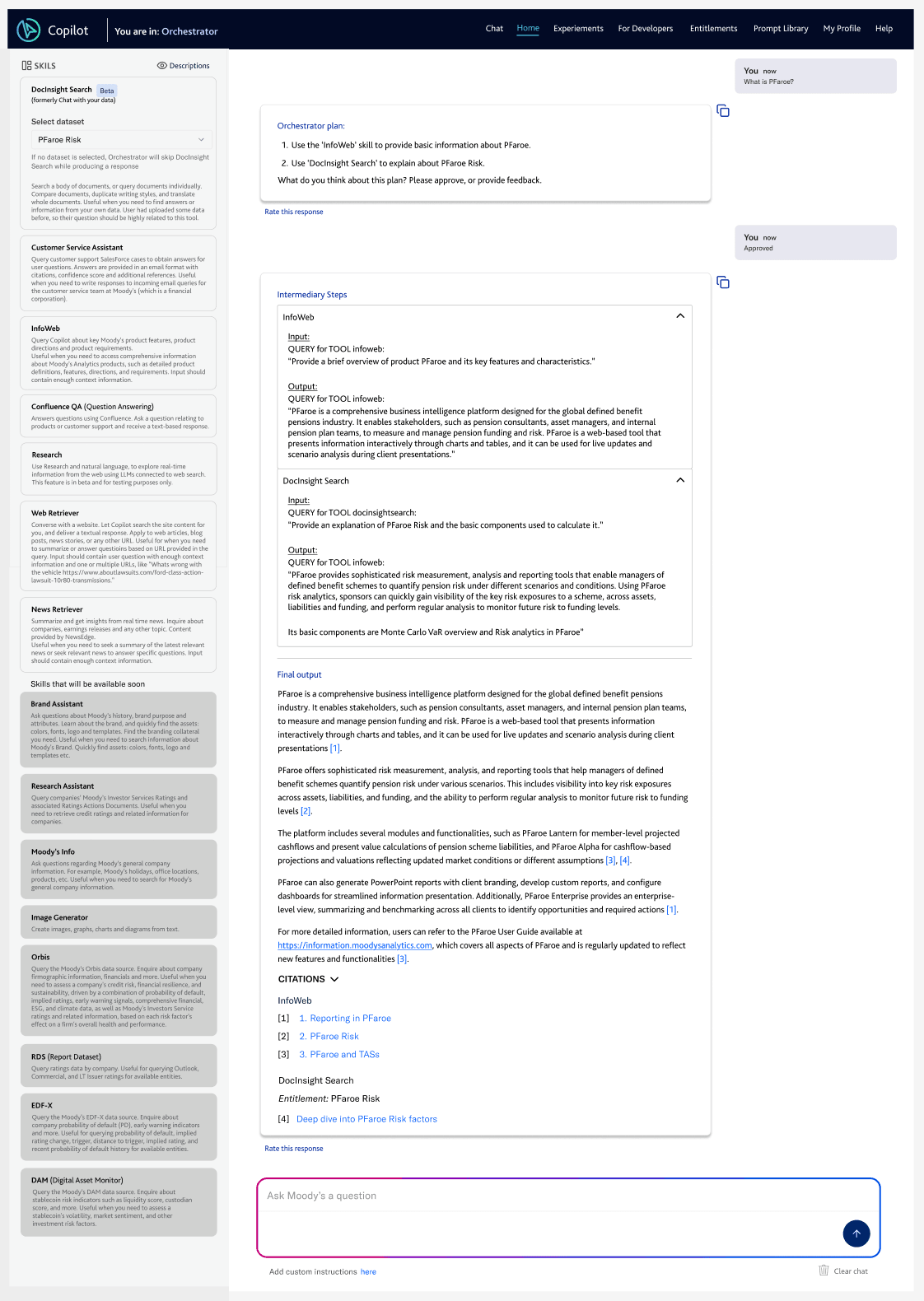
Day #2 features are listed underneath this image.
Impact:
Day #2 features:
1. File management inside the skill. So users can upload files, reference previously uploaded files or reference Entitlements. This is because product wanted 1 place, one location for all file interaction.
2. Ability to turn skills On or OFF via checkboxes.
3. Multiple Entitlements. Skill called DocInsight able to activate multiple Entitlements (folders with files). In MVP, it was only 1 Entitlement.
4. Confidence score on intermediary steps. Between the skill name and the chevron, right before the chevron. The score had a tooltip that explained how we came up with it "Confidence score is how relevant the response is to the detected intent."
5. Citation redesign. Please note source and citation redesign. It is different than any other model in this portfolio. All previous citations were not designed by me. Now, after 2 years, I finally got to redesign them so they are clean, crystal clear, easy to see - legible and readable, and easy to code so they perform well. Citations can collapse, because in Orchestrator, with all these skills and sources of data, citation can be very long.
6. Hide unselected skills. I added a toggle right next to the eye icon. Toggle hid unselected skills, so user can see and focus only on skills they want to use. Just reducing visual noise.
2026 redesign
When I designed these UIs for Moody's, in 2023-2025, we were moving at break-neck speed, and I had no time to spend on visual design. The visual design help I was receiving was sporadic. So I decided to redesign these in November 2026.
What I would have done now diferently and applied here:
1. Make overall design less heavy-handed and more airy and light.
2. Separate content from background.
2. Modernize the page header.
3. Bring in the gradient, as it is sinonimous with AI now.
4. Utilize the modern framing of the cards: border on top, drop shadow on bottom.
5. Format the text in the responses.
6. Tone down the color of the prompts.
7. Utilize the gradient on the buttons.
8. Utilize the gradient on the chat input box and submit icon.
9. Use the Copilot logo as the Moody's avatar.
10. Added skill label in the navigation. This request to know what skill user is in, came from user research: users sometimes weren't sure what skill they were in.