Chat With Your Data (CWYD)
Situation:
We needed a skill that enables Moody's Copilot users, Moody's employees, an opportunity to query data they uploaded. This tool was custom-made for Moody's employees to interact with large volumes of data, using everyday conversational language.
MVP features
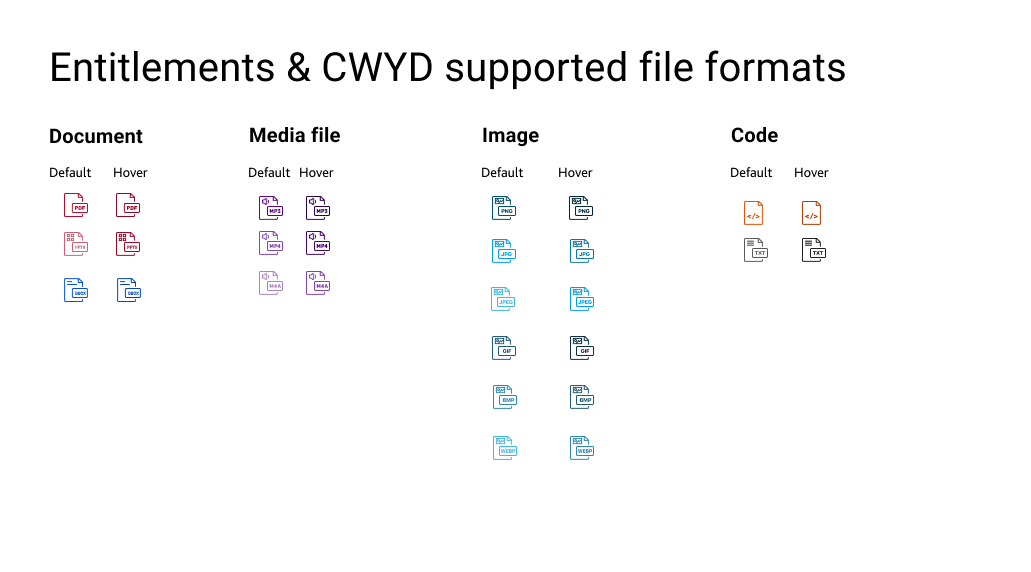
● Create a folder and upload files to it. PDF, Word, PPT, audio, video, images and code (html and text).
● You can create these folders only for yourself. Or share with colleagues.
● Ask questions to the data using natural language.
● Copy responses.
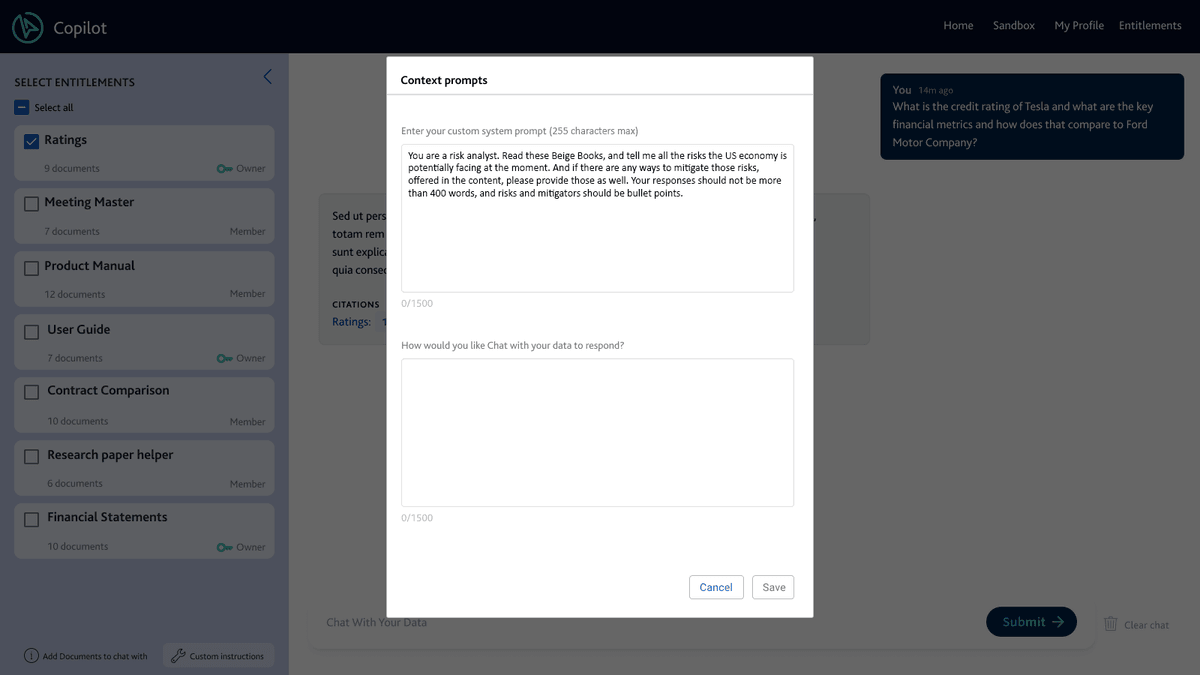
● Customize assistant's persona (otherwise known as system prompt). It can be financial analyst, sales rep, L&C (Legal & Compliance officer), etc.
● Rich options to provide feedback on the tool directly in the interface.
Value Proposition
CWYD (Chat With Your Data) enhances data accessibility and collaboration, making it easier than ever before to sift through and share the information quickly, saving time and effort. CWYD uses LLMs and RAG (Retrieval Augmented Generation). CWYD outputs are reliable and trustworthy, as it only uses documents user uploaded as sources. The threat of hallucinations is substantially reduced.
What's unique about Chat With Your Data:
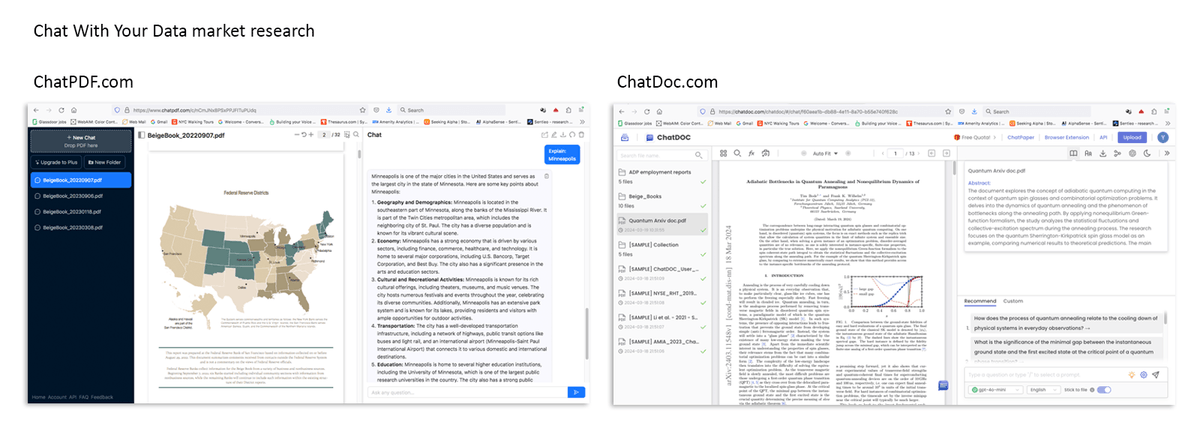
I didn't need extensive design exploration for "Chat With Your Data," because I had done the research ahead of time. I already had a long list of Gen AI and AI products, to draw inspiration from. My categories were: Video, Meetings, Writing, Process, Presentations, Sort & Summarize and Just Cool Stuff. On that list, under "Sort & Summarize", I had ChatDoc and ChatPDF. That's what you see screenshots of below.
The UX pattern was a user asking questions to the data they uploaded.
Task:
Skill that answers your prompts, referencing / sourcing from a body of documents and files you uploaded, that we called Entitlements. With an ability to also customize the system prompt (define assistant's persona, to a financial analyst, KYC officer, tech support agent, administrative assistant, etc.).
Why:
We needed a custom made assistant, so our users can chat with multiple documents at once, while we also preserve the integrity of Moody's data. That's why we built our own skill, as opposed to purchasing a solution from a vendor.
When:
● Started design in November 2023
● Launched MVP in December 2023, for internal testing
● Launched to Moody's employees in January 2024. Gave users few months to use it and report feedback in the Slack support channel.
● Conducted user research end of February - early March 2024, with our Head of User Research, to see how the product is performing.
Team:
Product Manager, few Data Scientists and Back End developers. 1 Front End Developer. And me, as the only UX resource.
Action:
My role:
● Drew inspiration from ChatDoc and ChatPDF. Screenshots are below.
● Designed interaction and visual design.
● Helped run user research after the product was launched. Extracted UX feedback.
● The video below is an MVP prototype in Figma. I presented it in a team meeting. That meeting was recorded. I downloaded the video, and edited to just my presentation. So it was essentially Figma prototype walkthrough demo with voiceover. I then uploaded that to the Jira Epic, for Developers. Developers received it favorably because they did not have to look at the Figma file, they'd just play bits and pieces of the video.
Where:
On Moody's premises. On Moody's Copilot web platform.
Who:
These are examples for CWYD, that uses chunked document ingestion. It breaks down large documents into smaller, manageable segments or "chunks" before processing them with AI. This means model finds a specific sentence or paragraph to respond to a query. This allows for precision and accuracy. Sample use cases are below:
Customer Support for Structured Finance team:
They use Jira service management as their Customer Support platform. Other teams mostly use SalesForce. So SF (Structured Finance) team loads all their resolved cases into CWYD, as Entitlements. They entitle the whole team to this data. So everyone can look up a particular use case, when a client reaches out with questions.
Sales team:
Sales use CWYD to prepare for meetings with clients and prospective clients. They load previous communications. Research about the client or prospect, consisting of the following types of resources:
● Published articles, white papers, analyst reports
● Earnings calls transcripts
● 10-K reports (annual report filed within 60-90 days after the fiscal year-end)
● 10-Q filings (quarterly report that public companies in the US must submit to SEC)
● Job postings (if a company is hiring in a particular discipline, that means they are investing in that area or domain...could be Generative AI, quantum computing, Cloud storage, or else, and may be interested in partnering, or purchasing relevant products or services, etc.)
● Everyone at Moody's used CWYD for meeting minutes to summarize, extract main points, ask questions to the content.
● Analysts used it for research. They would upload 20-30 studies, articles, white papers, and ask the assistant to summarize, and ask specific questions to the data.
● Technical personnel used it to find information in product manuals and user guides.
UX and user research:
● My manager created a knowledge base for Talent Acquisition team, to use while they were recruiting for open spots on our team ("what's the difference between UX and UI designers").
● For user research, we uploaded interview transcripts and asked specific questions to that content.
1 year after launch, we added whole document ingestion. More about this is below in the story.Results:
Impact:
● CWYD (Chat With Your Data) solved 150 out of 500 use cases requested on the Gen AI Idea Board (where Moody's employees submit ideas and request skills to be built for their particular needs)
● 1 year after launch, CWYD has 2,000 monthly users, out of 14,000 Moody's employees
● 20% productivity increase for some users
● 1 year after launch, there were 6,000 Entitlements created by 2,000 unique users
● 260,000 documents ingested
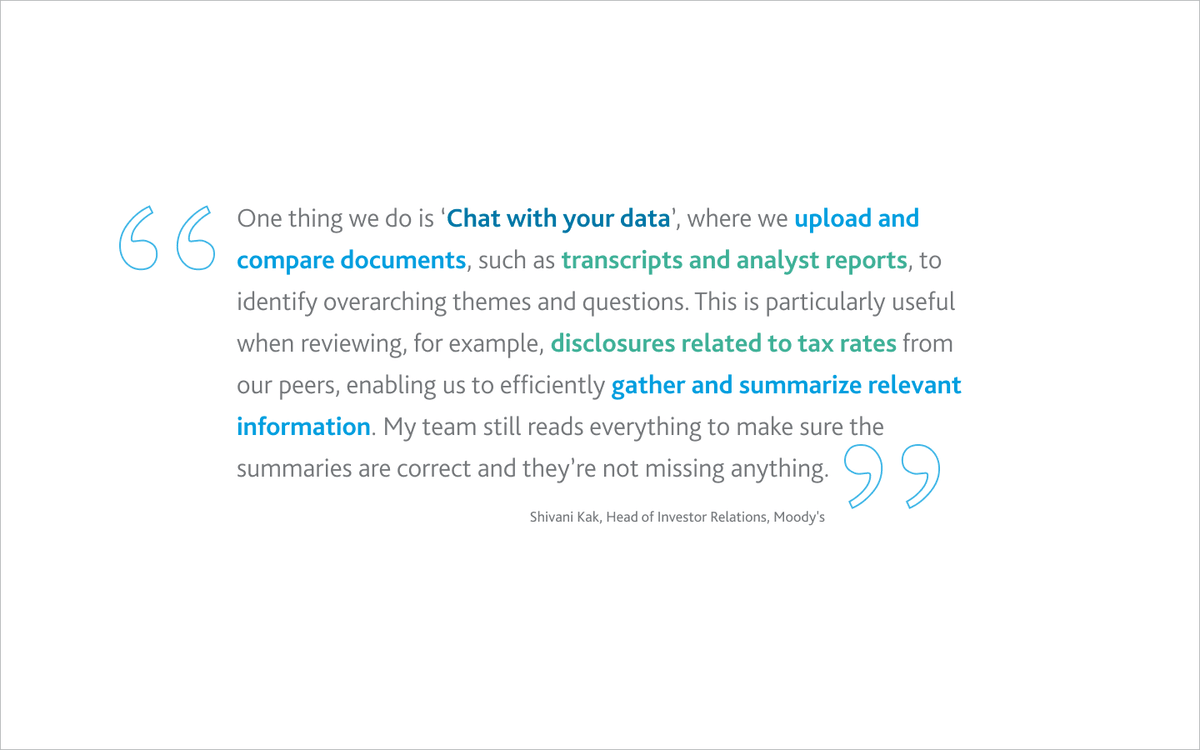
● Magazine "Investor Relations" published an article about CWYD in April 2024. The quote below is from that article. If the web link asks you for a subscription to access the article, open this PDF instead.
Lesson learned: User research can uncover small UX improvements that can deliver large gains in user adoption and stickiness.
The video below is a demo of CWYD in Production and UAT, from September 2024, with my voiceover. It's 10 minutes long.
December 2023. I am doing a demo of my Figma prototype to the team, as CWYD was being launched in the December release. It is 9 minutes long.
The quote below is from an article that the magazine Investor Relations published about Chat With Your Data, 3 months after we launched the skill.
This is how I thought about what metrics to collect, at launch time.
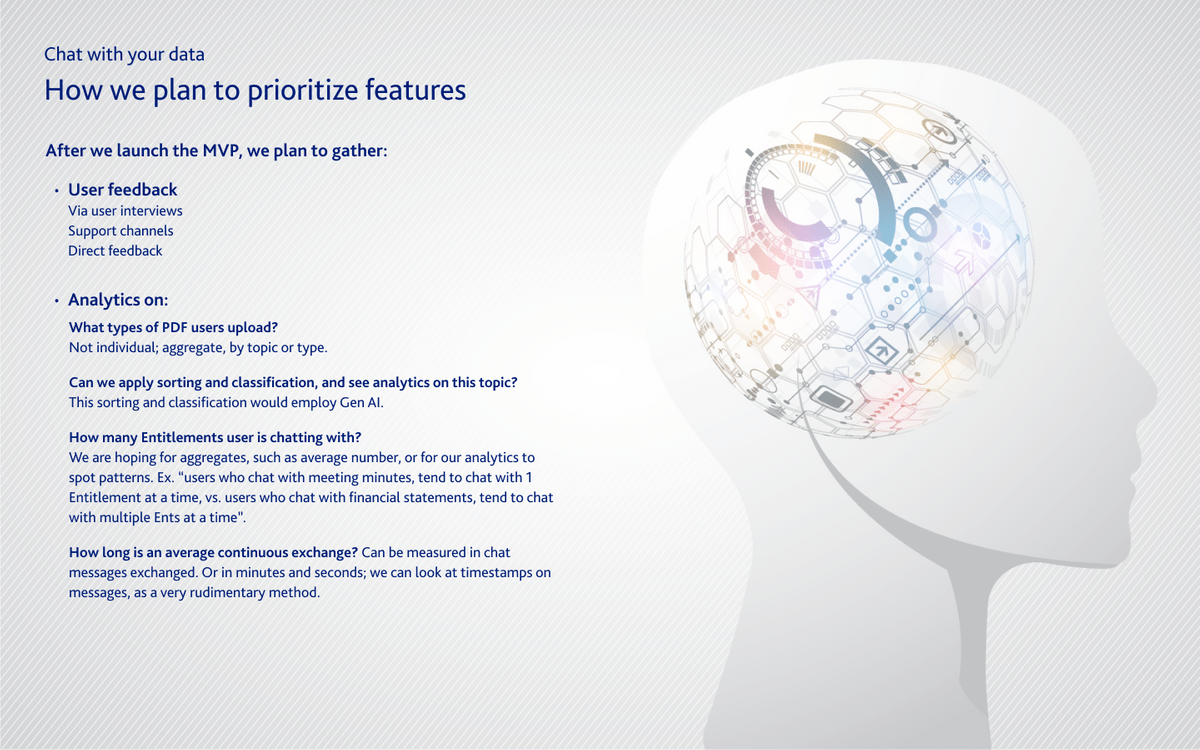
Moody's Copilot dashboard is an entry point. User clicks on the "Chat With Your Data" tile (see red arrow).
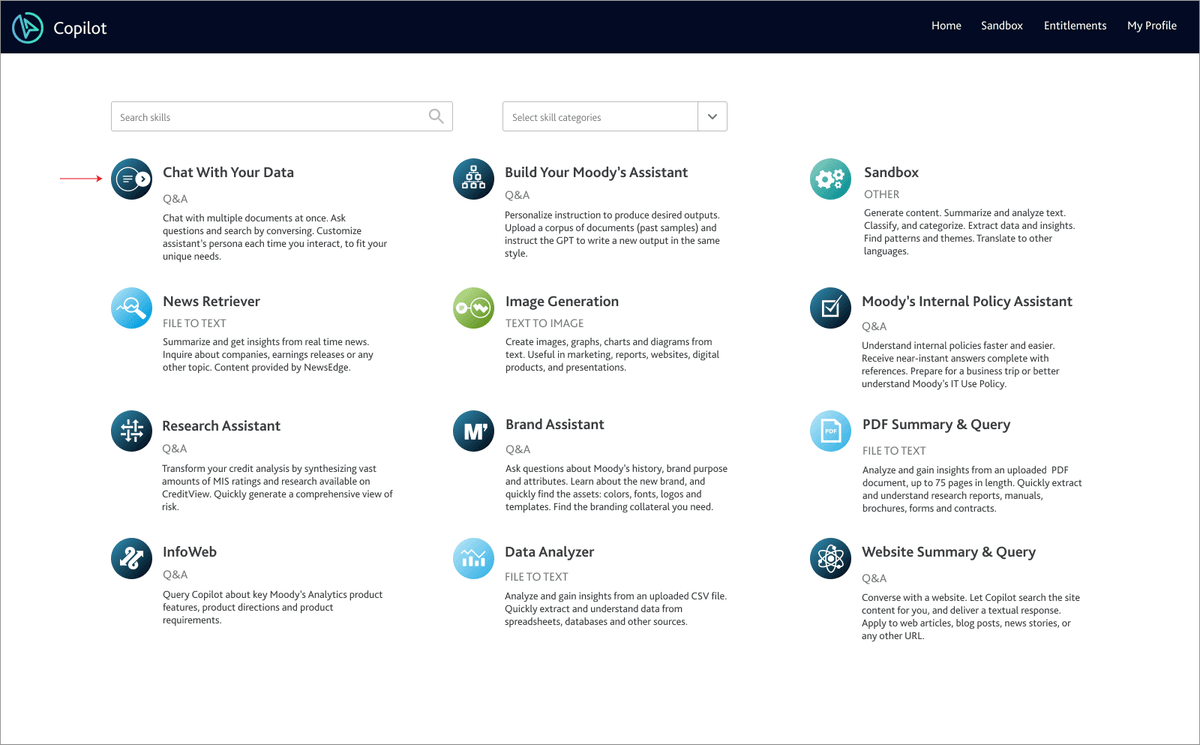
Image below is user's landing page, if they don't have any Entitlements.
Please note that it was very rare that a user would see this page. Because even if the user hadn't created any Entitlements themselves, it's almost certain that their manager or colleague created some Entitlements, and entitled the user to them. This was a coordinated effort from management's side, to nudge employees into using "Chat with your data" skill, because it was very versatile and effective. It solved 150 out of 500 employee requested use cases.
● However, we had to have a landing page for a user with no Entitlements, just in case the user fell into that edge-case of users with no Entitlements.
● Once user has entered the skill, they could get this page back by clicking "You are in: Chat with Your data" hyperlink, in upper left corner. User may want to do that, to remind themselves of what the skill can do. I used this pattern because it was the same as how Copilot works in Slack or Teams, where user goes to the "About" tab, and sees all skills listed there, together with their trigger words. Or, user says "Hi" and gets this same info as a chat response.
● If user has no Entitlements, the "Add Documents" button takes them to the Entitlement section, to create some Entitlements (folders of documents).
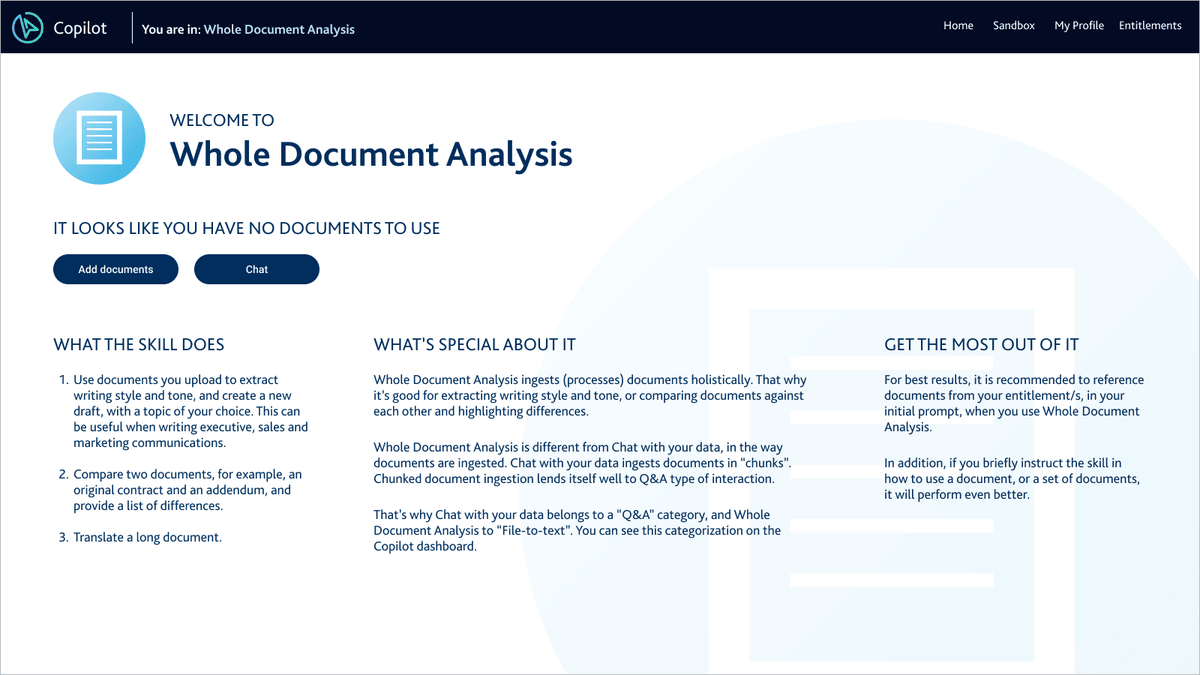
● This landing page content actually became even more important, once we added "Whole Document Analysis" skill:
- CWYD (Chat With Your Data) was good at chunked document ingestion, and search-type queries.
- WDA (Whole Document Analysis) was good at analyzing documents wholistically, and extracting style and tone, or comparing contracts, or translating long documents.
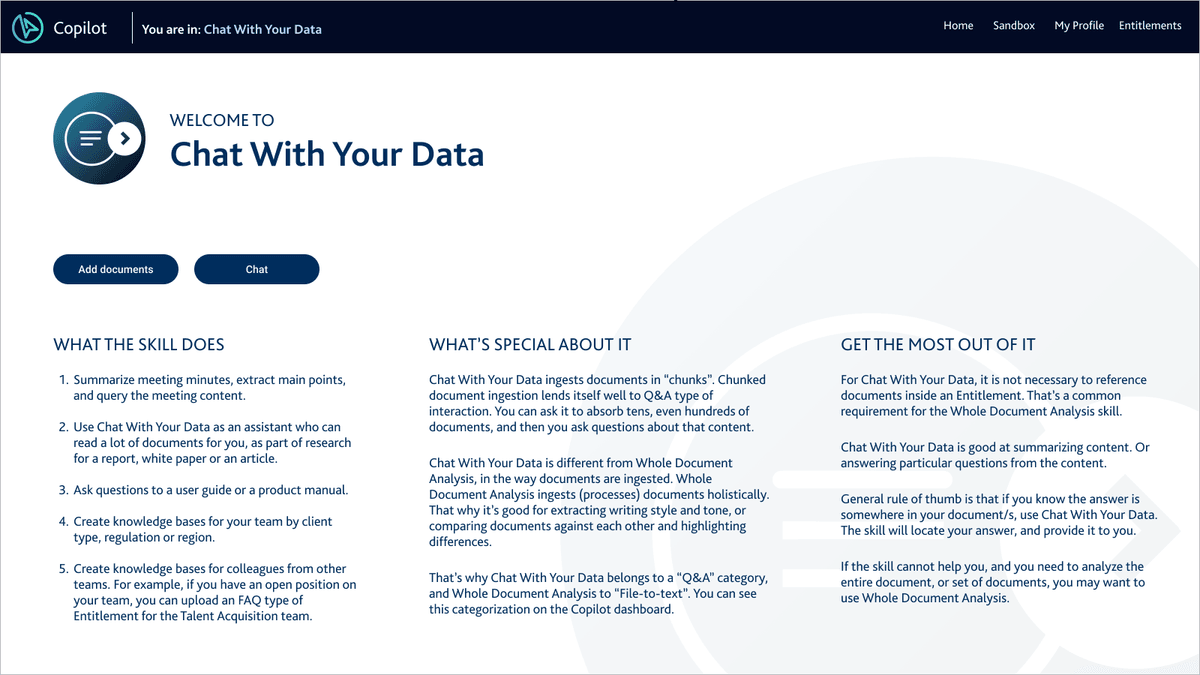
Chat With Your Data
CWYD (Chat With Your Data) used chunked document ingestion, which breaks down large documents into smaller, manageable segments or "chunks" before processing them with AI. This means model finds a specific sentence or paragraph to respond to a query. This allows for precision and accuracy.
Whole Document Analysis
1 year after launch of CWYD, we added whole document ingestion, which was good at analyzing documents wholistically. This method processes the entire document in one go, preserving its full context. It is ideal for scenarios where correlated information across the document needs to be understood comprehensively. Whole document ingestion typically requires models with larger context sizes or advanced techniques to handle extensive data without losing coherence. We called this skill Whole Document Analysis, or WDA. Here are top uses:
1. EXTRACTING STYLE AND TONE
This use case was often internally referred to as Executive Voice. First executive to model it after was Moody's CEO, Rob Fauber. We created drafts of his communications. So previous samples of these communications were loaded into the skill. New topic would be added in a few words. And model would produce a new draft. Internal Communications team may or may not tweak them then. Here are examples:
Internal:
● Rob's Corner. Whenever there was something of substance to communicate, Rob would send a company-wide email. These emails were called "Rob's corner."
● Town Halls. These were actually both internal and external. Because after every internal Town Hall, Rob would post a quick summary and comment about it on LinkedIn, as a short video.
● Presentations. PowerPoint to Board of Directors, for example.
External: LinkedIn posts, External speeches, Earnings Calls scripts and Press releases.
2. DOCUMENT COMPARISON
● You could be Legal or Procurement personnel. A vendor's contract may be up for renewal. Vendor sent you a new contract. You want to know what's the difference between that contract, and the one from 3 years ago. They look very similar at first glance. The format is the same, etc.
● Comparing a contract against the template it derived from.
3. TRANSLATING LONG DOCUMENTS
Wholistic document ingestion is better able to understand overall purpose, format and structure - and emulate it in the translated version. It is not just translating word-by-word without a big picture understanding.
4. WHOLE DOCUMENT INGESTION CAN UTILIZE WRITING STYLE GUIDES
Whole document ingestion also has the ability to understand and apply writing style guides.
5. WHOLE DOCUMENT INGESTION EVENTUALLY BECAME NOT JUST DIFFERENT, BUT SUPERIOR
Whole document ingestion by end of 2024, was processing chunked document ingestion types of queries, with 80-90% accuracy. So it just became dominant.
CWYD accepted file formats
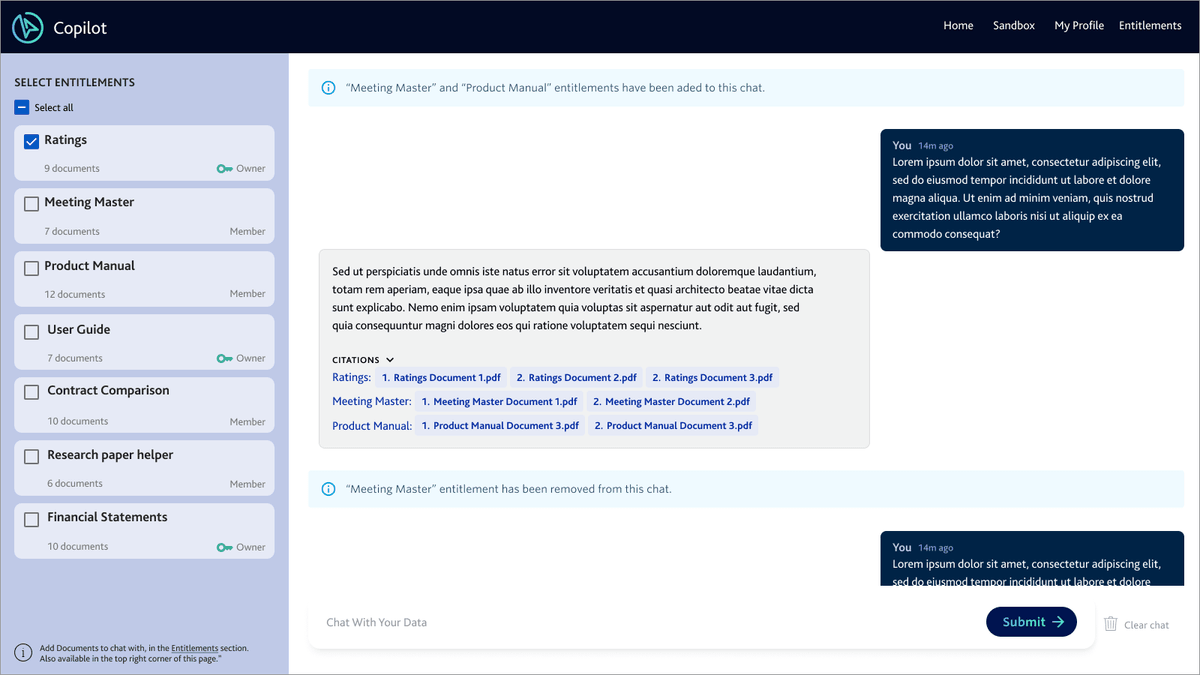
MVP UI. The only components in this UI, that I did not design, are the prompt, the response, and the "Submit" button. Those components came from a design kit designed by my colleague. In terms of visual design of those elements, I think they are a bit heavy-handed. Few slides down, I offer a quick redesign option.
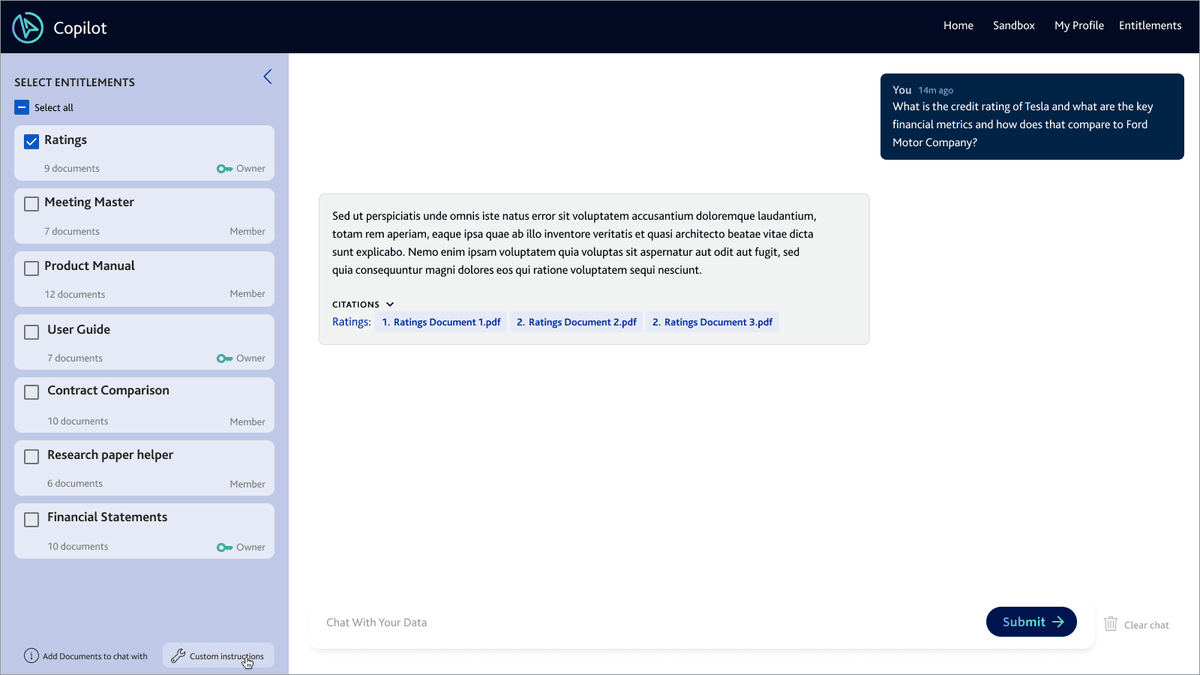
User clicks on the system prompt CTA to launch the modal (next slide).
System Prompt modal. User can define assistant's persona, to a financial analyst, KYC officer, tech support agent, administrative assistant, etc.
Day #2 features I suggested:
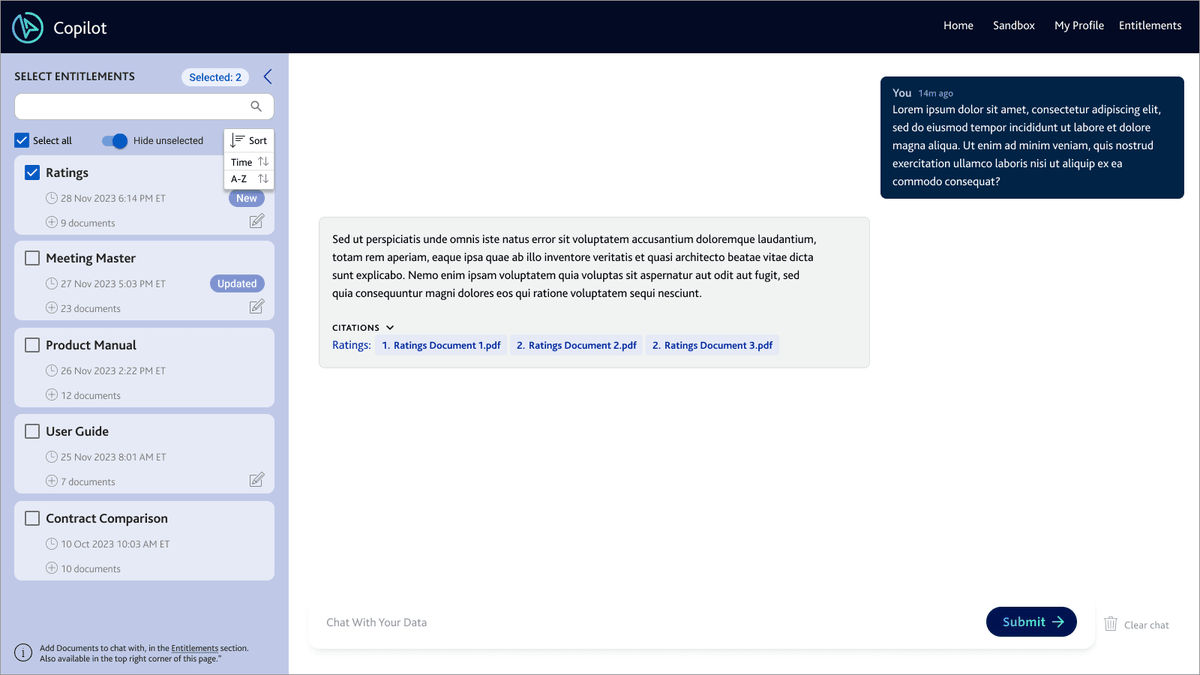
● "Selected" label to show if there are selected Entitlements below the fold.
● Search field
● "Hide unselected" toggle to put focus on only selected Entitlements, and also reduce visual noise
● Entitlements are by default sorted alphabetically, A-Z. But the user cannot sort Z-A, if they want to. Also, need chronological sorting.
● Timestamp
● "New" and "Updated" labels
● Edit icon that takes user directly to the Entitlements section, to edit the Entitlement
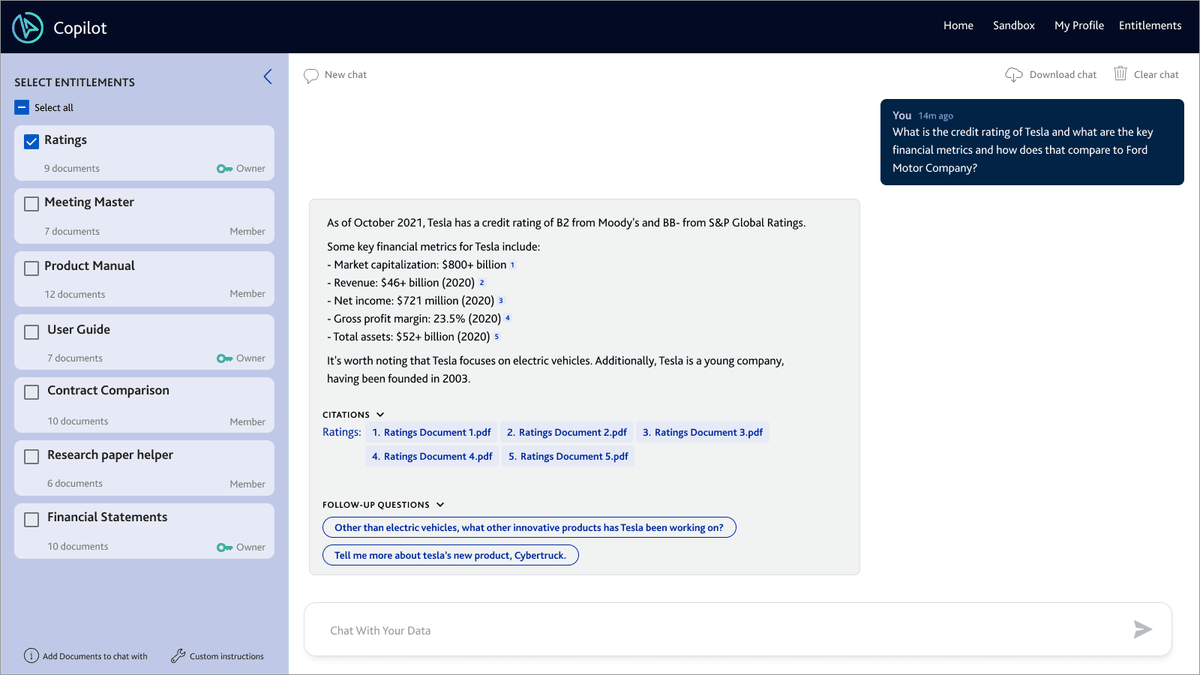
Adding follow-up questions and superscript numbers for citations. The visual design of citations and follow-up numbers isn't mine. I had to use from a library someone else designed.
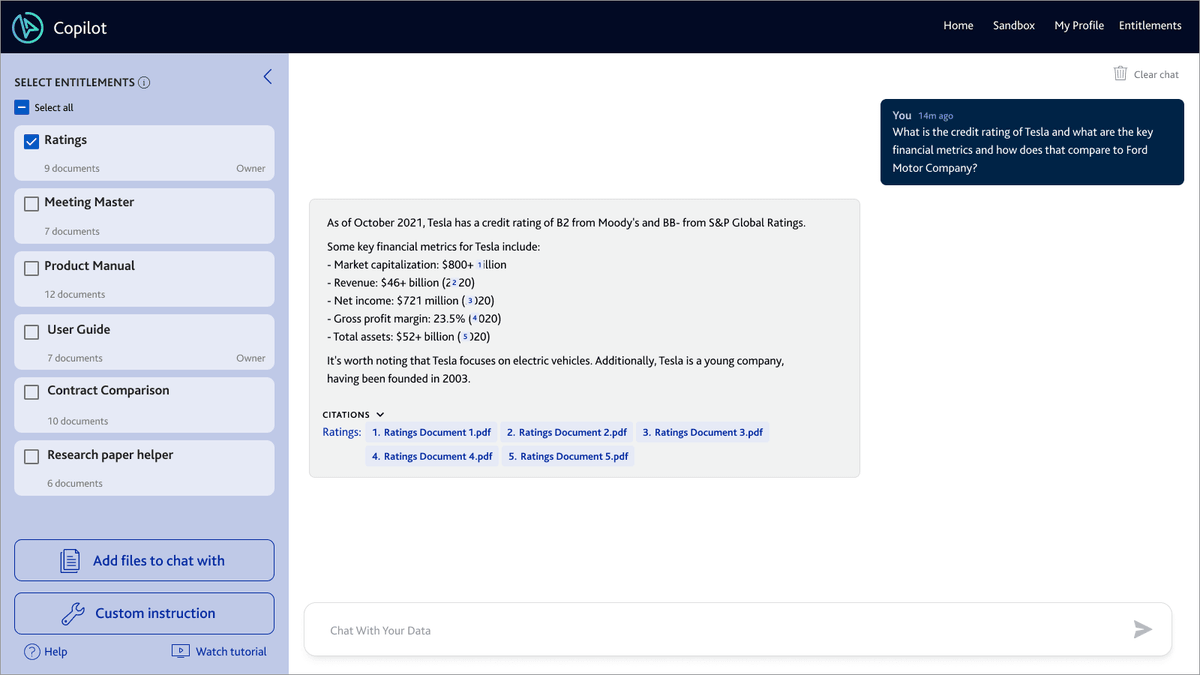
User research revealed some users missed the CTAs for system prompt and where to go to add documents. In previous slide they are in lower left corner.
So, I made those CTAs much bigger and more prominent.
Please note the "Help" and "Tutorial" smaller CTAs.
● "Help" takes users to the Help section we created in the meantime, for the whole platform, and various skills and features on it.
● "Tutorial" launches a video in a modal (next slide).
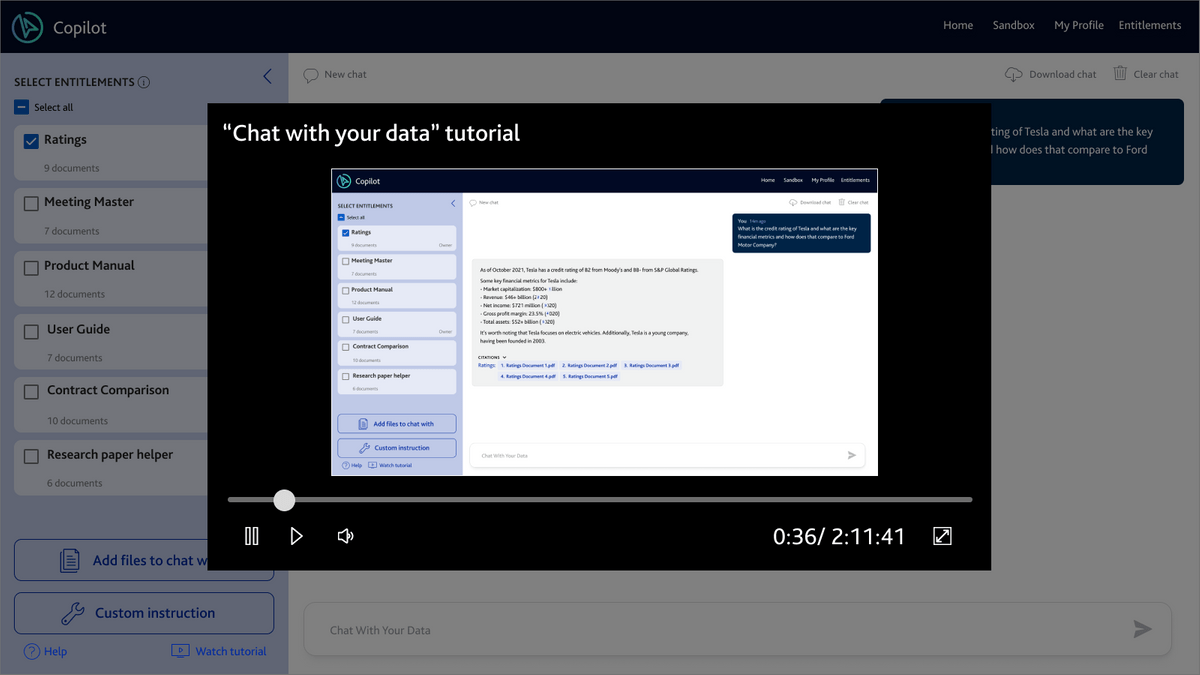
Tutorial video in a modal.
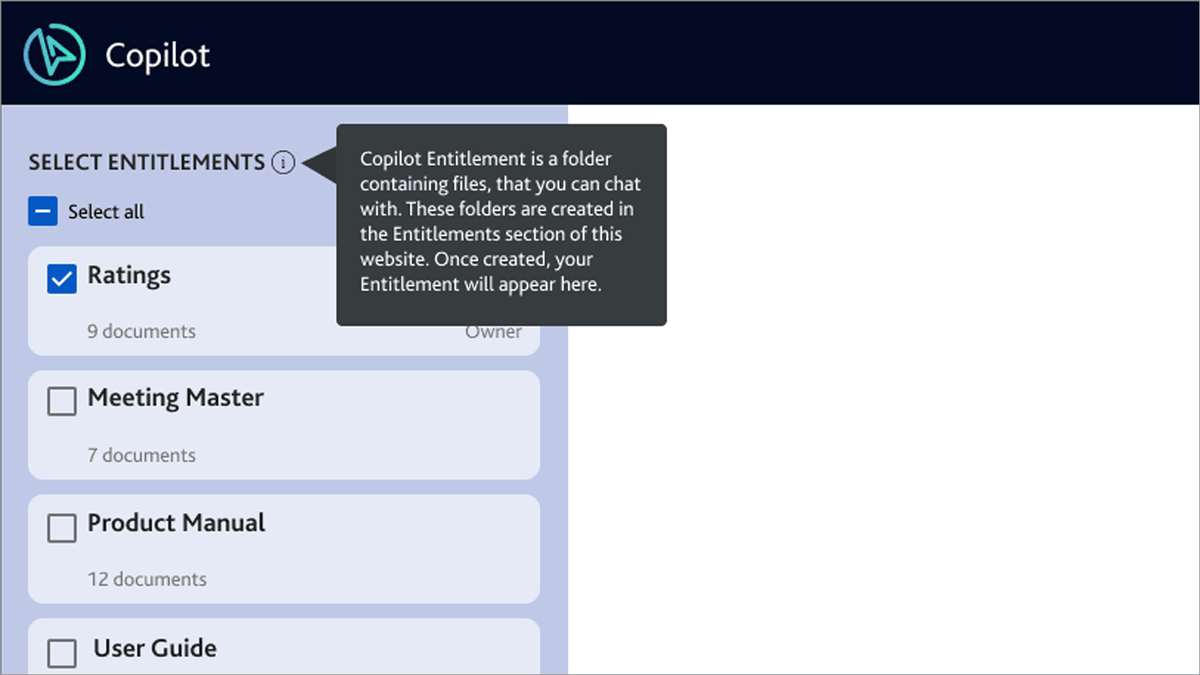
User research also surfaced that some users are having a hard time understanding what an Entitlement is. So I added this tooltip, to explain that.
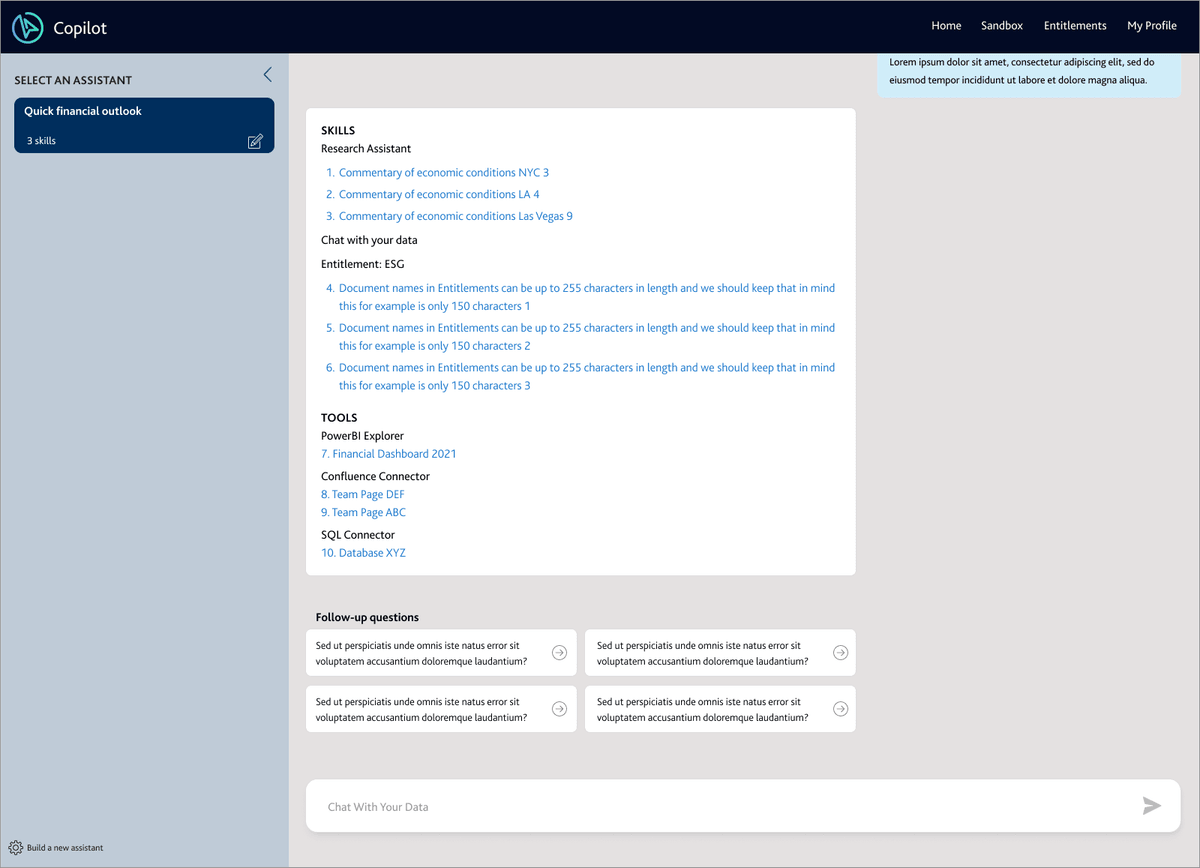
This was my redesign of the Citations. This was from a different product, Build Your Own Assistant. But Citation design applies:
● Few slides above is a Citation design I had to use from a library someone else designed. I thought it was hard to read and a bit heavy-handed. This was my redesign and I believe it to be cleaner, clearer and easier to read. With just blue text on white background. Citations are hyperlinks and they launch pages of documents used in that particular sentence or paragraph.
● Bullet point format also makes it easier to read. Plus, as the product evolved, we realized that 164 characters we originally set as the limit for Document names, was not enough. We increased it to 255 (maximum allowed). So that made Document names rather long. And bullet format was much more appropriate for long names to be legible.
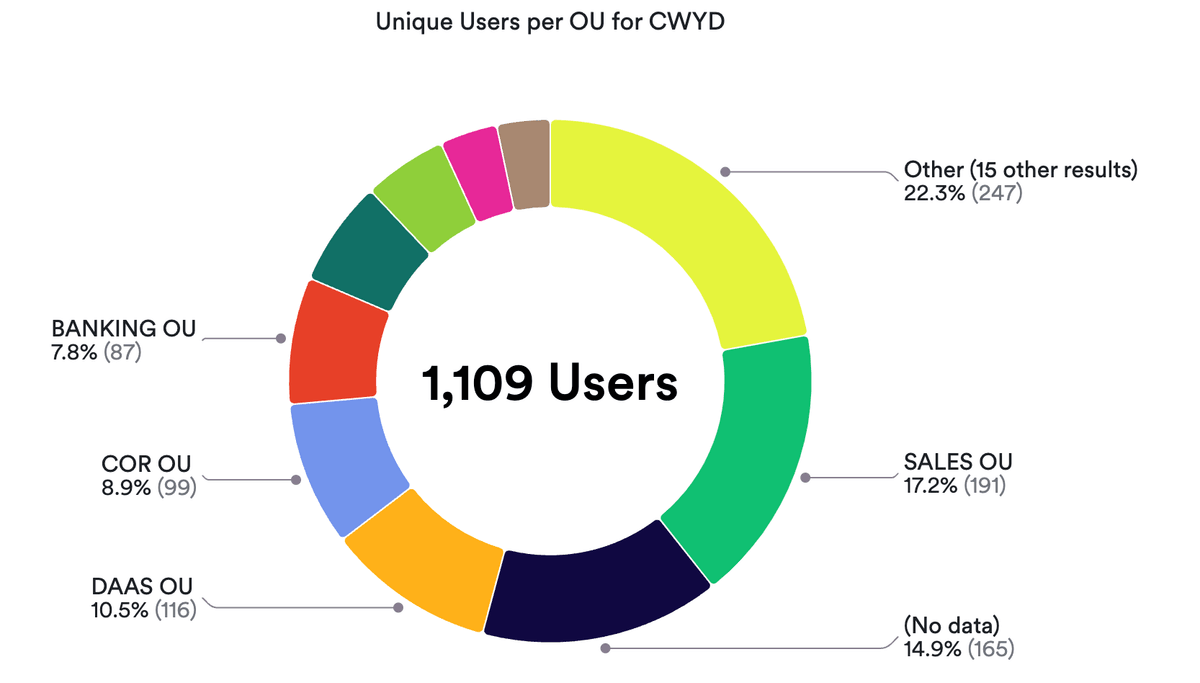
Who's using it and how
Sales team is the biggest user, 2 years after launch. And since I worked on all Copilot products, I can say with certainty that:
● Sales team is the most enthusiastic adopter of all of our products.
● They always respond enthusiastically to invites to user research sessions, and they come prepared with lots of feedback.
● They are generous with their time and they explain their workflows in detail. They even give ideas for products and features.
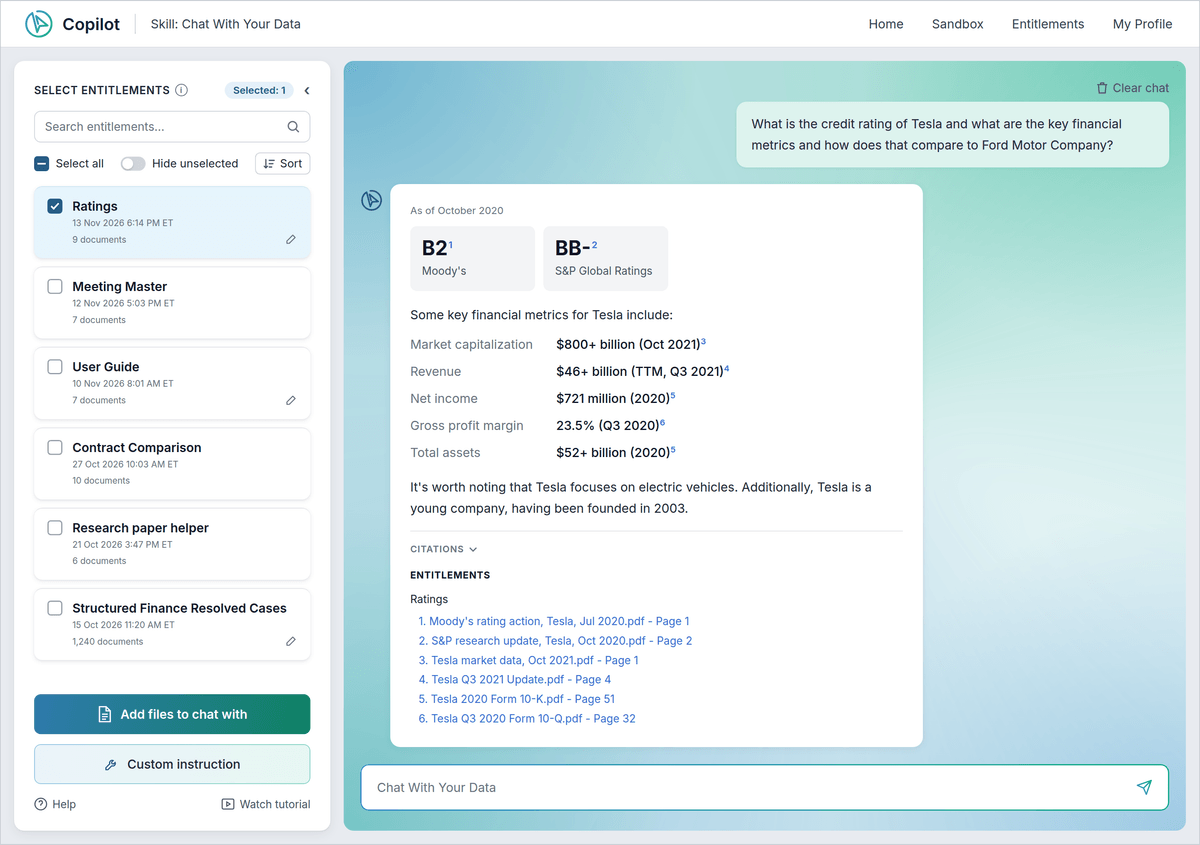
2026 redesignWhen I designed these UIs for Moody's, in 2023-2025, we were moving at break-neck speed, and I had no time to spend on visual design. The visual design help I was receiving was sporadic. So I decided to redesign these in November 2026.
What I would have done now diferently and applied here:
1. Make overall design less heavy-handed and more airy and light.
2. Separate content from background.
2. Modernize the page header.
3. Bring in the gradient, as it is sinonimous with AI now.
4. Utilize the modern framing of the cards: border on top, drop shadow on bottom.
5. Format the text in the responses.
6. Tone down the color of the prompts.
7. Utilize the gradient on the buttons.
8. Utilize the gradient on the chat input box and submit icon.
9. Use the Copilot logo as the Moody's avatar.
10. Added skill label in the navigation. This request to know what skill user is in, came from user research: users sometimes weren't sure what skill they were in.