Product Management
Sections below show a variety of deliverables. One repeats: MVP Feature List. When faced with ambiguity and no PRD, I created and shared an MVP Feature List in Slack to define the path forward, clarify responsibilities, and secure leadership approval or feedback. This approach consistently removed bottlenecks, empowered the team, and provided a clear, accessible product definition for all stakeholders.
In this section, look for hyperlinks, underlined, bold, and blue. They are bullets, and isolated, for easier spotting. Those are the artifacts. I provide a brief context here, but most relevant projects exist in this portfolio, as individual entries and elaborate stories.
PDF files should open in a new tab in Google Chrome but they may download automatically in Firefox, and you will have to go to your "Downloads" folder to open them.
Entitlements
Situation:
We needed a custom-made Entitlements system, that safely holds our data, so that we, Moody's employees, can chat with our data on Moody's Copilot Web Platform. So you are a Moody's employee, you create a folder with documents. You can just use it yourself. Or, you can entitle it to some of your colleagues. That's where the word Entitlements came from.
We had no PRD (Product Requirements Document), and no Product Manager.
Task:
I had to design UX for Entitlements, but did not have a definition of what I was designing, or what was the MVP.
Action:
Not having a Product Manager made it difficult to make decisions. Everyone had an opinion, and I had to establish buy-in, in order to move forward. So I patiently addressed every single concern, explained pros and cons of choices, and guided the team through. This is an example of that guidance:
● Three form patterns and pros and cons of each
Without a PRD and a Product Manager, there was plenty of space for ambiguity. To ensure alignment, I came up with this deliverable:
Timeframe:
● Kickoff to Production: 4 months
● UX took 3 months
Result:
● Entitlements have been in use for a 3rd year now.
● Chat With Your Data, the skill where Entitlements are used, 15 months after launch, had 2,400 monthly users, out of 14,000 Moody's employees.
● 20% productivity increase for some users that we interviewed.
● 6,000 Entitlements created by 2,000 unique users, 1 year after launch.
● 260,000 documents ingested, 1 year after launch.
Chat With Your Data
Situation:
We had a PRD (Product Requirements Document), and a Product Manager. We needed a skill that enables Moody's Copilot users, Moody's employees, an opportunity to query data they uploaded. Users uploaded documents using the Entitlements system described above.
Task:
I had to design UX for Chat With Your Data. So I wanted to look at some similar products in the market.
Action:
● I had a list of AI and Gen AI products, that I used to work more efficiently and also for UX inspiration. The list had a "Sort, summarize and chat with documents" category, and so I used those products for inspiration, for CWYD UX.
● Yelena's AI and Gen AI products list
Timeframe:
● Kickoff to Production: 3 months
● UX took 6 weeks
Result:
● CWYD (Chat With Your Data) solved 150 out of 500 use cases requested on the Gen AI Idea Board (where Moody's employees submit ideas and request skills to be built for their particular needs)
● All results from the Entitlement section apply here as well.
Chat Threads
Situation:
We needed the feature but the Product Manager had no time to write the PRD (Product Requirements Document).
Task:
Write Product Requirements. I wrote them, but I wrote them in a format where the Product Manager could just answer questions yes or no. So she still made all the decisions, and I did the groundwork.
Action:
● I did market research: how Chat Threads are handled by ChatGPT, Perplexity and Gemini.
● I incorporated our Entitlements, and designed how chat threads and entitlements affect each other - which was intricate logic.
● Chat Threads product requirements
Timeframe:
● Product and UX took me 6 weeks.
Result:
● Junior Product manager used my PRD, and my Feature List, to write the official PRD.
● Front End Developer used my Feature List to write the official RFC.
Daily Briefing
Situation:
The feature was a calendar enhancement tool, that analyzes external companies found in user's calendar, and provides firmographic data about those companies, such as industry classification, annual revenue, number of employees, headquarters location, watchlist status, ESG standing, latest news, and pre-canned Copilot questions.
● Target audience for this tool was anyone who has to look up companies frequently: Procurement, Sales, Credit and Risk Analysts.
● We had user stories, and Senior Leader's sketch of what he envisioned. We needed content.
Task:
Come up with realistic content.
Action:
I actually did my own search for a vendor, about 8 months before I worked on this project. I was looking for an NLP vendor of sorts. The end result of that search ended up being perfect content for this project. I had not realistic but 100% real content!
● Daily Briefing content strategy
● Daily Briefing edge-case logic
Below, wireframe and visual design are not product deliverables. They are UX. But I am showing them so that it is evident exactly how much my content strategy and edge-case logic contributed to the final product.
● Daily Briefing wireframe and visual design
Timeframe:
● Kickoff to Production: 3 months test
● UX took 2 months
Result:
● This project was done in partnership with Microsoft. After the launch, Google and Amazon reached out to express interest in working with Moody's. Partnership with Google ensued.
● Partnership with Microsoft was mutually beneficial, as MSFT is looking for Wall Street credibility, and Moody's for MSFT's reach.
● Another much bigger project with Microsoft ensued as well. I was also the lead on it - Build Your Own Assistant.
● Moody's Sales team received Daily Briefing rather favorably and we were able to learn a lot how they work and what other tools and features they need - new project ideas for us.
Code Interpreter
Situation:
We were building the Code Interpreter, after OpenAI's Code Interpreter. It writes code, it answers questions in natural language, it analyzes Excel files, and writes Excel formulas, it does math computations, and it creates charts. We had the PRD and RFC.
Task:
We needed UX. This implementation was the most complex of all, I'd say. Because the skill performs so many different tasks, we also needed a way to summarize all UX, so that we can be aligned and the work can be approved.
Action:
● I designed the UX, customized to our needs.
● I created the Feature List, to ensure alignment and aid the creation of Jira tickets and Release Notes. This was important because Release notes are written by staff who sometimes struggle with the UX nomenclature. So they were able to utilize the Feature List, to write better Release Notes.
● Code Interpreter MVP feature list
Timeframe:
● Kickoff to Production: 6 months, because implementation was rather complex.
● UX took about 2 months of work, but not all at once. It was in bouts, and some needs were only encountered during implementation.
Result:
● Successful implementation to UAT.
Whole Document Analysis
Situation:
Chat With Your Data ingests documents in chunks. It is good for Q&A type of interaction. Whole Document Analysis ingests documents as whole. It is good for extracting the style and tone, comparing documents (contracts for example, original vs the addendum), and translating longer documents. We had the PRD, and 2 Product Managers.
Task:
● UX was rather complex
● Project suffered from never having the whole team - it started in late June, and went on during peak vacation season. There were always at least 2 people on vacation, including myself. This caused breaks in communication and lack of continuity. We would talk about the same things, over and over again.
● Stakeholders disagreed what the MVP should be. Some thought that it should be Executive Voice, the "write in my style" for corporate communications, social media, earnings calls, etc. Others thought it should be much broader than that; matter of fact - the most senior stakeholder did not believe in MVPs.
Action:
I designed the UX, customized to our needs. And then created the Feature List, to ensure alignment and aid the creation of Jira tickets and Release Notes (Release notes are notifications we send to our users about what is new in each release. They are written by staff who sometimes struggle with the UX nomenclature. My Feature Lists aided accuracy or Release Notes).
● Whole Document Analysis MVP feature list
● Whole Document Analysis landing page
Timeframe:
● UX took 2 months.
Result:
● Project being implemented.
User feedback
Situation:
Design a way for users to provide feedback, in Moody's Copilot eco-system.
Task:
Come up with content strategy for pre-canned options, as well as logic of how the "good, neutral, bad" feedback should work.
Action:
● I did industry research into user feedback patterns, as the base for the first iteration.
● For the second iteration, where our product matured, and we needed more complex and sophisticated feedback, I brainstormed by myself, all the possible options, and results were favorable.
● For the third version, I needed bespoke options for bespoke skills. But at this point, we had user research insights as well as skills that could help me brainstorm and that would provide me inspiration!
● User feedback content strategy
Result:
● Successful implementation
● The Product Manager was very pleased with each deliverable. With me doing market research, developing the logic and diagram for implementation, and coming up with comprehensive content strategy, that lifted weight from her shoulders.
Mobile strategy based on data
Situation:
I worked at BNY Mellon Pershing, Wealth Management division as a consultant. I was asked to evaluate their mobile strategy, for their NetX360 platform for financial advisors. They had a native mobile app but there was a cost associated with upkeep - the mobile team.
NetX360 consists of:
- 10 yr old desktop and web offering (.NET and .com platforms, respectively), with 60,000 users.
- 5yr old, award-winning native mobile app with 6,000 users (financial advisors). The 6,000 are a subset of the overall user body of 60,000.
Stakeholders needed to make strategic decisions about the mobile app. But they were divided, and stuck.
Task:
Business wanted to know whether they should keep the native app. They were redesigning their web platform, and were wondering if just creating the mobile version of the web platform would suffice - given that only 10% of their user base was actively using the native app.
My job as an SME in UX Strategy, was to figure out a way to move forward. Contributing factor was the fact that I was an external consultant and thus, perceived as neutral, and my advice objective.
Stakeholders wanted to decide or figure out the following:
1. Why only 10% of desktop users use the mobile app?
2. Is the current navigation serving users well?
3. New or same app? App has one target audience: financial advisors. Some stakeholders wanted to add another audience and another set of use cases. This secondary audience would be Compliance Personnel.
4. Keep or eliminate? Some stakeholders wanted to kill the native app, to save money on maintenance and updates. They were planning to create a responsive web code, and flow it, through the mobile container; effectively creating a so-called hybrid mobile app. The Head of UX wanted me to identify and point out disadvantages of this approach.
Action:
● I started meeting with the mobile app team, and they started supplying me with metrics, and sharing their insights.
● I started joining mobile app team's user research sessions, to hear directly from the users.
● I read all previous user research material and insights.
● I performed comprehensive competitive landscape analysis.
● I evaluated reviews on the appstore.
● I did a quick redesign of the mobile app log in process, just to give ideas of how it can be simplified. One of the reasons why some users weren't using the app, was because log in and authorization process was long and complicated, they said.
● I created 2 different scripts for user research interviews, based on frequency of use:
- Daily and Weekly users were asked about the app, how they use it, what they like and dislike, etc.
- Users who logged in once and never again, were asked what was it that they disliked, or expected to find but didn't.
Result:
● This is the executive summary, loaded with data, metrics and my strategy.
● This is supporting comprehensive competitive landscape analysis.
● This is a quick log in process redesign of the mobile app.
Assistant Sharing
Situation:
Day #2 feature for Build Your Own Assistant: Assistant Sharing.
Task:
Share Assistant you created with coworkers. Figure out user experience to enable Assistants Owners to share Assistants with a Member type of user, who cannot edit but can use the Assistant.
Challenge: no PRD. Product thought it was a simple function and no PRD was needed
Action #1:
● After 2 months of trying to figure this out in Figma, I realized this is not a UX challenge. There are Legal, Compliance and Technical decisions to be made on a higher level. Because there was a dependency between Entitlements utilized in skills included in an Assistant.
● In other words, Entitlements already had sharing attributes. Please see below. If Assistant included skill "Chat With Your Data", that skill included an Entitlement. And that Entitlement already had sharing attributes.
● Let's say user wants to share this Assistant called "CreditLens Helper".
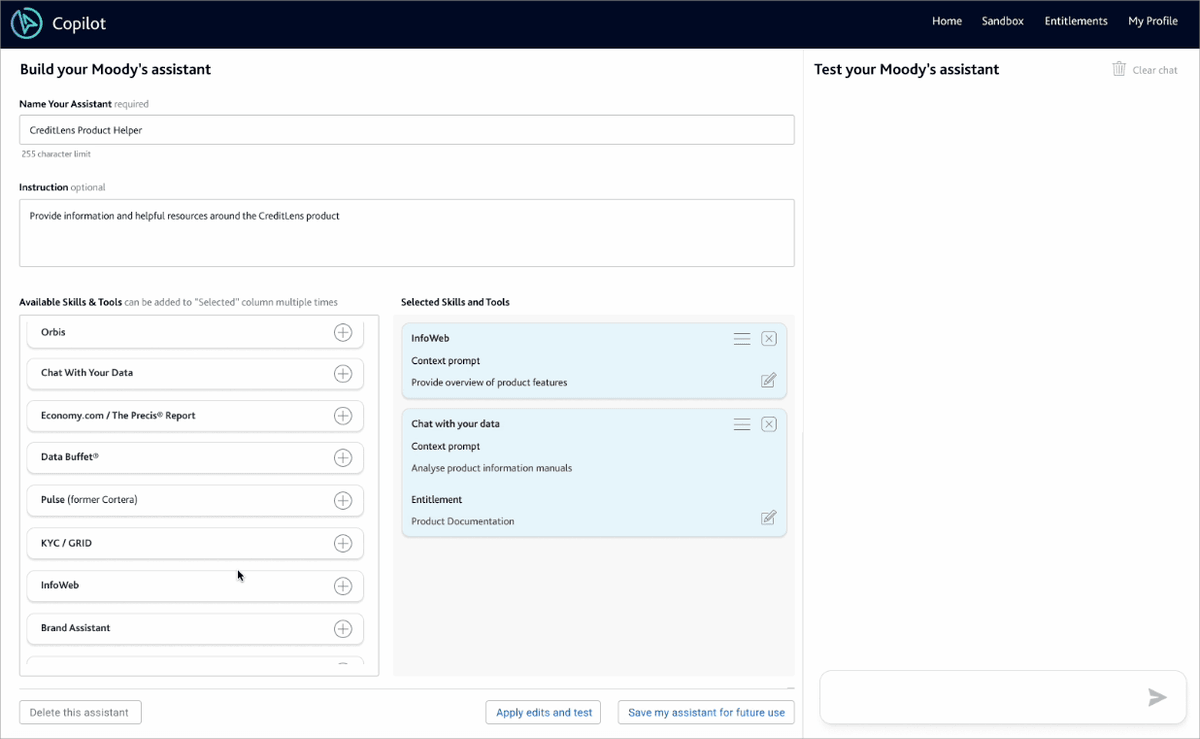
Sharing "CreditLens Helper" Assistant
If user were to share this Assistant, how do sharing attributes work, with the already existing Entitlement sharing settings? This is where the Legal, Compliance and Technical considerations come into play.
Action #2: How I solved this?
● UX could not proceed without some decisions being made by Product and Leadership.
● I had Figma screens to show different options. But at this point, it was essential that Product and Leadership get involved.
● Below this slide is what I put together to present the problem in its simplest form.
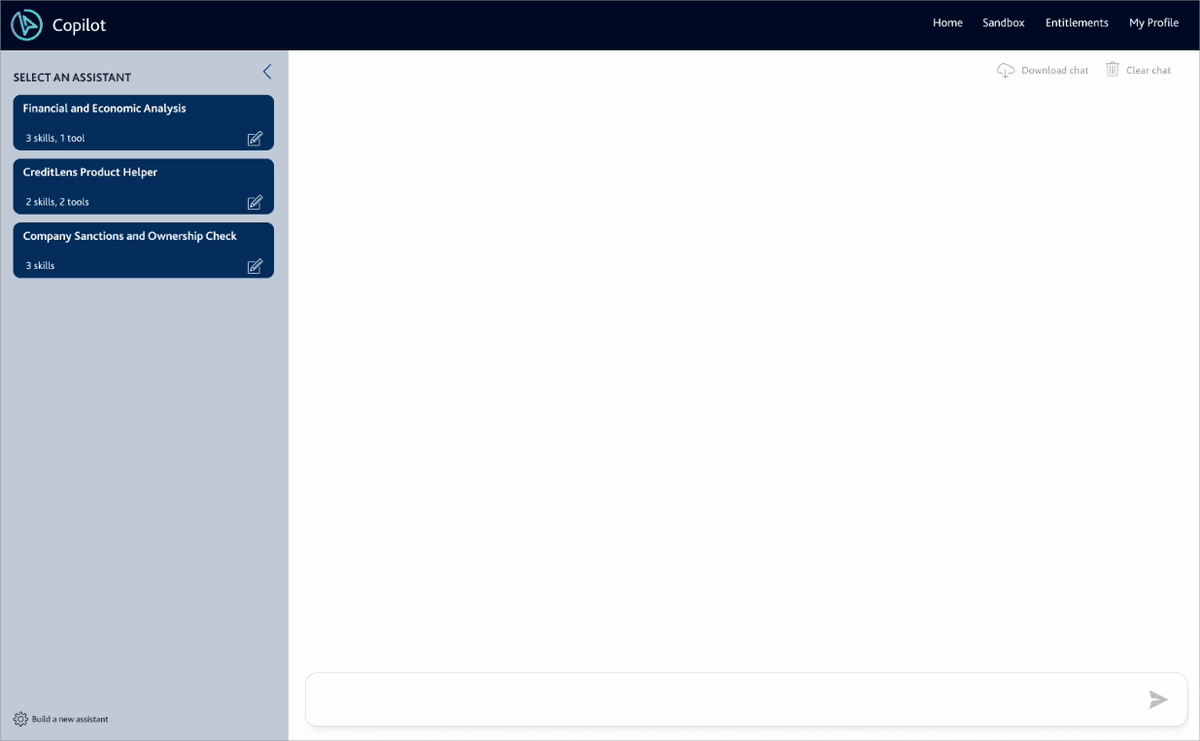
Action #3: I put together a PRD, to demonstrate what was needed to unblock this project:
1. Use case #1: Vanilla sharing. No Entitlements.
2. Use case #2: No Entitlements but user wants to share with 2 Active Directory groups, or more.
3. Use case #3: Assistant contains 1 instance of "Chat With Your Data". The Entitlement's been shared with an Active Directory group. Thus, the Assistant can only be shared with that same group.
4. Use case #4: Assistant contains 1 instance of "Chat With Your Data". The Entitlement has been shared with individual users. Assistant Owner can:
● Share Assistant with that same group of individual users.
● Omit some users entitled to the Entitlement.
● Add additional users. In that case, those users will be granted access to the Entitlement, right from the BYOA UI.
5. Use case #5: Assistant contains multiple instances of CWYD. And thus, multiple Entitlements. Each Entitlement has its own sharing attributes. How should this be handled?
Result:
● UX, Engineering and Product together, invested time and effort into resolving these issues. But considering what was possible and what were most optimal solutions, considering privacy and data security (so that every user sees only data they are allowed to see and nothing more).
● "Sharing Assistants" grew into a global, Copilot-wide sharing mechanism. Because while I was untangling "Sharing Assistants", we launched Prompt Library and Chat Threads. So now it made sense to think about how users share Prompts and Threads too, in addition to Entitlements and Assistants.
● Back-end developers started experimenting and testing what could realistically be done from a Technical perspective, in terms of sharing.
● For MVP, Product decided to share Assistants by sharing everything but CWYD and Entitlements. And then decide how to do it better, later.
Lessons learned:
● Figma pages were helpful but the short writeout was a lot more impactful. Sometimes the more Figma pages you have, the more difficult it becomes, for your audience, to understand the core problem and just follow the train of thought.
● Outlining the 5 use cases to be solved, in words, in writing, short and concise, was super effective to surface the conundrum.
● Writing your thoughts down forces you to organize them. Whether you are a designer, product manager, or anyone else. Organizing thoughts saves resources. 30 minutes of critical thinking replaces 30 hours of Figma.
● It's always good to know what everyone else is working on, and what the team is up to. Whatever your role, you shouldn't work in isolation, and with your head in the sand. Regardless of how busy, make time for team meetings - Stand Ups, Backlog Grooming, Sprint Planning...Being connected, engaged and curious, enabled me to realize that what I was working on, Sharing Assistants, should actually be thought of as a platform-wide feature, not just focused on Assistants.
Picture is worth a thousand words. Until it's not. Sometimes few words are more effective than a thousand pictures.
