Entitlements
Situation:
We needed a custom-made Entitlements system, that safely holds our data, so that we, Moody's employees, can chat with our data on Moody's Copilot Web Platform.
Who / Roles:
Creator: of the Entitlement; you create a folder with documents. You can just use it yourself. Or, you can ENTITLE some of your colleagues to it. That's where the word Entitlements came from.
User: your colleagues use the Entitlement you created. They cannot edit it.
What is unique about Entitlements (this will be a loooong one!):
● We had no PRD (Product Requirements Document). I extracted product requirements from an RFC (Request for Comment), which is a document created by Engineers, for Engineers, and it proposes and describes a new feature from a developer perspective. Plus I used Slack messages and meetings with engineers, to fill in the blanks and weave a story.
● We had no Product Manager, which made it difficult to make decisions. Everyone had an opinion, and I had to establish buy-in, in order to move forward. So I patiently addressed every single concern, explained pros and cons of choices, and guided the team through. This is an example of that guidance:
Three form patterns and pros and cons of each
● The team was focused on building, not design thinking. I tried to define personas and use cases, but this was a developer-heavy team that responded best to visuals. So I created wireframes as a visual stimulus, and we would go through them together and decide yes or no.
It was a painstaking process. It resulted in creation of 500+ Figma screens.
● The team was rarely all present. The project started at the end of July, during peak vacation season. For 2 months, we never had the full team, as there were always at least 2 people out. This caused confusion and lack of continuity, and we would revisit the same topics over and over again. To keep continuity, I took notes in meetings and posted them to a dedicated Slack channel I created: what we discussed, and what we decided at the end of each meeting. The reception was favorable, as it provided structure and enabled progress.
On my end, it resulted in 100 (Microsoft Word) pages of notes. But I did it because I knew that once we launched our products, what I was doing manually would be automated. We'd upload meeting transcripts into Entitlements and ask Chat With Your Data (CWYD) to produce meeting insights in seconds.
● Ambiguity and ownership. Because there was so much ambiguity, and because I had taken on a very prominent role on this project, I needed a clear record of what the team agreed to. I came up with this deliverable: the MVP feature list, a flat text view of what was agreed upon to build. I uploaded it to Slack so everyone could provide approvals, including leadership, and the document became our source of truth.
Developers loved the Feature List because it left nothing to interpretation. This was the feedback I received in Retrospective Meetings. After Entitlements, the Feature List, became part of our process.
Task:
● Ability to create a folder with documents, store it and save it for future use. And have multiple chat threads with this same folder of documents. User does not have to reupload every time they want to interact with this set of documents.
● Ability to chat with multiple documents at once. MVP was just PDF and Word, but Day #2 we added images, and media files. We had a separate skill for interaction with Excel files.
● Ability to chat with multiple collections of documents. So you create Entitlements. You can turn them ON and OFF. Which means, you can turn ON multiple Entitlements at once. There were no limits with how many Entitlements user can interact with at once.
● Ability to chat with files (txt, html). FYI, the difference between documents and files is the following: Documents are file formats that can take form in a digital and in a physical world. So PDF, Word and PPT would be documents, because they can be printed. Files only live in digital form.
● Ability to transcribe video and audio, to enable users to extract meeting notes and query the data. This was #1 request from all levels, C-suite, to Analysts. There are many meeting transcription and summary products in the market. But only if we use our own, is our data safe (mp3, mp4, m4a).
● Ability to upload images so users can ask questions about charts, diagrams, and UIs, and ask questions to that data (jpg, jpeg, png, gif, webp).
● We had a separate skill for interaction with Excel files.
● Ability to share Entitlements with colleagues.
Action:
My role:
● I extracted product requirements from various sources.
● Guided the team and established buy-in throughout the process.
● Built wireframes, and designed visual design.
● Extracted UX feedback from user research, that we performed after product launch. Then applied those edits.
Where: On Moody's Copilot web platform.
Timeframe:
● Kickoff to Production: 4 months
● UX took 3 months.
● We gave users few months to test the product, and report feedback in the Slack support channel.
● Then my colleague, Head of User Research, and I, conducted user research to see how the product is performing.
Team:
● Few Data Scientists
● Back End developers
● 1 Front End Developer
● Me, as the only UX resource (this was one of our first projects, there was no budget for a big team)
Result:
● Entitlements have been in use for a 3rd year now.
● Chat With Your Data, the skill where Entitlements are used, 15 months after launch, had 2,400 monthly users, out of 14,000 Moody's employees.
● 20% productivity increase for some users that we interviewed.
● 6,000 Entitlements created by 2,000 unique users, 1 year after launch.
● 260,000 documents ingested, 1 year after launch.
● Metrics and how they affected user behavior, and system design:
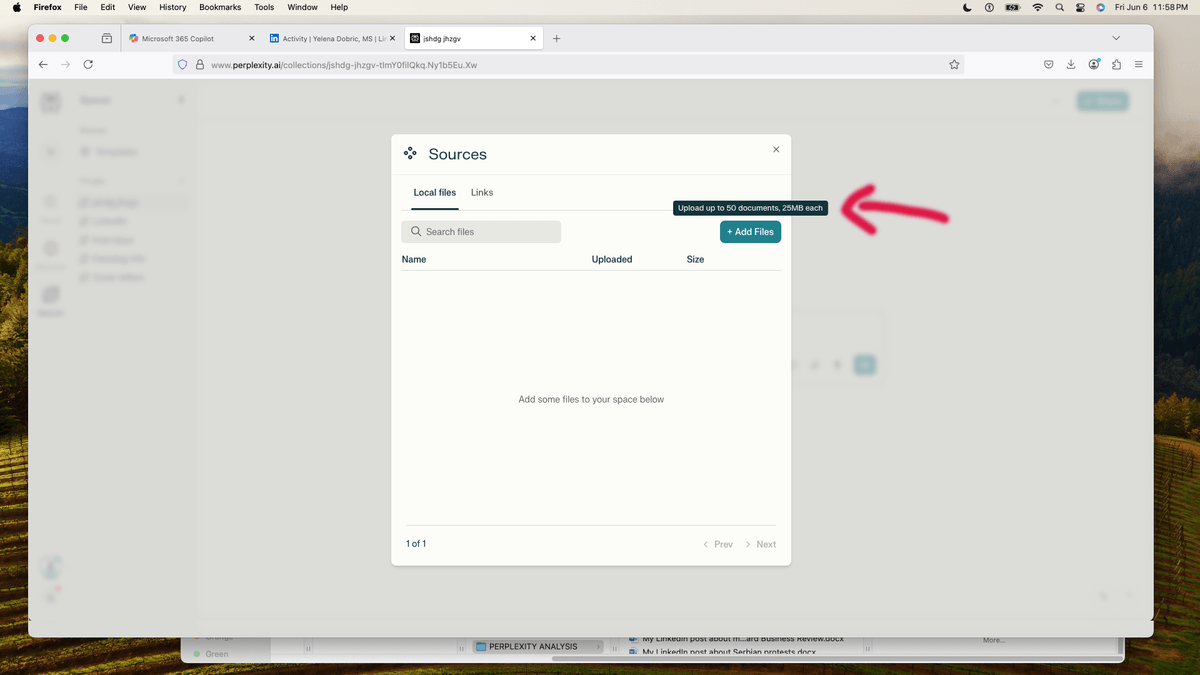
- Please note that we designed the system to accommodate for an average of 50 documents per Entitlement. That was an industry standard. Please see the first screen below. That's Perplexity with a monthly subscription. Their "Spaces" feature, where user can upload Documents and then chat with them, allows for 50 documents per a Space, at 25MB per document.
- 6 months after launch, we had 200,000 documents ingested into 3,000 Entitlements created by 1,200 unique users. That's 66 documents per a single Entitlement.
- 12 months after launch, we had 260,000 documents ingested into 6,000 Entitlements created by 2,000 unique users. That's 43 documents per a single Entitlement.
- In addition, users complained in user research about Entitlements performance and speed. The feature would choke when users uploaded many documents into one Entitlement. Above I used average numbers. But in empirical user research, some users mentioned uploading 100 or 200 documents into one Entitlement.
- But we see that after 6 months we had 1,200 users and after another 6 we had 2,000. So the number of users continued to climb, and the system was utilized. But users just learned to upload fewer documents per an Entitlement.
- With time, Copilot team worked to improve performance as well.
Lesson learned:
1. There are some things you just cannot know, until you put a tool in user's hands.
2. Establishing a robust, scalable permissions framework early on streamlines future development and safeguards compliance.
Features users asked for about a year after launch:
1. "Transfer Entitlement ownership". When a colleague leaves a team, or a company.
2. Adding "Editor" access. Person who would be able to add Documents to an Entitlement. When a manager creates an Entitlement, teams wanted someone who can maintain it afterwards, as managers had no time. To clarify: Editor cannot take documents out of an Entitlement, or delete an Entitlement. Or add or remove users. Editor can just add Documents.
3. Renaming an Entitlement. The way MVP was coded, renaming was in the same place where search was, so it was tricky. I didn't design it like that.
I designed separate pages for "Create an Entitlement" and "Edit Entitlement." Engineering felt this was too much to code and combined them into one, which didn't work well and confused users.
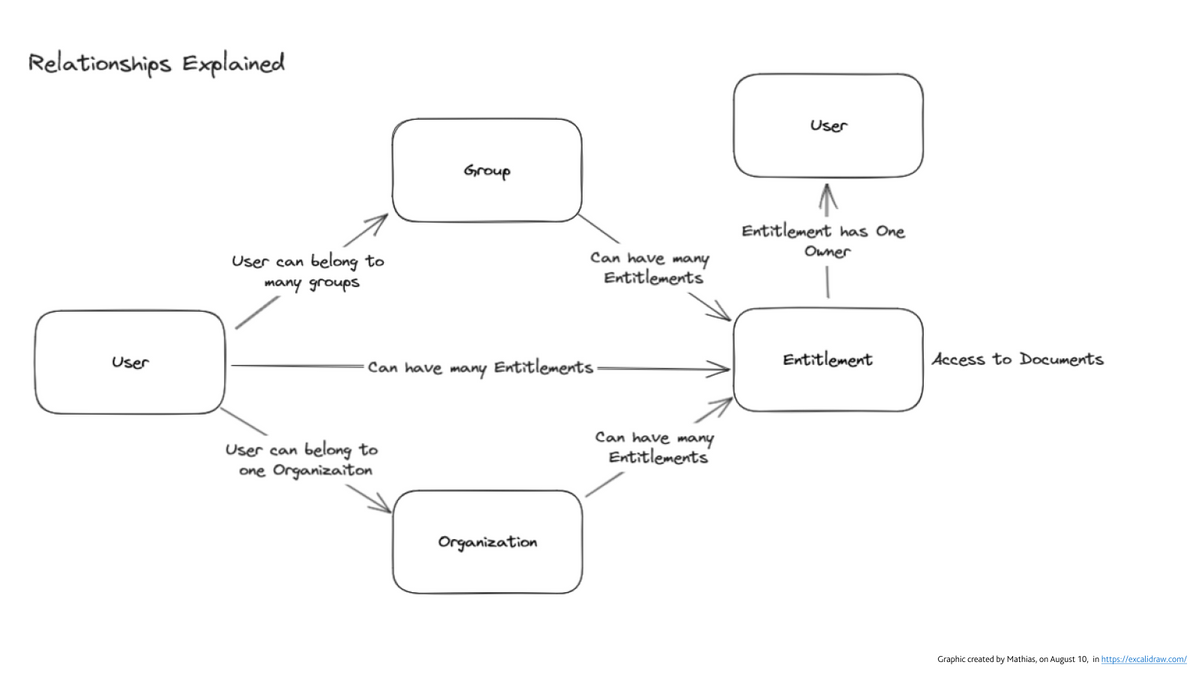
Here's the process I went through. This graphic was the first artifact we had, and it was part of the RFC (Request for Comment), built by a lead Engineer.
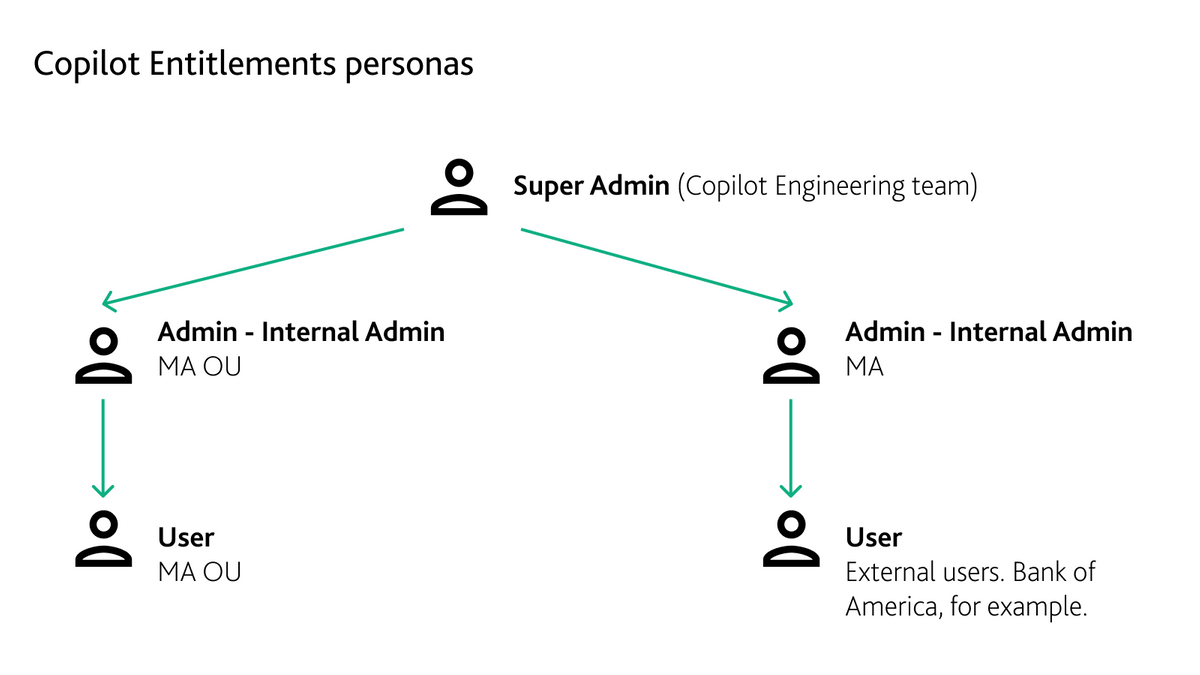
Entitlements personas I created, to understand the roles.
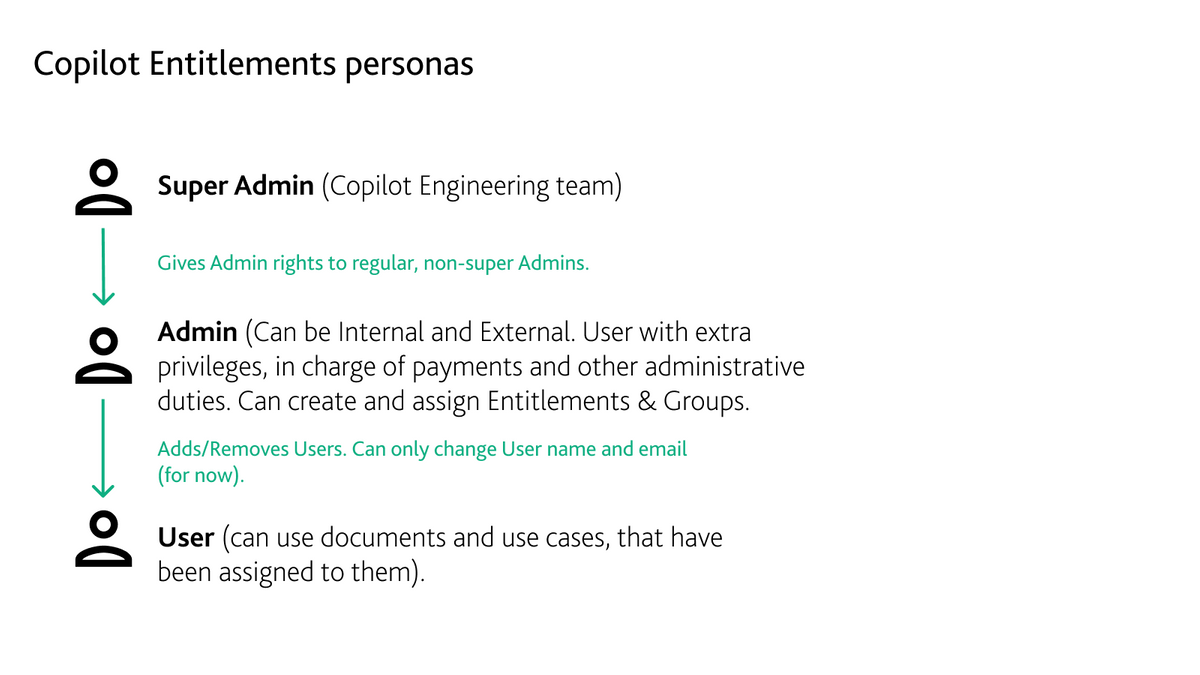
Entitlements personas, if we include external users.
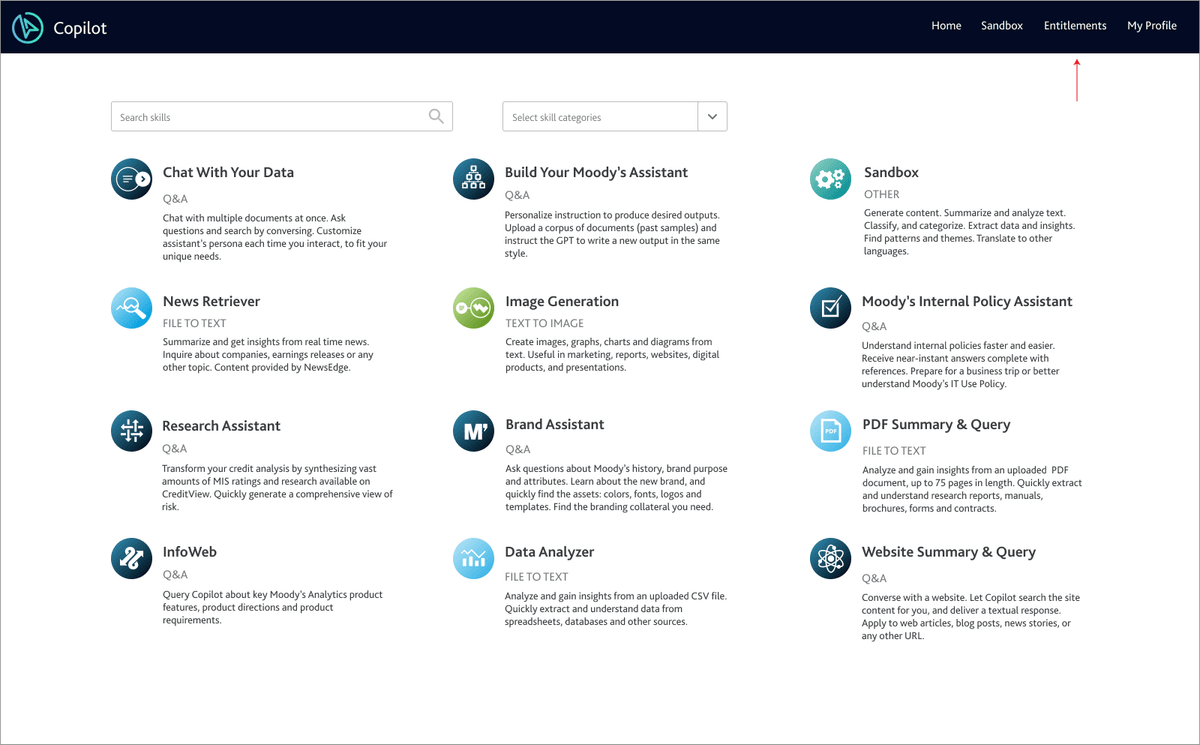
Moody's Copilot dashboard and red arrow showing where Entitlements were, on the dashboard.
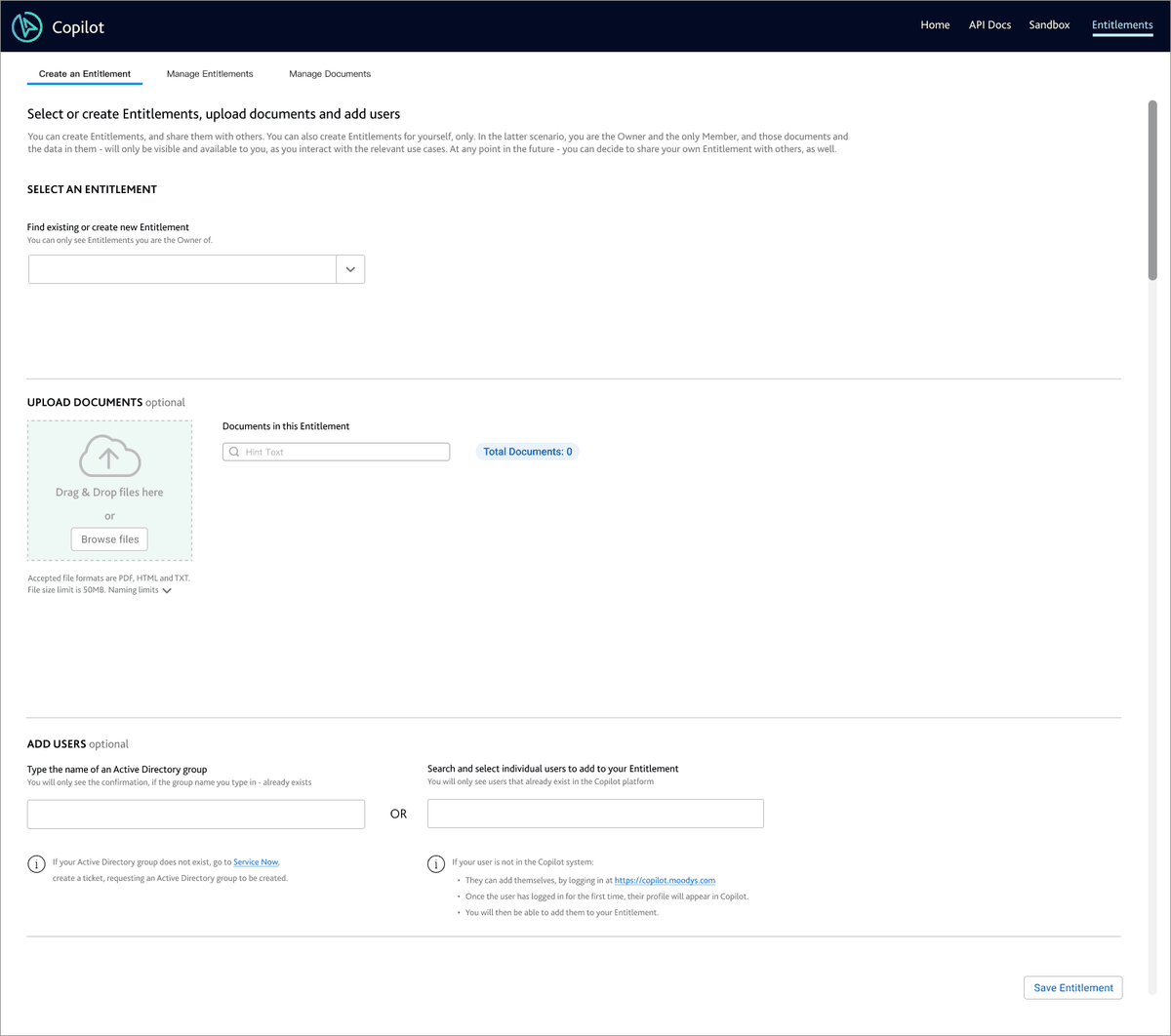
Final design of a form to create an Entitlement. This is an empty form. Populated one is at the end of this story.
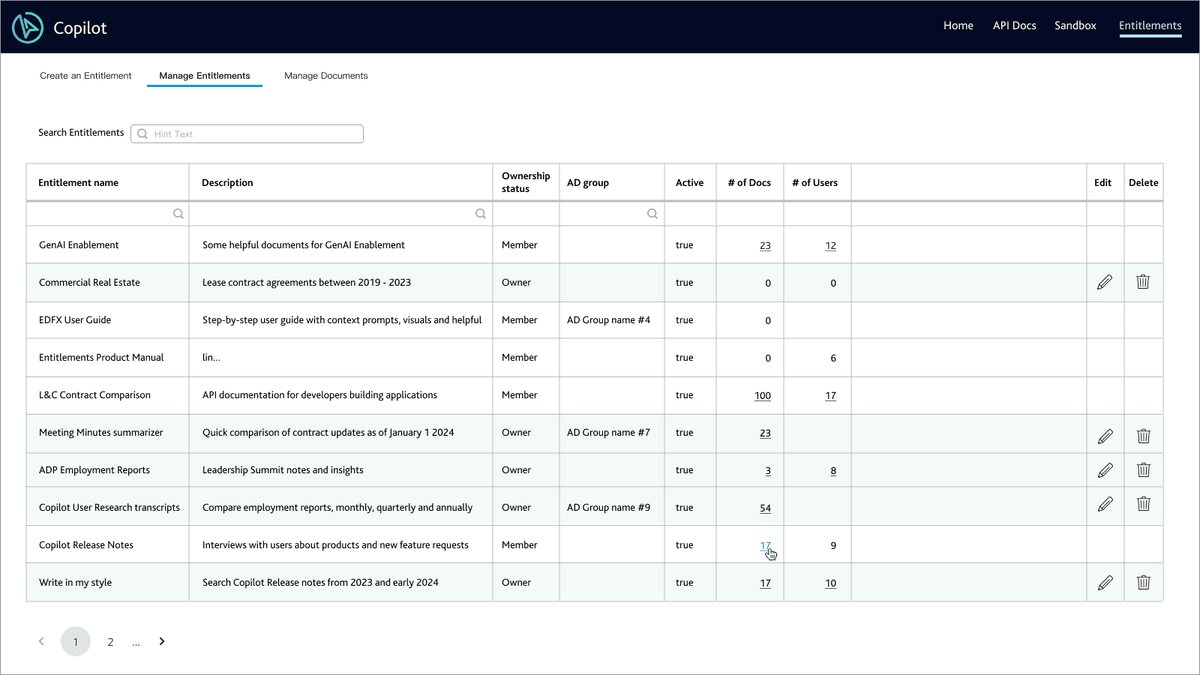
"Manage Entitlements" table gave users:
● Flat view of all Entitlements they have access to.
● Ownership status: are they an Owner or a Member of a particular Entitlement.
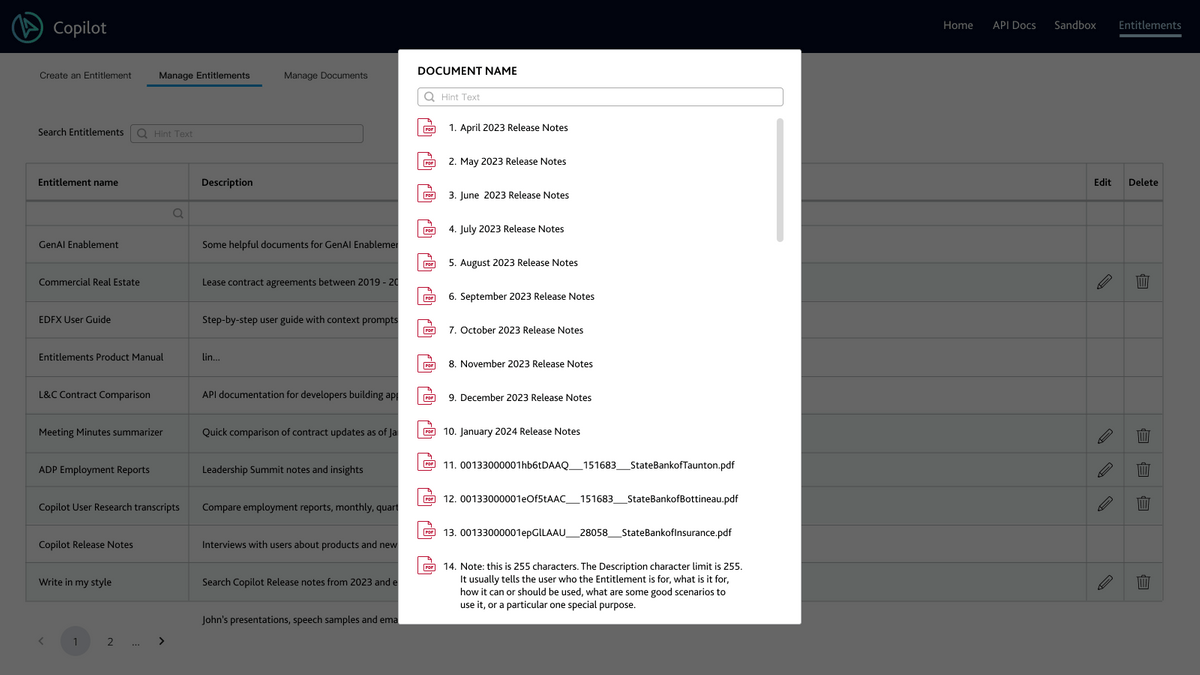
● Ability to launch a modal window with the list of Documents belonging to an Entitlement. Modal is the best pattern, because it allows user to focus attention, from an otherwise busy page. User can also copy document names from here, in case they want to search for that one document in the "Documents" table (next slide and next tab in the Entitlements section).
● Ability to access "Edit Entitlement" option, which opens the populated form.
● "Delete" Entitlement is also here on this page. I did not add "Delete" on the form, so users cannot delete accidentally.
Document list launched from the table is the only clear and isolated view of all Documents.
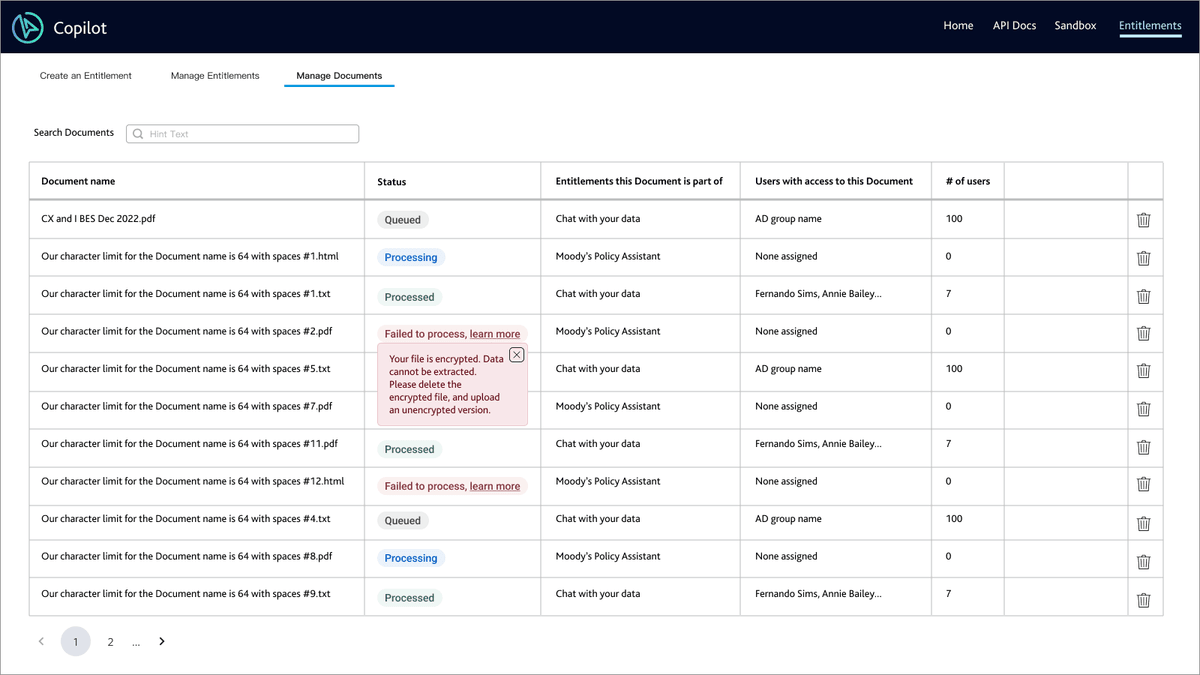
"Manage Documents" table gave users:
● Flat view of all Documents they have access to.
● Document upload status: queued, processed, processing, failed to process.
● Ability to see what Entitlements this document belongs to.
● See upload date (not in this visual but was implemented in PROD, it was a later design).
● What users have access to the Document and how many users do.
● "Delete" Document is also here on this page, but also on the form.
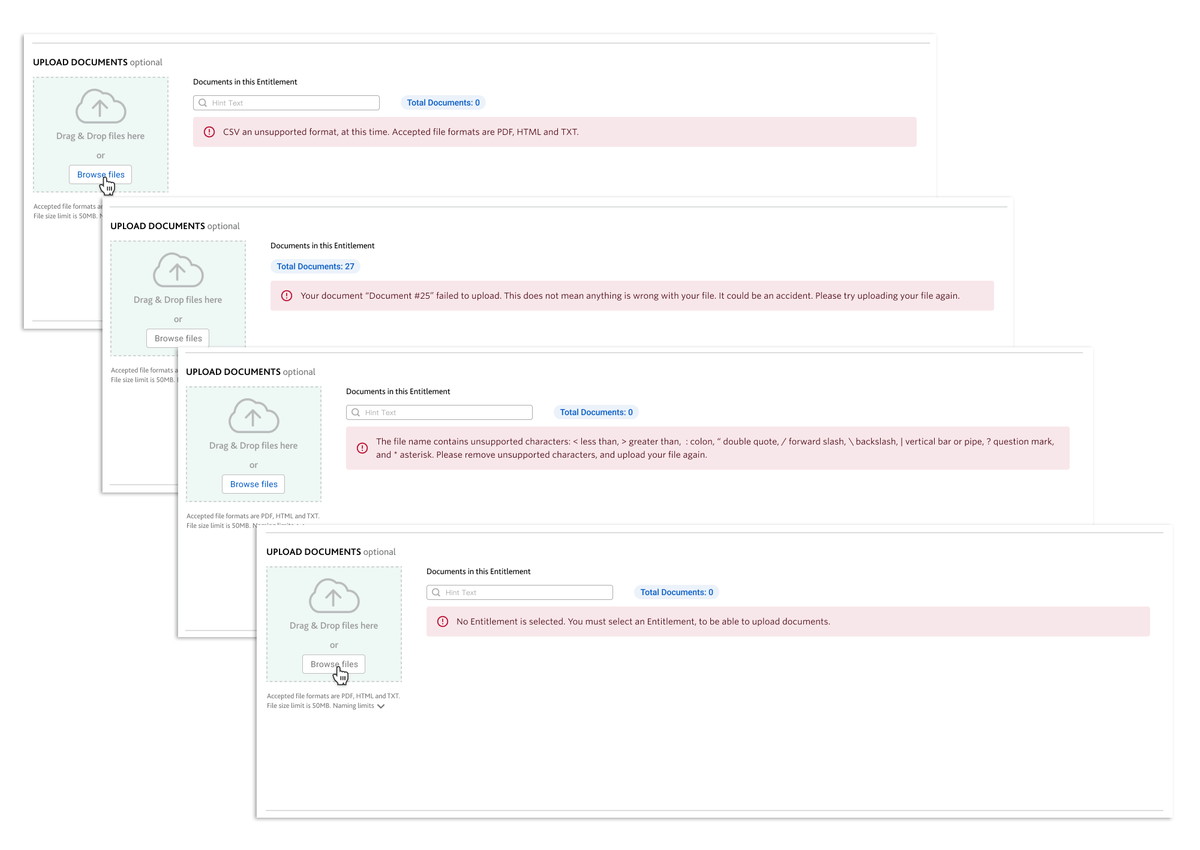
Error messages
Document ingestion process: statuses and relevant messages user can experience. These messages appear on the Document Ingestion portion of the Form.
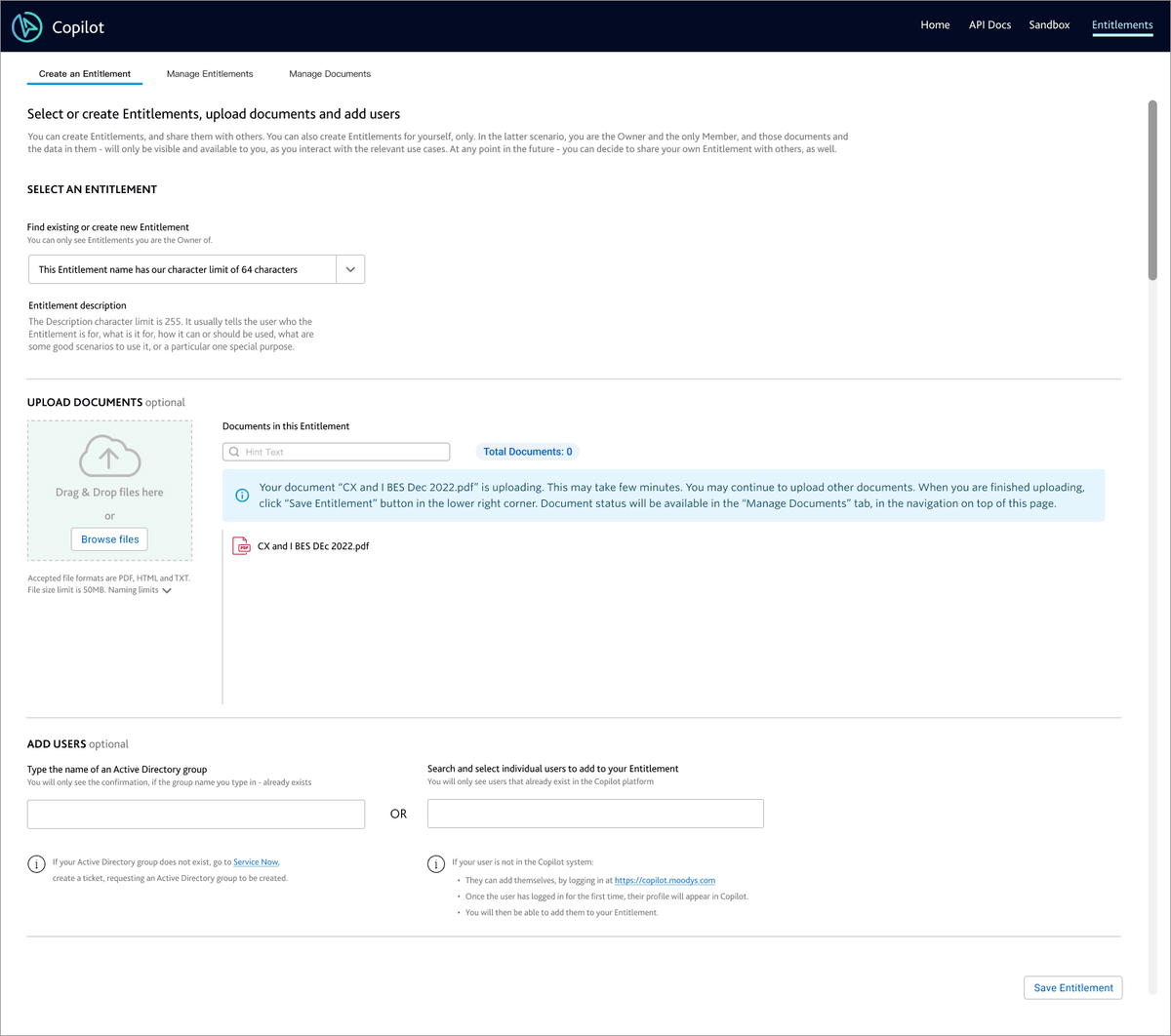
Informational message (see screen below this text). Why I decided to use this pattern:
● Message to the user about how the Document Ingestion process works. It's a chunky message and here's why I decided for it:
● Another option was a spinner or a loader:
- Engineering team did not have the time or appetite to implement a spinner.
- I had more information to communicate, than just how long it will take to upload document/s.
- Users were uploading hundreds of files.
● Other alternative was a tooltip. Tooltips are often missed, or user has no interest to hover over and read.
● This message was used in the early days of Entitlements, where users were still learning how Entitlements work. Please remember that Entitlements were launched in January 2024; long before major LLMs had such a feature. Major LLMs had a feature to upload a document while you are chatting, and interact with it for the duration of that chat. But not to save folders with documents for future use, AND have multiple chat threads with the same folder.
● As the performance, speed, and stability of the document ingestion engine improved, users saw this message less and less.
● After initially uploading upwards of 200 documents into 1 Entitlement, and experiencing crashes, slowness and bugs, users simply started creating more Entitlements but with lesser amounts of Documents. That worked better and as a result - also users saw this message less.
● The Copilot team's mandate was increased adoption. We had to accommodate different levels of tech savviness. Some users needed messages such as this one. Please note that increased adoption is not the same as sex appeal.
In enterprise software development, KPI is "time to value". In consumer, it's appeal. Plus delight, emotional connection, maybe entertainment, etc. They are different paradigms.
- When your KPI is increased adoption, you dumb things down, so to speak.
- When your KPI is sex appeal, you make things cool, and often - you make them more complex. You add cool features, that impress users.
● Copilot power users spoke openly that Copilot saves them 1 day per week. Entitlements were an essential part of the Copilot.
- So, the ROI on reading these two lines of text, is 20% increase in your own productivity. There's a ton of upside, and little downside. That's how decisions are made in enterprise UX, remember - time to value.
- Your teammate is using Moody's Copilot. If you want to keep up, you will use it too.
- Power Users mostly did not read this message because they understood how it all works. So the message was for what I like to call, the Reluctant user, who needed a little help and a little nudge.
- In the Reluctant User case, all they have to do, to understand how Entitlements worked, is read this message. All that's standing between you and YOU 2.0 is this message. Again, that's how decisions are made in enterprise UX.
- In UX, context is everything. Who is doing X, why, where and when.
I am doing a demo of my Figma prototype to the team. This is the very first iteration of Entitlements. I handed the final draft 6 weeks later.
There is some interesting thinking beyond what we launched for the MVP. It is 15 minutes 37 seconds long.
Entitlements in Production, 10 months post launch. This video is screen recording and it has my voiceover. It is about 6 minutes long.
