Daily Briefing
Situation:
What:
Daily Briefing was one of the products we produced in Moody’s much-publicised partnership with Microsoft, formed in March 2023. Target audience were Microsoft clients who use Microsoft Teams. In this partnership, Microsoft provided technology, and reach (access to their sizable client base). And Moody’s provided our unprecedented data. Moody’s is a 115-year old company, who has been collecting data about companies for over a century. We have data that no other company has. The tagline for the partnership was:
“Powered by Microsoft, anchored by Moody’s”
Daily Briefing was a spinoff of Microsoft's other recent product: Meeting Prep. Learn more.
Task:
Daily Briefing is a calendar enhancement tool, that analyzes external companies found in user's calendar, and provides additional information about those companies, such as:
● Firmographic data such as:
- Watchlist status (showing any transgressions, sanctions, security alerts by the US Government, etc)
- Headquarters location
- Number of employees
- Annual revenue
- Industry classification
- Website URL
● Moody's Rating for rated companies: long-term, short-term, and outlook
● Moody's ESG score and breakdown of that score: Environmental, Social and Governance individual scores
● Latest news summary from Moody's Copilot
● Follow-up questions from Moody's Copilot (suggested questions, frequently asked about the company)
What's unique about Daily Briefing:
● I contributed content strategy and edge-case logic. Here's how:
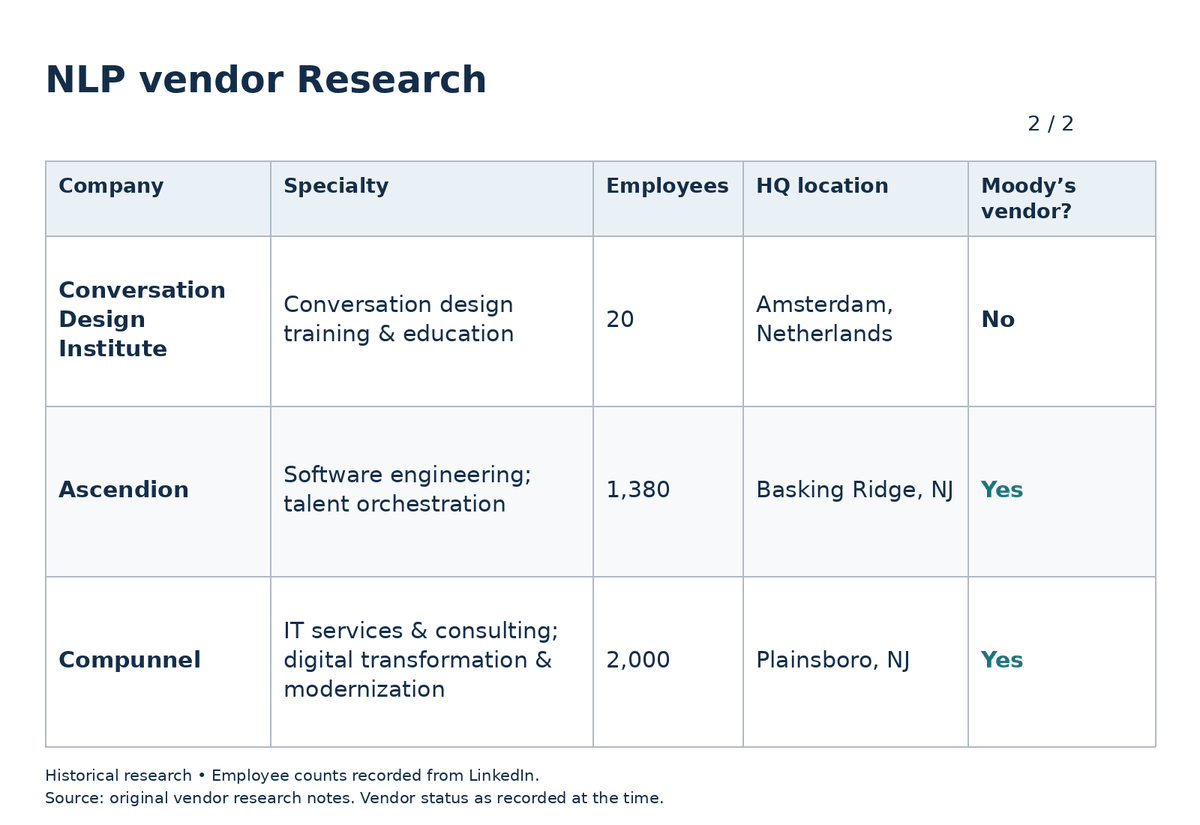
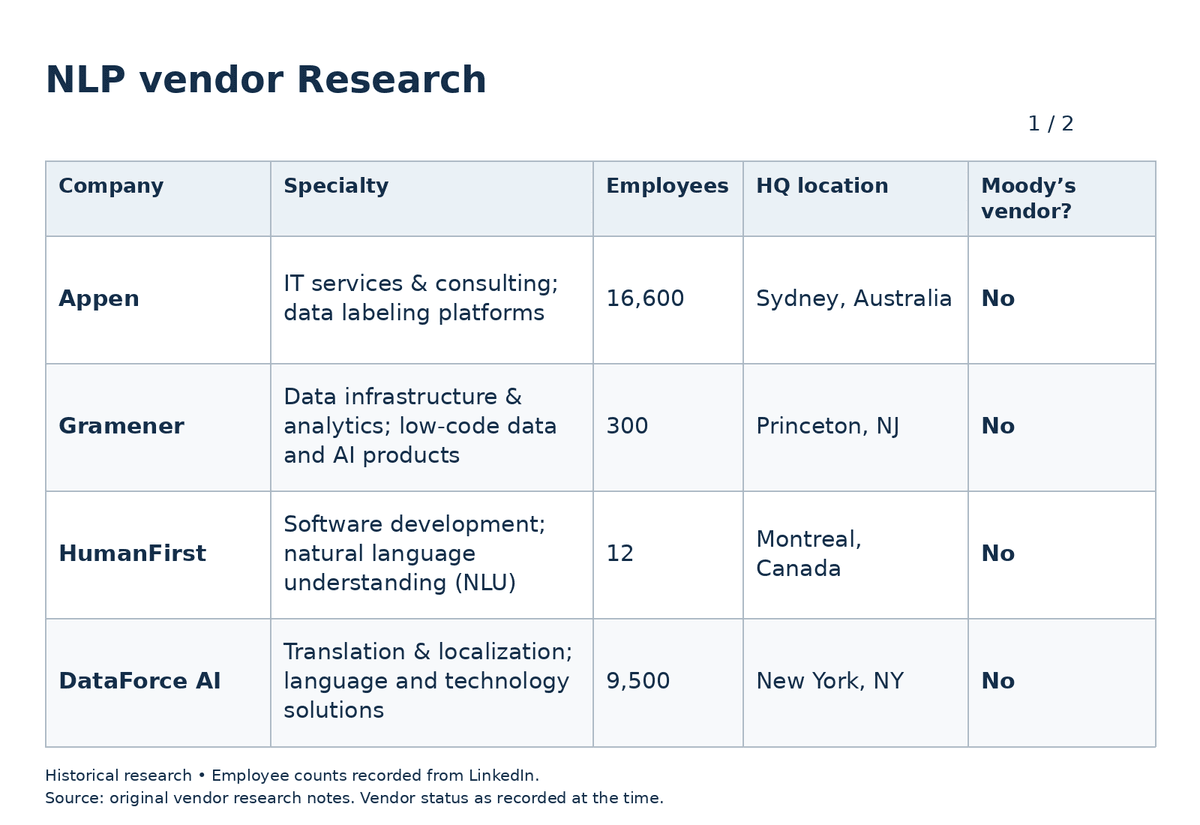
● I had performed a vendor search of my own, just months before this project. I was looking at particular type of NLP vendors. I also partnered with Moody’s Procurement team. This initiative proved rather valuable, because the end result of that search ended up being perfect content for the Daily Briefing. I had not realistic but 100% real content! I was able to quickly put together a dashboard, with real data, and populate all required fields. Note: data I used is publicly available on Google and LinkedIn. Nothing I’m showing is confidential.
● Daily Briefing content strategy
● Edge-case logic. In the story below. I contributed to Product Management, by outlining the edge-case logic. Our Product Manager was phenomenal, but she had just joined the team, and had also recently joined the company too. So while she was getting her footing, I provided the edge-case logic, and she was thankful. The Senior Leader who was managing the project, was thankful too.
● Daily Briefing edge-case logic
Why:
● To enable users to prepare for their meetings: To save users' time from having to look up all this information on their own.
● To showcase Moody's products: The breadth and depth of Moody's data. It is optional and free to use, for these select Microsoft clients.
● To attain new clients: Moody's Copilot initial Teams' integration was a teaser, where Moody’s gave a peek into the breadth and depth of our data. Users can then express interest in obtaining a fuller access to Moody’s data, and establishing a relationship with Moody’s.
● To showcase Microsoft capabilities: Moody's Copilot, as the Daily Briefing, in Microsoft Teams. Microsoft Inspire conference. May 2023.
Team:
Microsoft + Moody's
Moody's team:
● 2 Front End Developers
● Moody's Product Manager
● Moody's senior stakeholder who is also Head of Engineering
● Myself as a UX Lead
● Visual designer from my team
● Head of User Research
Microsoft team:
Mostly developers.
● 1 Front End
● 1 Back End
● Team lead who was mostly in a Product Management + Engineering Lead and oversight role.
● There were some additional MSFT resources throughout the project.
Action:
Timeline:
● April 2023 – Started work.
● June 2023 – Launched Daily Briefing in Teams, to be demoed at conferences and events.
● July 2023 – Continued to test internally, the whole team, Moody's + Microsoft. We all acted as QA.
● August 2023 – Implemented improvements and enhancements from QA.
● October 2023 – Implemented with internal Moody’s Procurement, Sales, and Credit Analysts, and externally to "friendly" Microsoft clients.
Who was it for:
Daily Briefing targeted particularly individuals who have to research and meet with a lot of companies in their daily jobs.
● Procurement Personnel
● Sales
● Credit Analysts
● CounterParty Credit Researchers
Where:
In Microsoft Teams, exposed to select subset of Microsoft users.
My role:
● Content strategy
● Edge-case logic
● Information architecture
● Interaction Design
● 90% of visual design
Results:
WHAT'S GREAT:
● Increased efficiency: Daily Briefing helped users reduce the number of platforms they access to get the information they need, helping them stay organized, keep them informed and reducing their daily task load. The information is clear and digestible.
● Favorable UX: Daily Briefing even though the briefing contained a lot of information, and was fairly busy, users found the overall design and information organization to be clear, appealing and easy to understand.
PARTNERSHIPS
● Partnership with Google, interest from Amazon:
Following Microsoft presentations, during their Envision1 and Insights2 conferences, Google and Amazon reached out to Moody's, to explore partnerships. Partnership with Google followed.
Both Microsoft and Moody’s benefited from the union:
● Microsoft made Moody's look "cool & techy". For a company that's 115 years old, a nice refresh on our brand perception.
● Moody's gave Microsoft exposure and validity on Wall Street, which Microsoft sought, with their newly formed financial services division.
● Partnership was extended:
Teams' integration was only the first and initial partnership between Moody's and Microsoft. The partnership continued.
IMPROVEMENTS
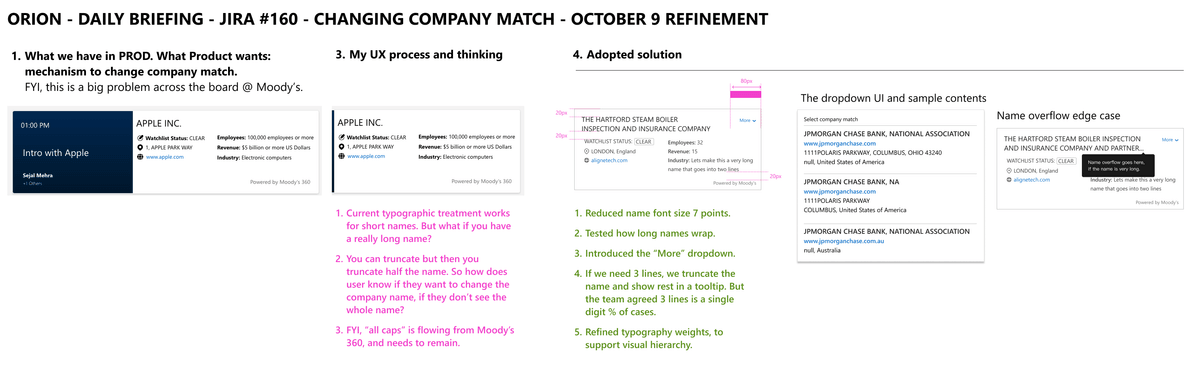
● Company match:
QA testing by my Moody’s Copilot team and our Microsoft counterparts, surfaced a common issue across Moody’s businesses: company match problem. One company can have many subsidiaries with similar names. Or, we found many different companies, with similar names. So I designed and we built a solution to that. See below in the story. This IxD pattern was later adopted in other Moody's products where we faced the same challenge.
IMPORTANT LEARNINGS: So Daily Briefing enabled us to learn a lot about one of our key user groups: Sales team.
REQUESTED FEATURES:
● Customization:
From internal Moody’s Procurement, Sales, and Credit Analysts. Users pretty much wanted substantial customization.
● Expansion:
The top ask though, was that Daily Briefing be expanded to scan users’ Outlook as well. Not just the Teams calendar. As it was, the Daily Briefing lives as a tab in Microsoft Teams, and scans user's Teams calendar.
● Growth ideas:
Second top ask was that Daily Briefing becomes able to also pull data from LinkedIn. The thinking was that such implementation would be easy, since Microsoft owns LinkedIn. However, there were some impediments on this feature request, internally at Microsoft.
● Integration earlier in the process:
- Because research and integration are instrumental to their work before booking meetings, Sales team members asked for the Daily Briefing to be integrated into their workflows sooner. Because Daily Briefing as is today, appears in user's Teams' calendar, when they have a scheduled meeting with an external company. Sales wanted the tool to appear before they have a scheduled meeting; when they are doing research and prospecting.
● Configurability:
Setting up a meeting with a prospect or a client is the culmination of many hours of research, planning, and strategic outreach. Moody's Analytics Sales team members asked for a configurable Daily Briefing that helps them stay informed throughout the entire Sales pipeline.
● Independence / stand-alone product:
- Sales team members asked for the Daily Briefing to be an integral part of their daily workflow, and not just attached to meetings.
- They asked for the Daily Briefing to be a configurable stand-alone feature, integrated into MS Teams calendar, but also to Outlook email, Teams Tasks and notes, and MS Word and Sharepoint.
Lesson learned: investing time to understand people's workflows, needs, pain points, wish lists and context, can unlock incredible opportunities. Sir William Osler, a prominent physician regarded as one of the founding figures of modern medicine stated, "Listen to your patient. They are telling you their diagnosis." The same applies to users and teams designing and building software. With team being a doctor, and user being a patient. "Listen to your users, they are telling you what needs to be done."
1. "Microsoft Inspire is a conference held annually by Microsoft Corporation for its partner community. At Inspire, partners are taught
about Microsoft's roadmap for the upcoming year, network and build connections, share best practices, experience the latest product
innovations, and learn new skills and techniques."2. Microsoft Envision seems like a roadshow type event. It "is a digital series where business leaders from around the world come
together to discuss their company's most pressing challenges and gain insights that can help them grow as leaders."Sketch by our Engineering Lead, who was acting as a Product Lead also, in this instance and overseeing collaboration with Microsoft on a daily basis.
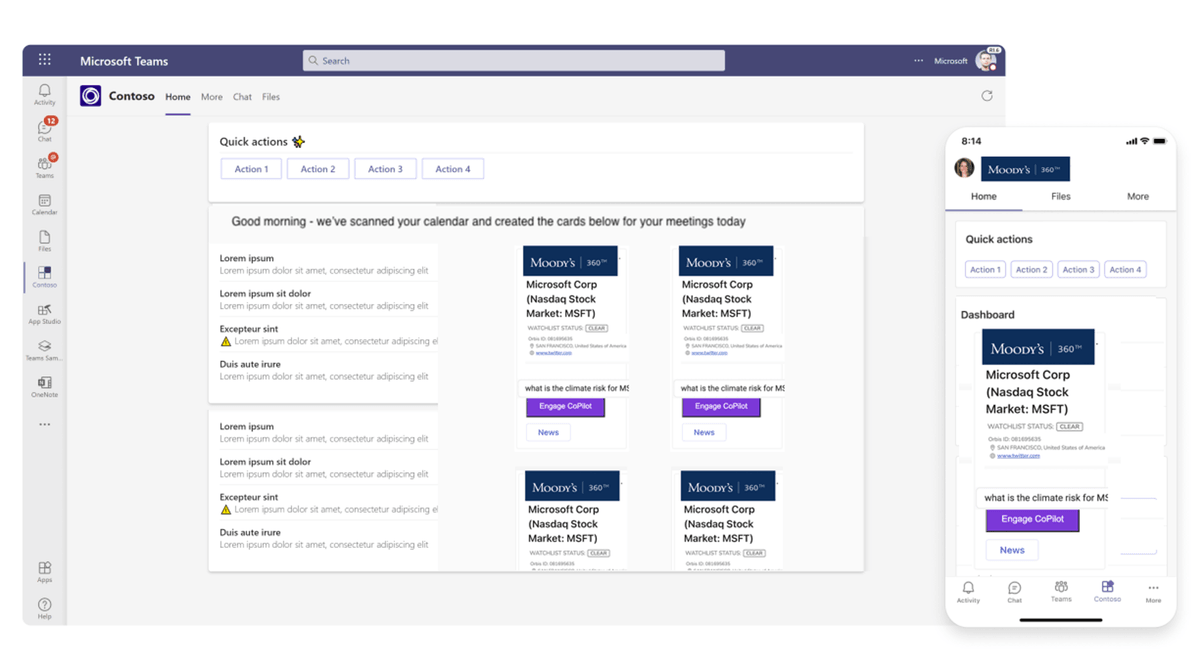
Just before I started working on Daily Briefing, I was doing an NLP vendor search. Without realizing it, I was collecting the same information Daily Briefing would end up offering. The tool didn't exist yet, so I gathered everything manually and organized it in this Word file.
This experience proved incredibly valuable once I started working on Daily Briefing. I understood exactly what we were building, so I was able to contribute fast and take on a good chunk of the Product Manager's responsibilities. She was new to the company and to the project at the time, and she welcomed the help.
Sample Teams calendar.
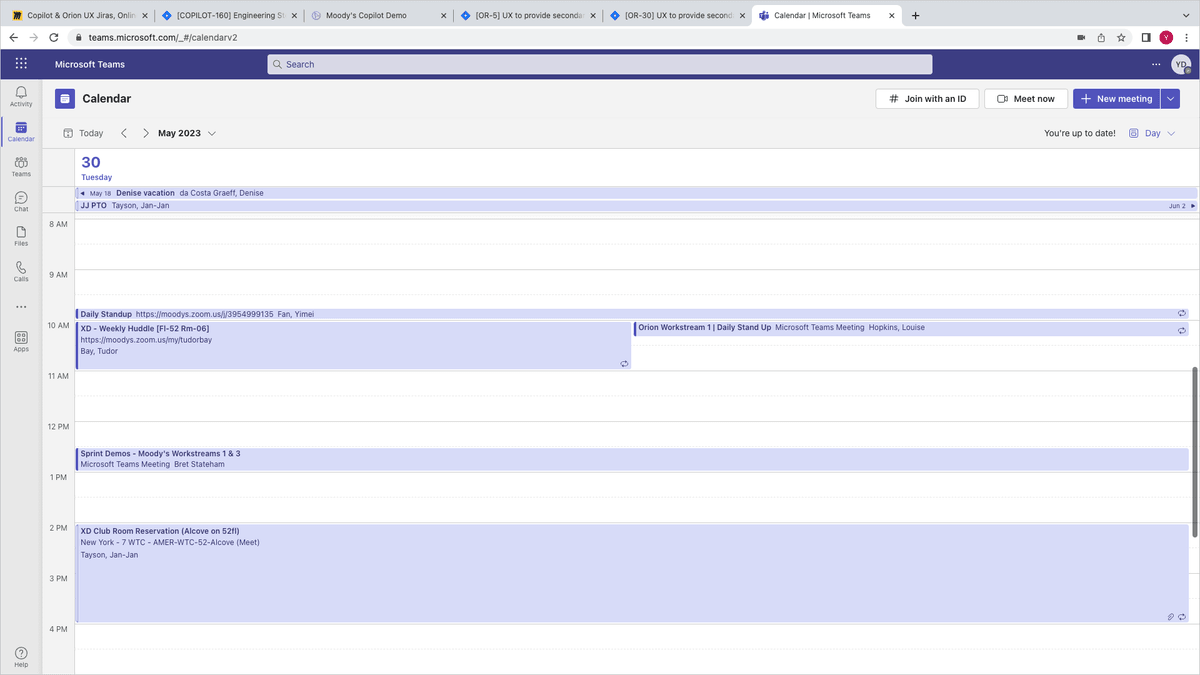
My first wireframe: I outlined content strategy and information architecture:
So that the Project Lead (Engineering Head) can approve. The whole team can basically pitch in their views. Visualize the vision. And we could all have a fruitful conversation.
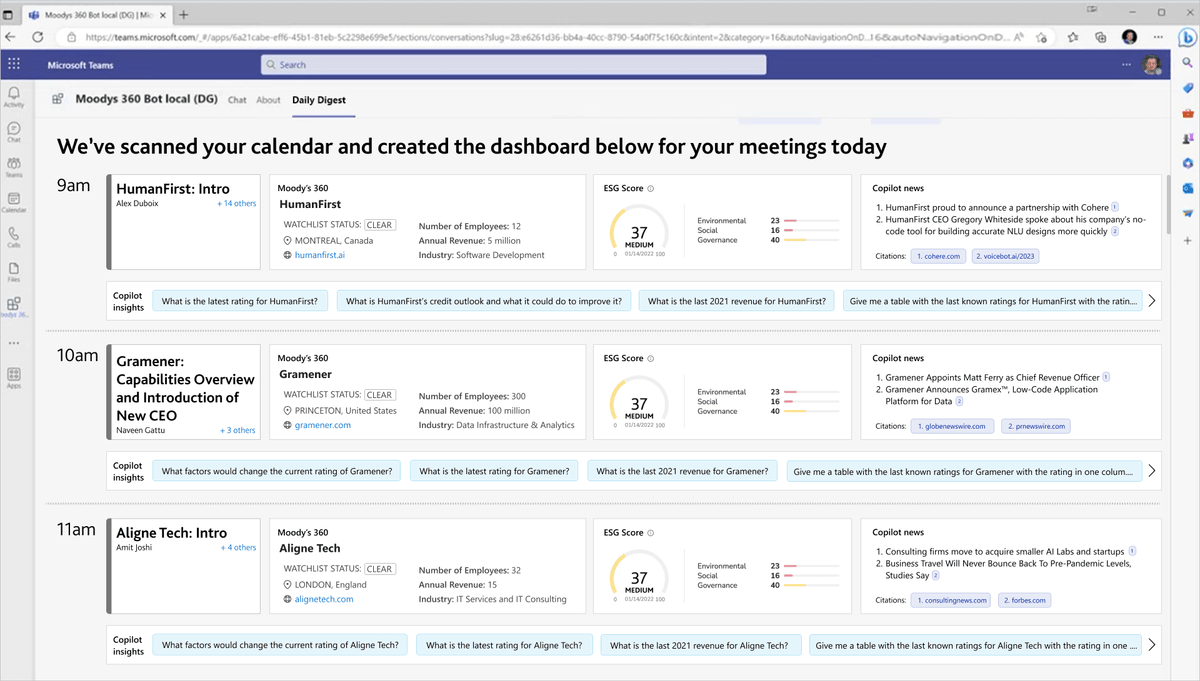
My step further towards visual design. I realized I need a focal point.
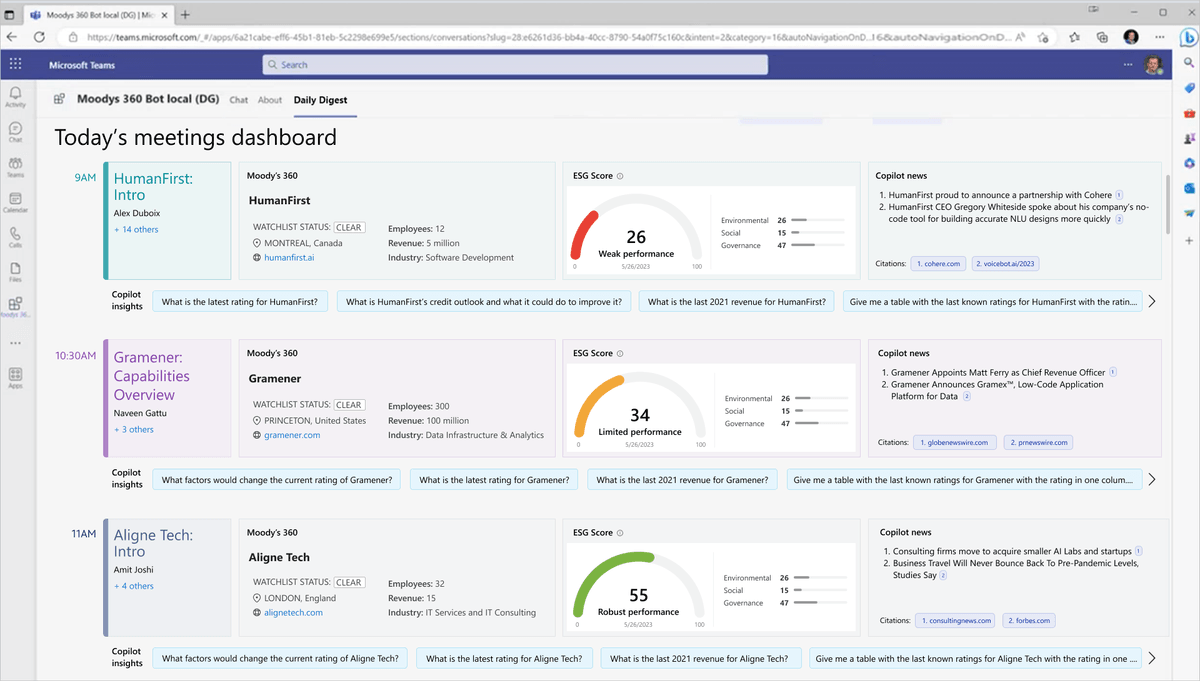
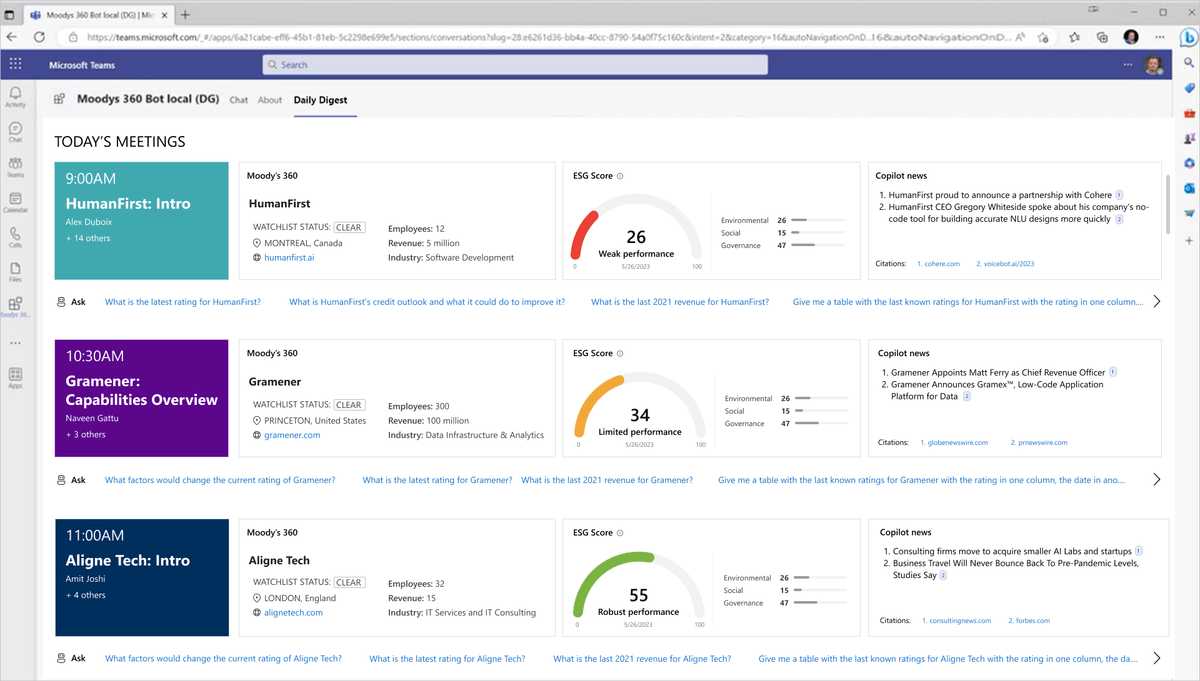
My final visual design that I handed over to our Visual Designer, to fine tune plus the edge-case logic I came up with:
Daily Briefing edge cases logic and instructions, May 31. First draft wireframe. Reviewed with Moody's Product and Microsoft engineers on May 31. Approved to move to DEV environment on June 1.
1. What to do if there's more than 1 external company in the meeting? What company do we profile?
M360 + Copilot Teams app, is targeted towards Procurement personnel, Sales Reps and Credit Professionals. They almost never meet with several third parties in a single meeting. More than 1 third party would be an edge case. That said, there are few ways to address this situation, should it arise:
a) Use the domain of the meeting organizer, other than our user.
b) Use the domain of the third party that is most represented in the particular meeting. Example: when I was evaluating NLP vendors, candidate companies usually came to those meetings with more than 1 person. There's a sales rep plus at least 1 SME.
2. What if there are no prompts from Copilot?
Please note that prompts are the row underneath M360, ESG and Copilot News cards.
a) If there are no prompts, the "Copilot Insights" row should not show.
b) FYI, on the Adaptive Card, in the Use Case #1, when there are no prompts, we show "Meet the Copilot" button, that takes users to the Copilot page on Moodys.com. Please note that this approach does not really work for the Daily Briefing because we can't use 1 button for the whole row.
3. What if there are no Copilot news about the profiled company? This can happen if a company is a startup and it hasn't gotten into any news yet.
We are talking about the "Copilot News" card. This card should return news about the profiled company.
a) From M360 firmographic data, we know what industry the company belongs to. So we return news about that industry. In this wireframe, we show that. With the 3rd company, Aligne Tech, there was no news. Aligne Tech is in the IT Consulting industry. So the news portrayed, is trends from the IT Consulting in general.
4. Why is there so much empty space in the Meeting Information card?
We leave space for long meeting names. See example #2, Gramener, 10am appointment.
5. What if there is someone with a Gmail email in the meeting?
Instructions for developers are in the Jira #81. "Please program the Daily Briefing to ignore the following domains: Gmail, Yahoo, Hotmail, Earthlink.net, AOL, iCloud, GMX, Mail.com, Email.com, USA.com, Post.com, Comcast.net, Verizon.net and ATT.net. Other types of domains are .org (non-profits), .gov (government), and .edu (educational institutions).
6. What if there are no meetings with external companies detected in the user's calendar?
a) Add a message that says "You don't have any meetings including external companies. When you do, we will show relevant details here."
b) Add "Refresh" button for MVP. For Day#2, Yelena provided design with informational icon to appear next to "Daily Briefing" tab, the moment a relevant meeting is added.
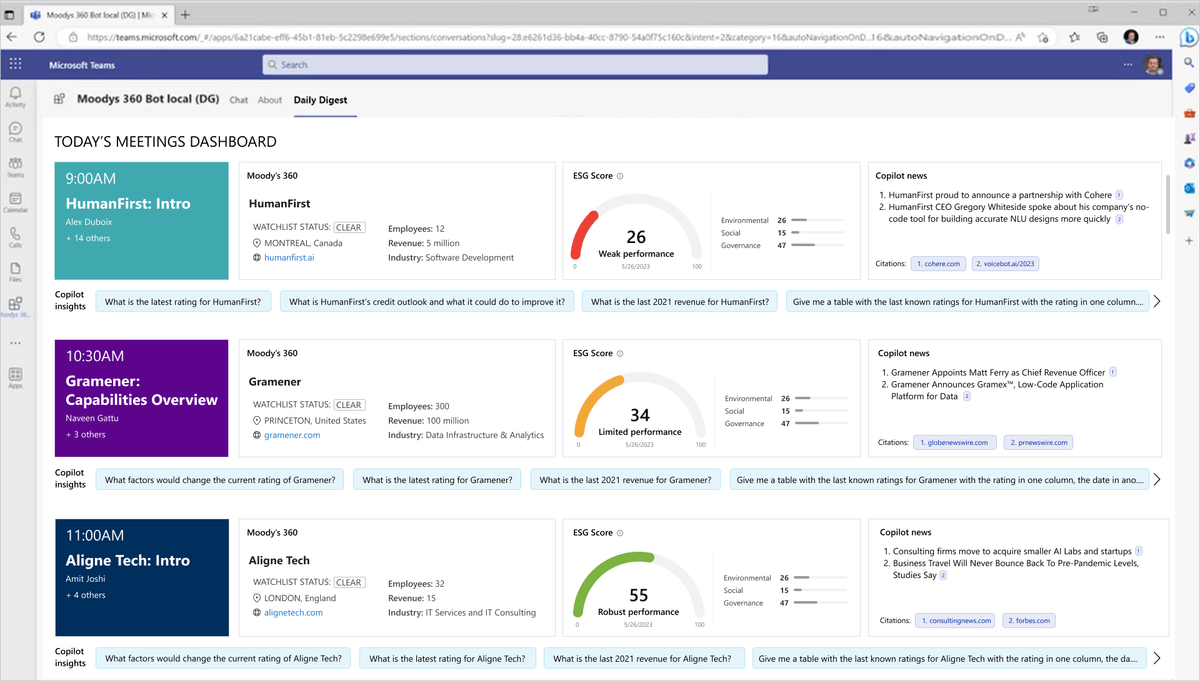
Final visual design, after touch ups by my teammate, the Visual Designer.
My mobile design.

Company match issue:
How I fixed the problem of many companies with similar names. I added a "More" dropdown in the company name section. That would provide user with more matches to choose from. Showing here is the lowest common denominator: companies with very long names. I had to make that work first.
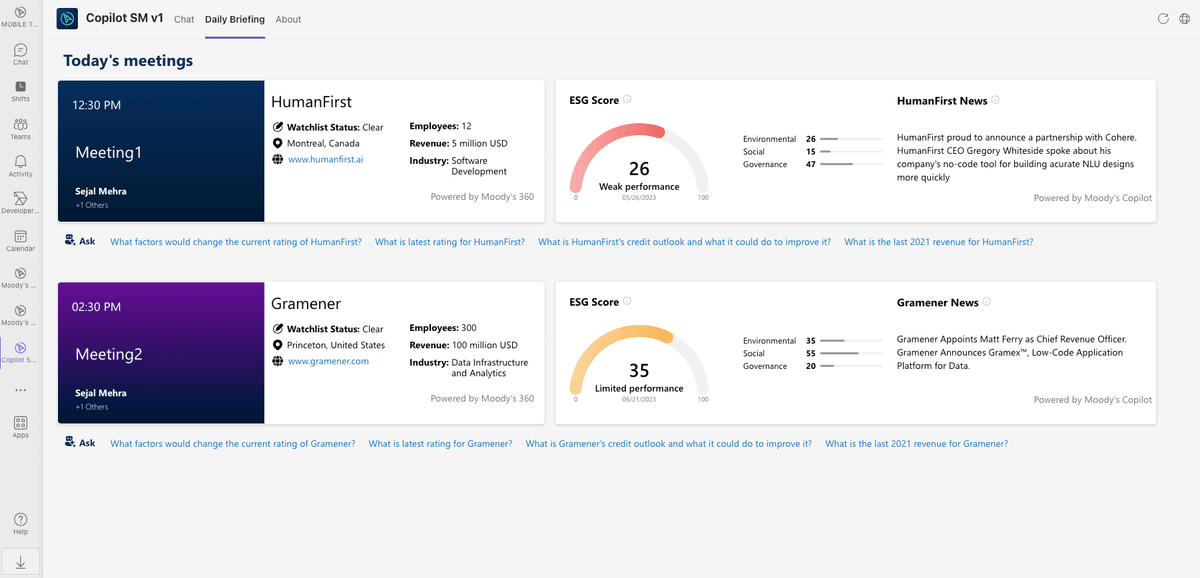
Implementation in code: Night mode.
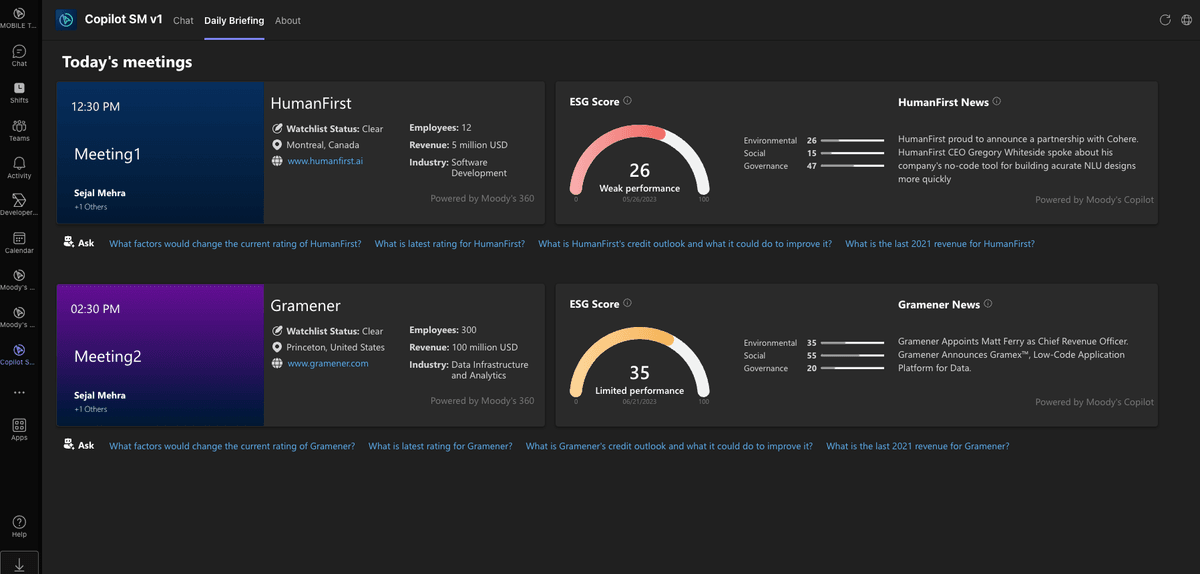
Desktop. Night mode proof of concept in code.
Desktop. Day mode proof of concept in code.
Mobile. Day mode proof of concept in code.
Mobile. Night mode proof of concept in code.
