Build Your Own Assistant
Situation:
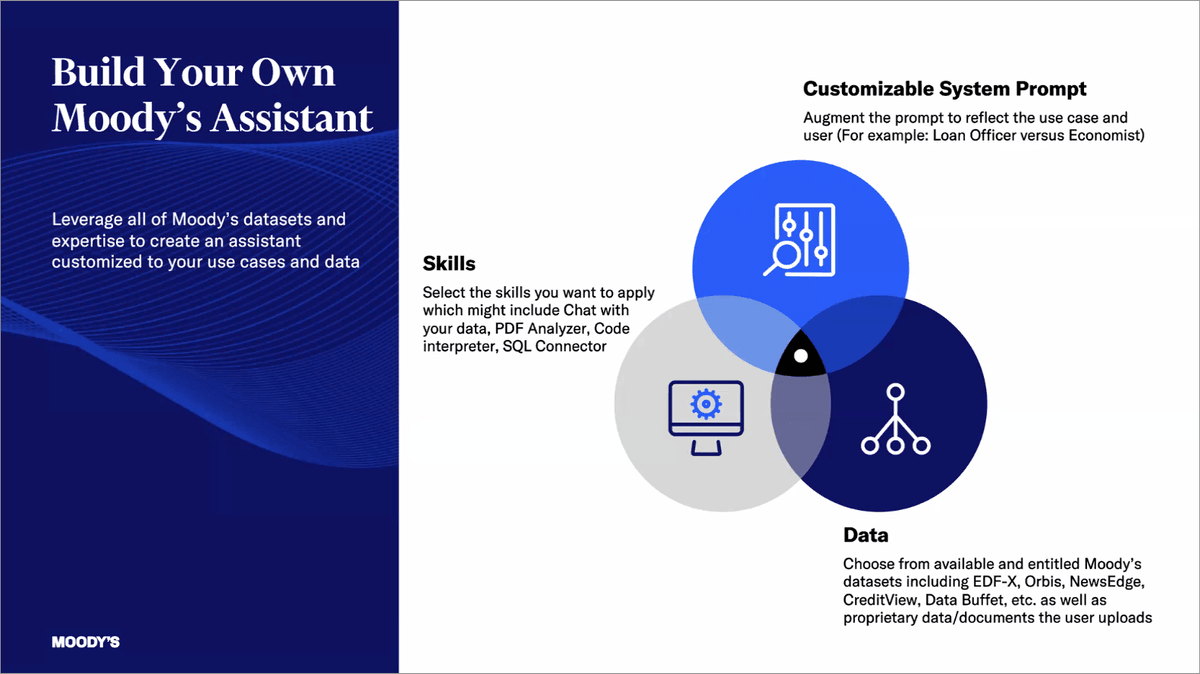
Provide Moody's employees with an opportunity to build their own assistant and customize GPT (Generative Pre-trained Transformer) for their specific use case. "Build Your Own Assistant" captures supreme functionality and flexibility. It encompasses access to a vast amount of Moody's products and datasets.
Task / MVP:
● Customize system prompt
● Ability to add skills, tools and datasets
● Ability to test their flows and prompts, before saving the assistant
● Saving multiple assistants in a single environment
● User can add skills such as:
- Moody's products: Research Assistant, EDFX, NewsEdge, Orbis, Economy.com
- Or external products, such as PowerBI Explorer, MongoDB, SalesForce Connector, Confluence, and Yahoo Finance.
Team:
Due to the complexity of this project, many individuals were involved. The only constant throughout was me as a UX resource, through all the stages.
Overall, we had 2 senior stakeholders involved, 2 Moody's Product Managers, Microsoft's back end team of 10, and few Moody's engineers.
Action / What's unique about Build Your Own Assistant:
Rapid Prototyping. I created several prototypes for user research and for many events where Build Your Own Assistant(BYOA) was featured long before any code was written.
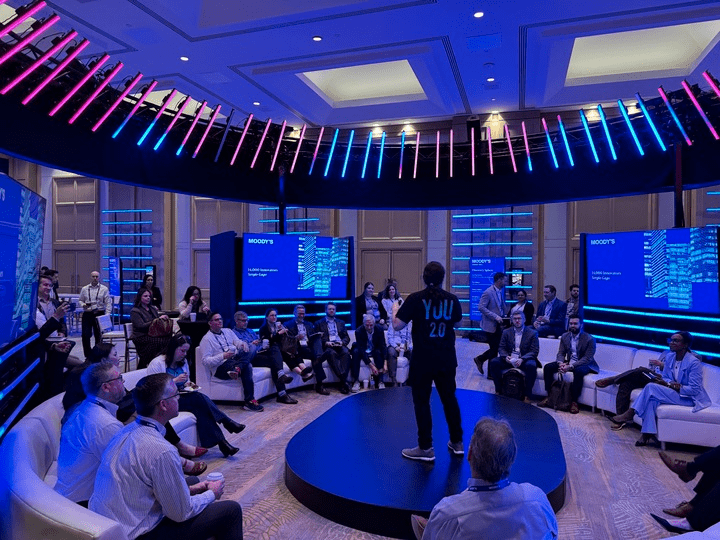
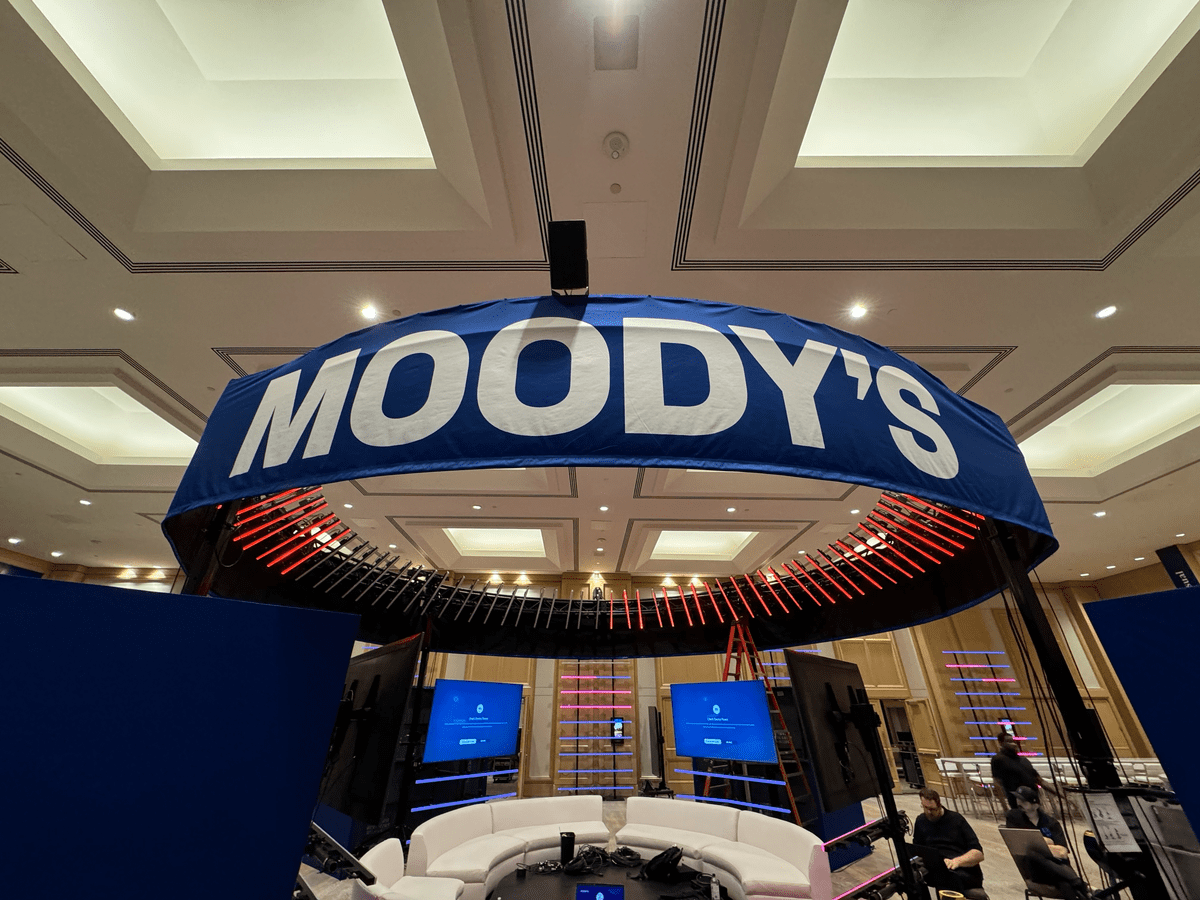
Results: initially, before launch, product was demoed at many important Moody's events. Pictures below are from those events. After the pictures, UX story continues:
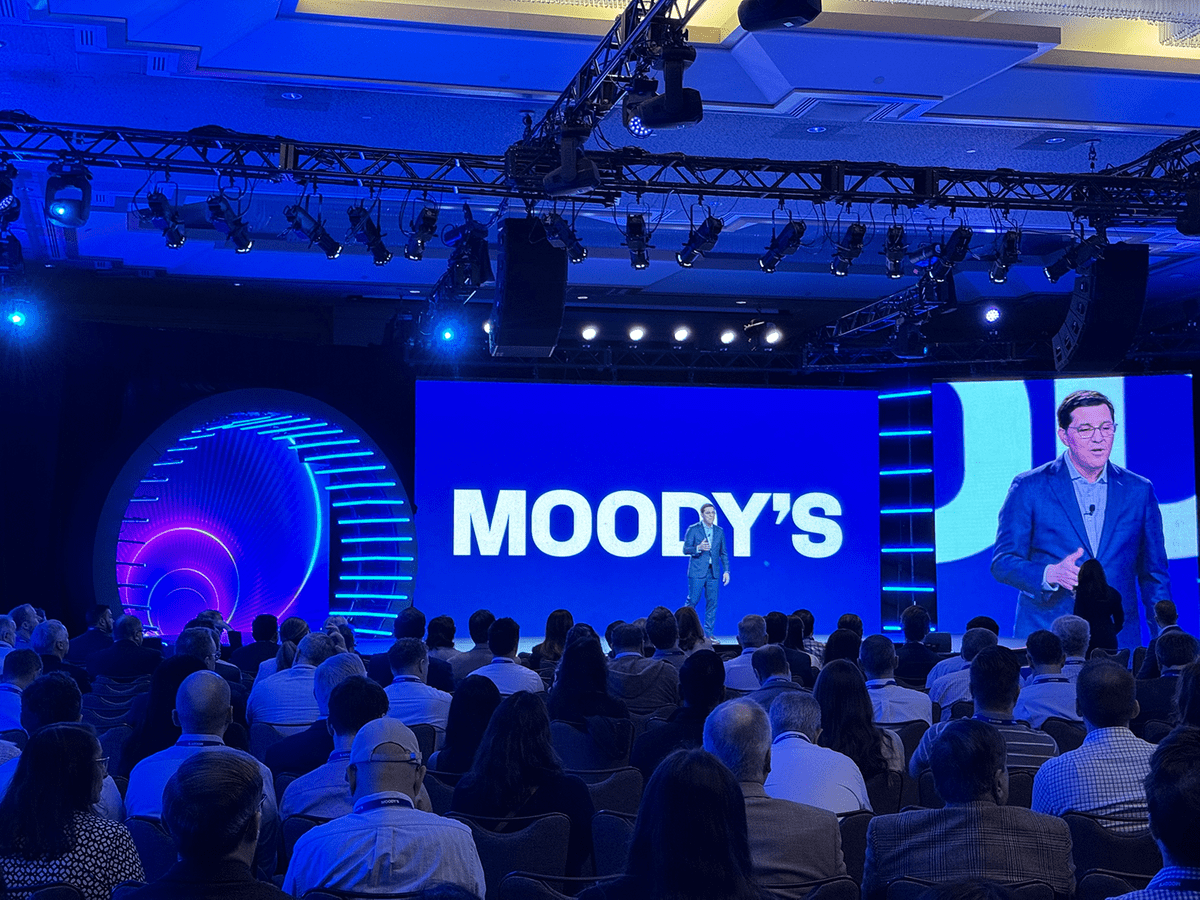
Moody's Summit, in March 2024.
Moody’s Summit is an event where our Sales team shows off Moody’s latest innovation. Some updates and new features on existing
products. And also net-new products. Moody’s Copilot leadership was there to show Moody’s Copilot. They showed “Build Your Own Assistant” prototypes I built. It is also an opportunity to discuss vision, roadmap, answer any questions or concerns our clients may have. These interactions are presentations on a stage, to a large audience. And also 1-1 demos, in more intimate settings.MD Connect, May 2024
MD Connect is another key event where updated prototypes were shared. MD Connect is short for "Managing Directors Connect". Moody's organizes an offsite for all its Managing Directors every year. It's a chance for Heads of Product to showcase our newest innovations. And also outline vision, roadmap, sales strategy, share metrics and analytics, and answer questions. And finally the Directors get to engage with the products themselves in workshops, and ideate and brainstorm potential new solutions.
Lesson learned: Rapid prototyping and getting user feedback early, saves tons of UX and engineering work, and weeks of meetings.
Presentation by our AI, Quantum and Machine Learning lead, Sergio Gago Huerta.
One of the slides from the event screens at our Booth.
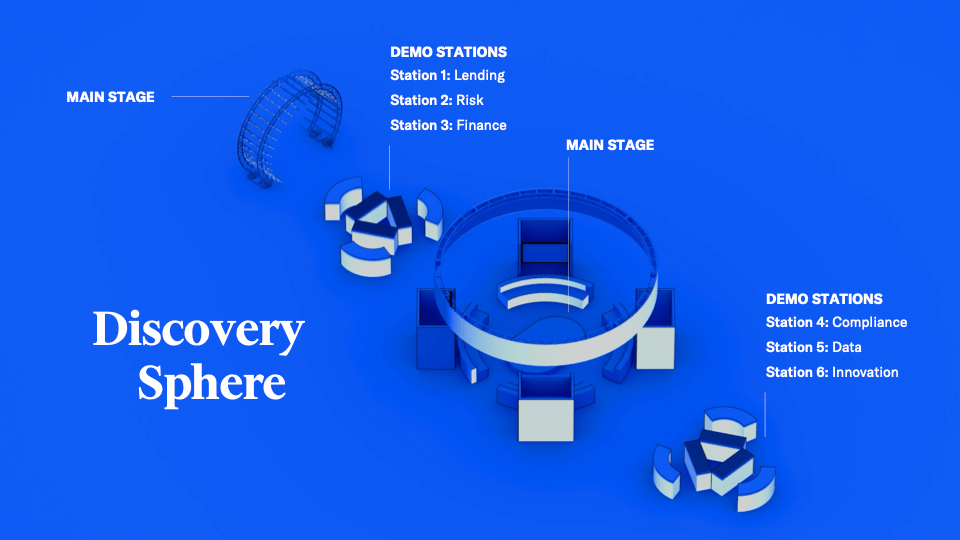
Moody's booth.
Presentation by our Head of Product, Nick Reed.
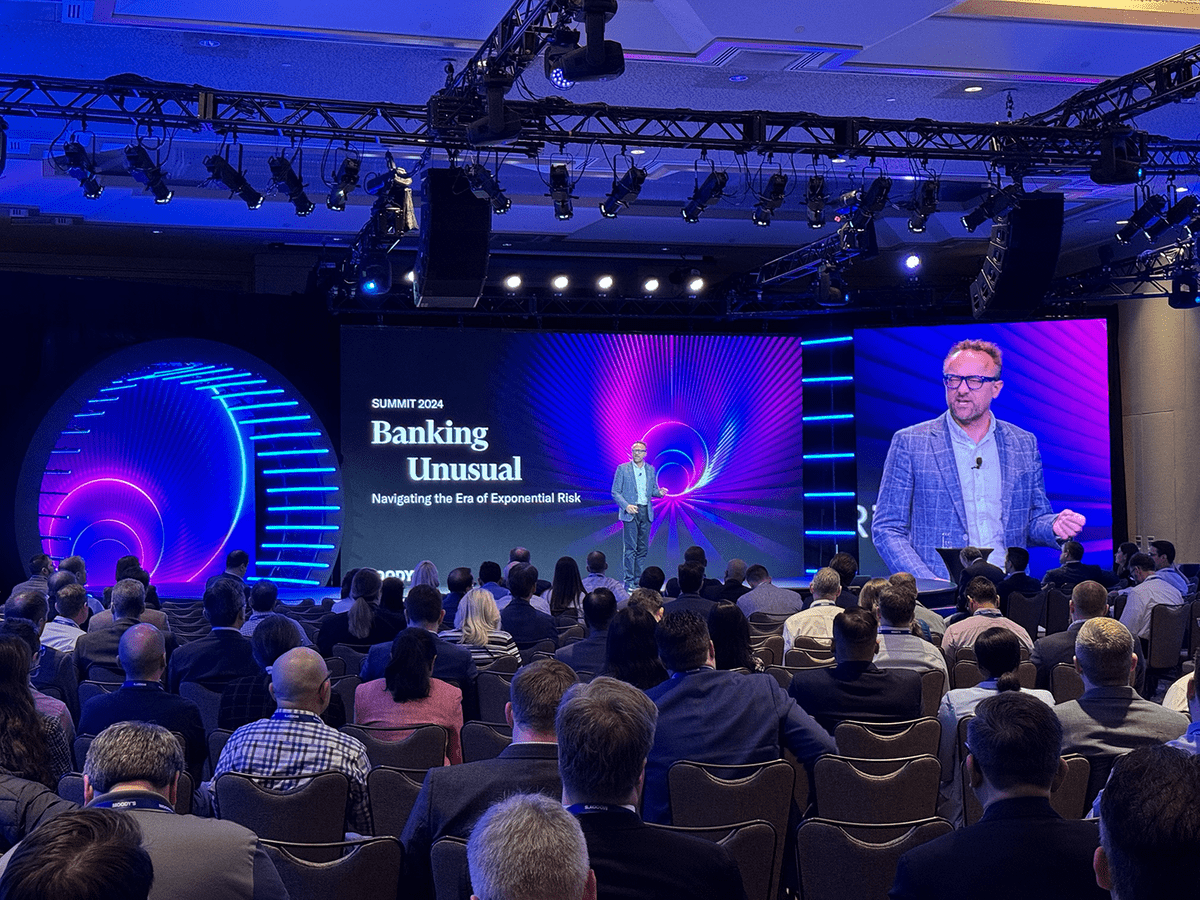
Presentation by our CEO, Rob Fauber.
More detailed UX story, and also following the same format as others in this portfolio:
Situation:
Provide users with an opportunity to build their own assistant and customize GPT (Generative Pre-trained Transformer) for their specific use case.
Task / MVP:
● Customize system prompt
● Ability to add skills, tools and datasets
● Ability to test their flows and prompts, before saving the assistant
● Saving multiple assistants in a single environment
● User can add skills such as:
- Moody's products: Research Assistant, EDFX, NewsEdge, Orbis, Economy.com
- Or external products, such as PowerBI Explorer, MongoDB, SalesForce Connector, Confluence, and Yahoo Finance.
Team:
Due to the complexity of this project, many individuals were involved. The only constant throughout was me as a UX resource, through all the stages.
● 2 senior Moody's Copilot stakeholders and 1 Product Manager put together a Product Strategy and PRD (Product Requirements Document).
● 1 UX, me. Then I created the UX for it.
● Head of User Research ran a series of moderated sessions, collecting general Copilot feedback. At the end of each session, I demoed my early BYOA prototype to users.
● Microsoft's team of approximately 10 Data Scientists and Engineers were then engaged for several months to build the product.
● Then Microsoft's involvement was completed and Moody's team of 5 took over. About 2 Data Scientists, 2 Engineers and 1 Front End Engineer.
● We hired another senior Product Manager mid-2024 and he took over BYOA.
● I designed Phase #2 of BYOA features, such as Sharing Assistants.
What's unique about Build Your Own Assistant:
Rapid Prototyping:
I had a fully-fleshed out prototype in 2 weeks, in early 2024. That UX is what was in Production in April 2025. The reason I had the UX in 2 weeks was because Product and Senior Leadership spent 2 months on strategy. So when they came to me, they knew what they wanted. This project had no ambiguity.
They also verbalized and explained what they wanted: Builder area, and Test area. In my previous job, at CVS I used IBM Watson Assistant. So I understood the concept right away.
I also knew we had a round of user research coming up in late February / early March 2024. As we only did research once a quarter at that time, I really wanted to be able to take advantage of that, and get some early user input! So I hurried to build a prototype. Even the lead Product Manager was surprised with the speed.
Why:
Users can build and save assistants to satisfy variety of tasks and needs.
When / UX timeline:
● Started first week of February, had 1st prototype on Feb 16 showing basic function.
● Had prototype to show MVP on Feb 23, to be used to conduct early user research.
● Had 3 robust prototypes with 3 distinct events:
- March - Splashy Moody’s Summit, where Moody’s hosts existing and potential clients. Showcase innovative products, discuss roadmap and vision, and answer questions. Demos were received quite favorably, with a number of clients expressing interest in using Build Your Own Assistant, as soon as it’s built.
- May - MD Connect ("Managing Directors Connect"), internal event where Heads of Product showcase our newest innovations.
- June - Board of Directors meeting, where Moody's Copilot team shows latest products.
Where:
On Moody's Copilot web platform.
Who:
Personas we started with, early on, March 2024:
#1 Analyst carrying out research on a company looking to understand the company's prior performance including data analysis on financials (skills to be used: Chat With Your Data, Orbis (library of private companies, and various data about them, such as ownership, exposure, risk, structure, etc.), Data Analyzer).
#2 Analyst looking to get up to speed on real-time information concerning a company, including forward-looking views (Chat With Your Data, NewsEdge, Website Summary & Query, EDF-X).
#3 Tell me what you know about company X (looking for all information across available Moody's data sources (Moody's 360 (risk evaluator based on microeconomy, climate and ESG), NewsEdge).
#4 Customer support assistant.
#5 Looking for similar / peer companies to the one researched.
Use cases that user research surfaced, March 2024:
#1 Moody’s Writing Coach: fixes grammar, polishes writing of SMEs that are experts in their domain but not native English speakers, incorporates brand tone and consistent nomenclature for certain items.
#2 Moody’s Design System coach: Not brand. UX. Explaining what type of accessibility standards we follow: is it A, AA or AAA? Where to find resources? How many libraries does Moody's Analytics have (Yelena's note: about 10, because each Operating Unit has its own, that is serving their particular product and business needs. So this user was spot-on that a new hire needs this type of a guide).
#3 Jira creator: Provide it communications from emails, Confluence pages, some saved prompts, previous Jiras, etc. System prompts such as “when faced with this scenario, do that, based on these parameters.”
Sample use cases we had after we put BYOA in UAT, July 2024:
#1 Finance Reporter. Tell me about Microsoft; What should a prospective client know about a company; Give me ideas for an article about LVMH (Orbis, News Retriever).
#2 Daily Commercial Real Estate briefing. Give me a risk assessment (Orbis, News Retriever).
#3 Company annual report and 10-K filings. Summarize Cloudflare's recent performance; I need to learn about Block ESG activities (Chat With Your Data, News Retriever, Orbis).
#4 CreditLens product overview (CreditLens is Moody's product that harnesses the expansive data and industry expertise from Moody’s Analytics). Provide summary of CreditLens including features and recent news (News Retriever, InfoWeb).
Action:
My role:
● Designed interaction and visual design.
● Lots of Figma prototypes for various events, and for user research.
● Helped run user research.
Results:
Impact:
● 3 million dollars saved in the first 6 months of usage. Customer Service team used "Build Your Own Assistant" skill to build an assistant and load it with historical data of resolved customer queries. The assistant drew from that corpus of data to put together a response for each new client query. The savings were due to increased speed and accuracy of responses to client queries.
This is how Build Your Own Assistant came to life.
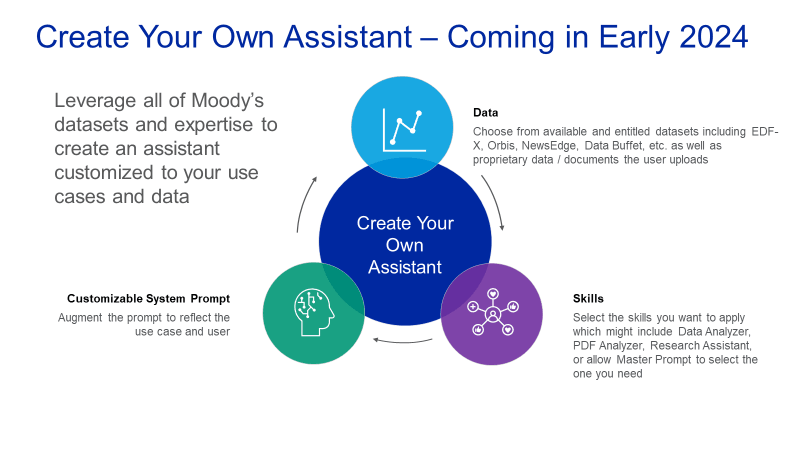
First there was a concept, and a PowerPoint slide.
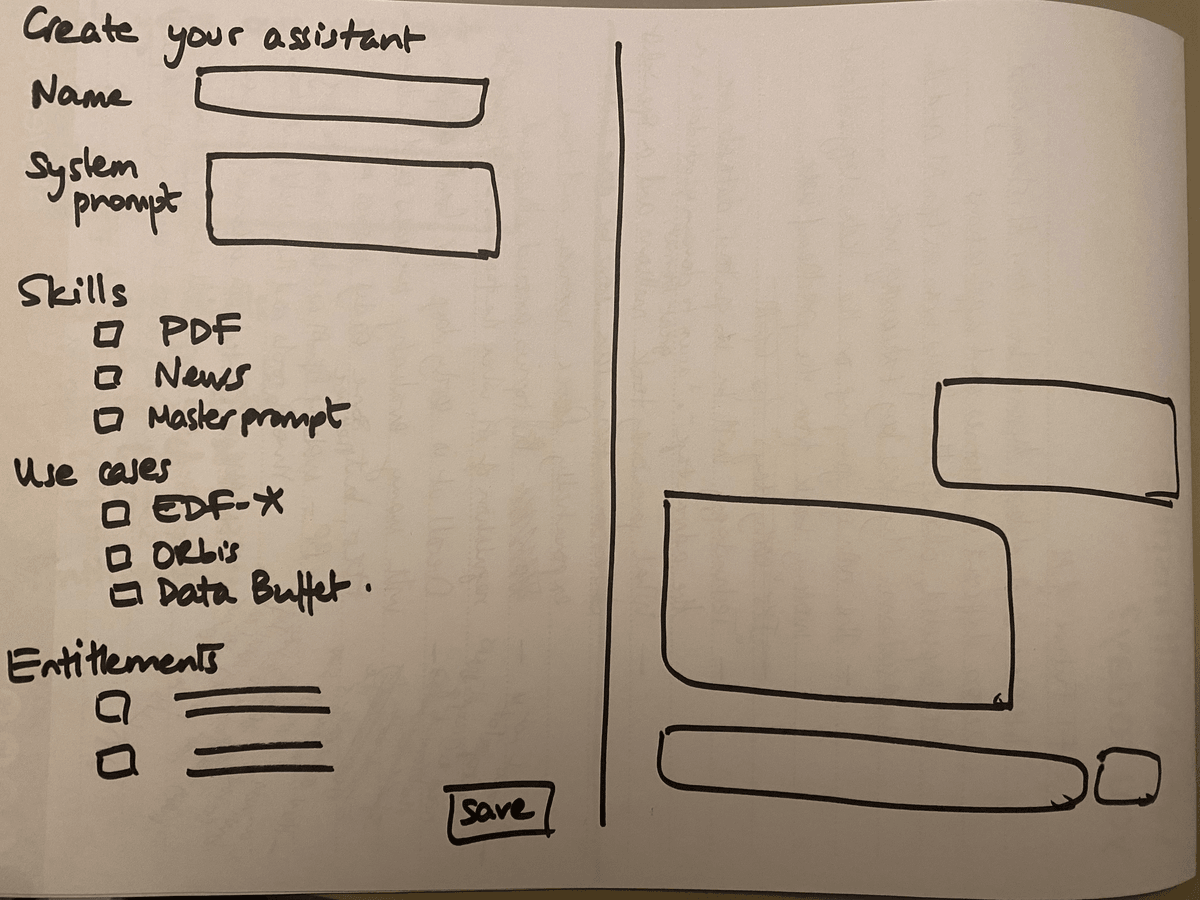
Then there was Product Manager's sketch.
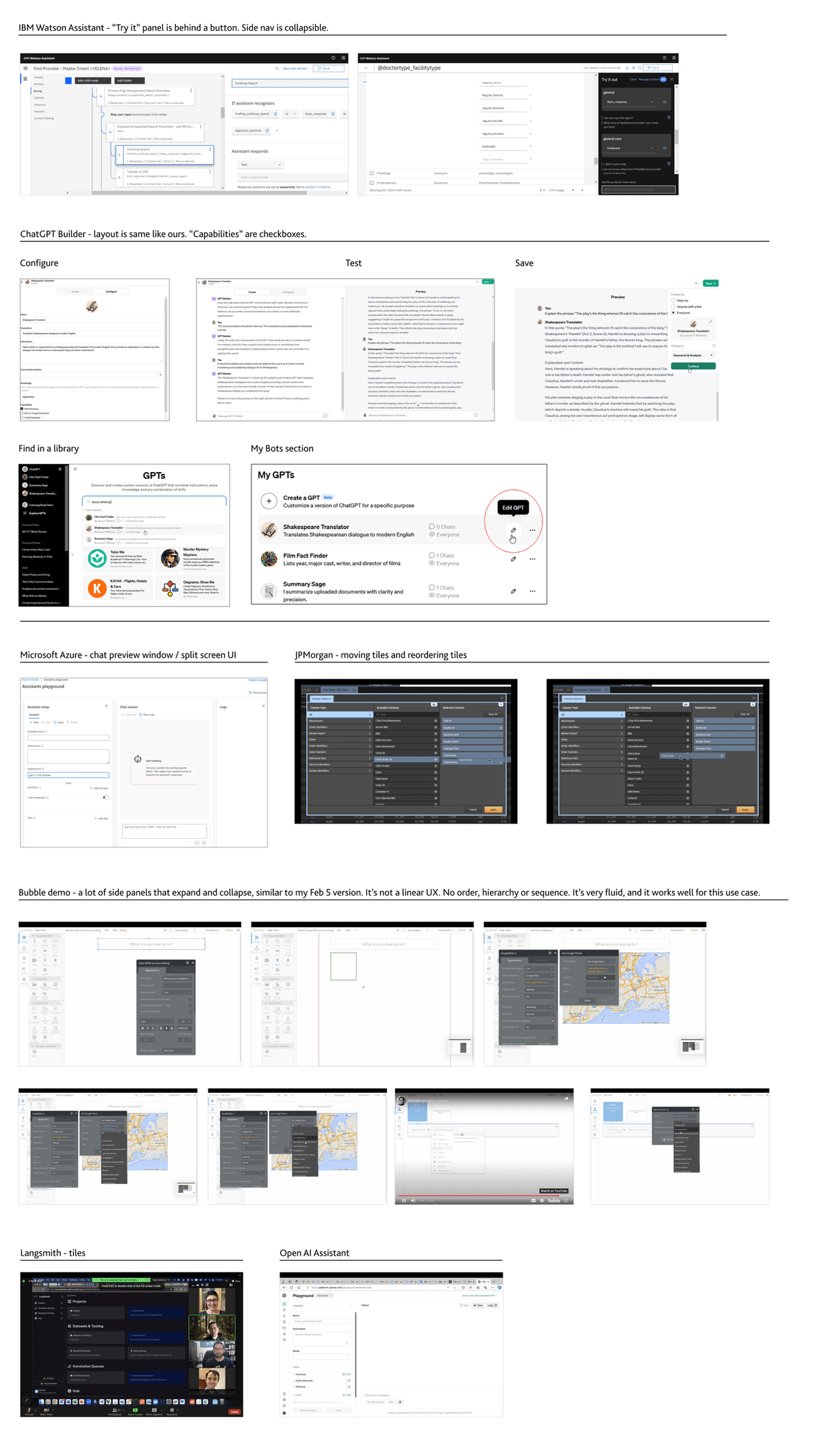
This was market research. I contributed IBM Watson, JPMorgan, ChatGPT Builder and LangSmith screenshots. Microsoft Azure and Bubble were supplied by Product Managers.
My initial sketches. The concept is there: left side is the Builder, right side is the Chat testing area.
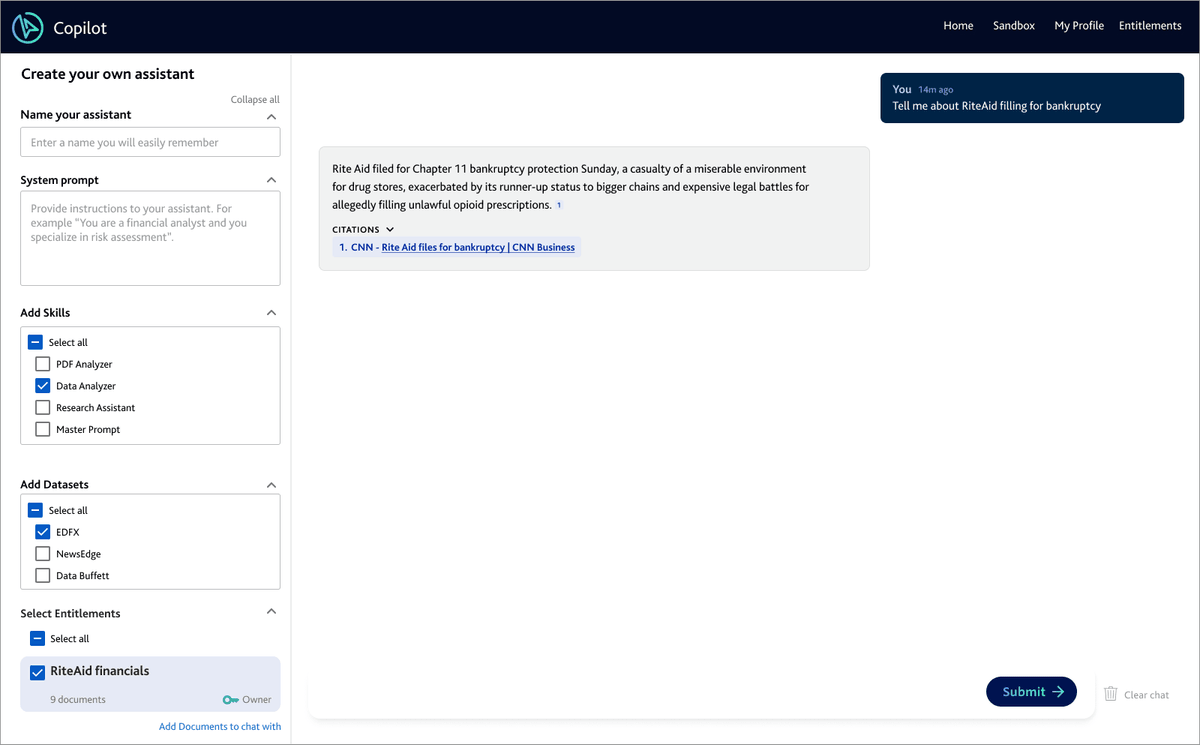
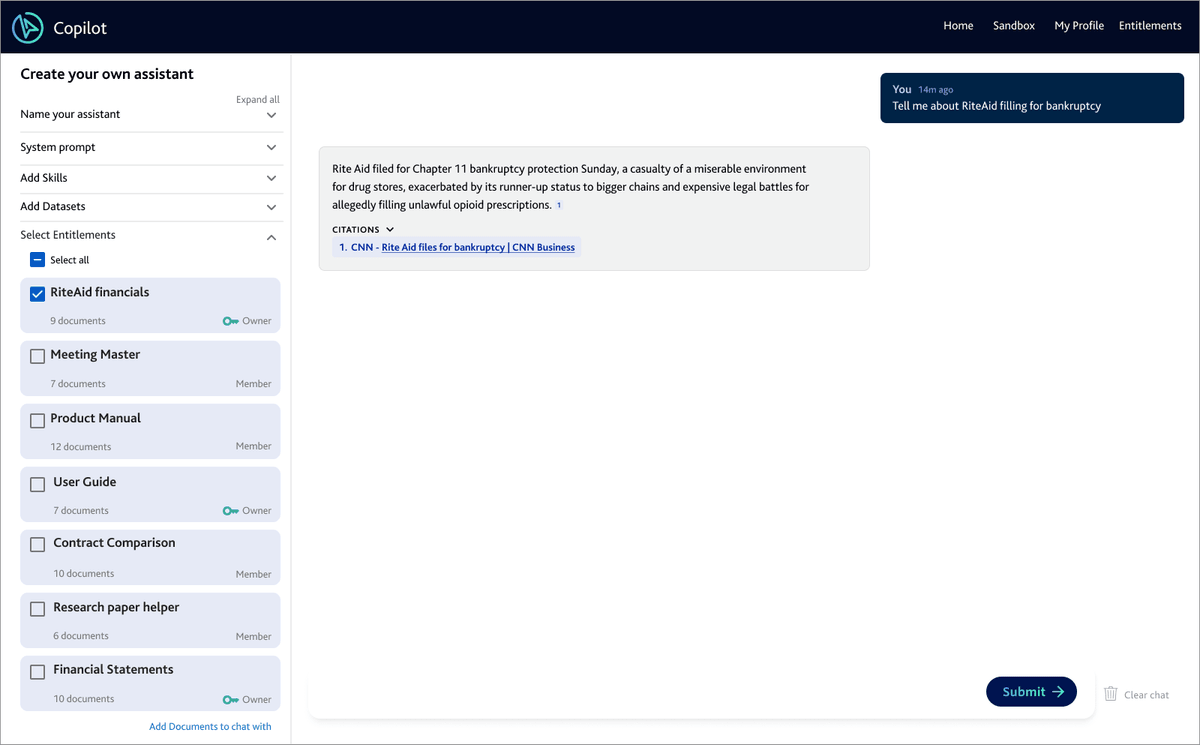
The UX is finished.
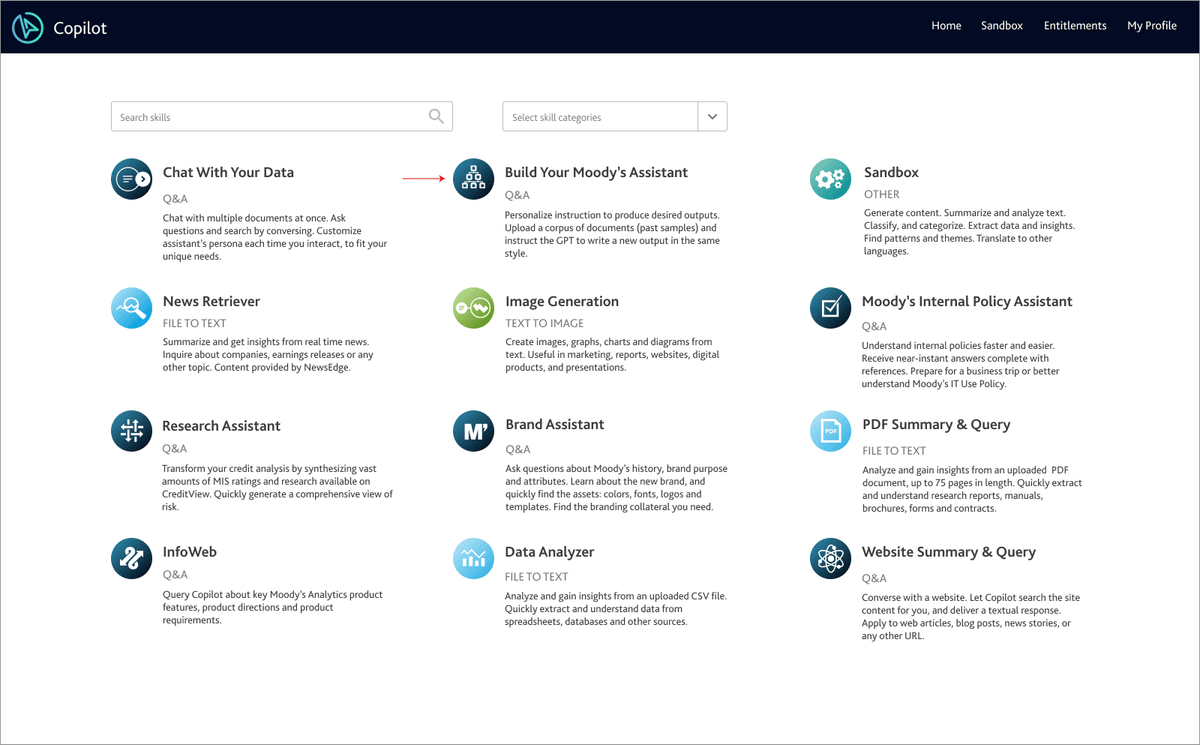
Moody's Copilot dashboard is an entry point. User clicks on the "Build Your Moody's Assistant" tile.
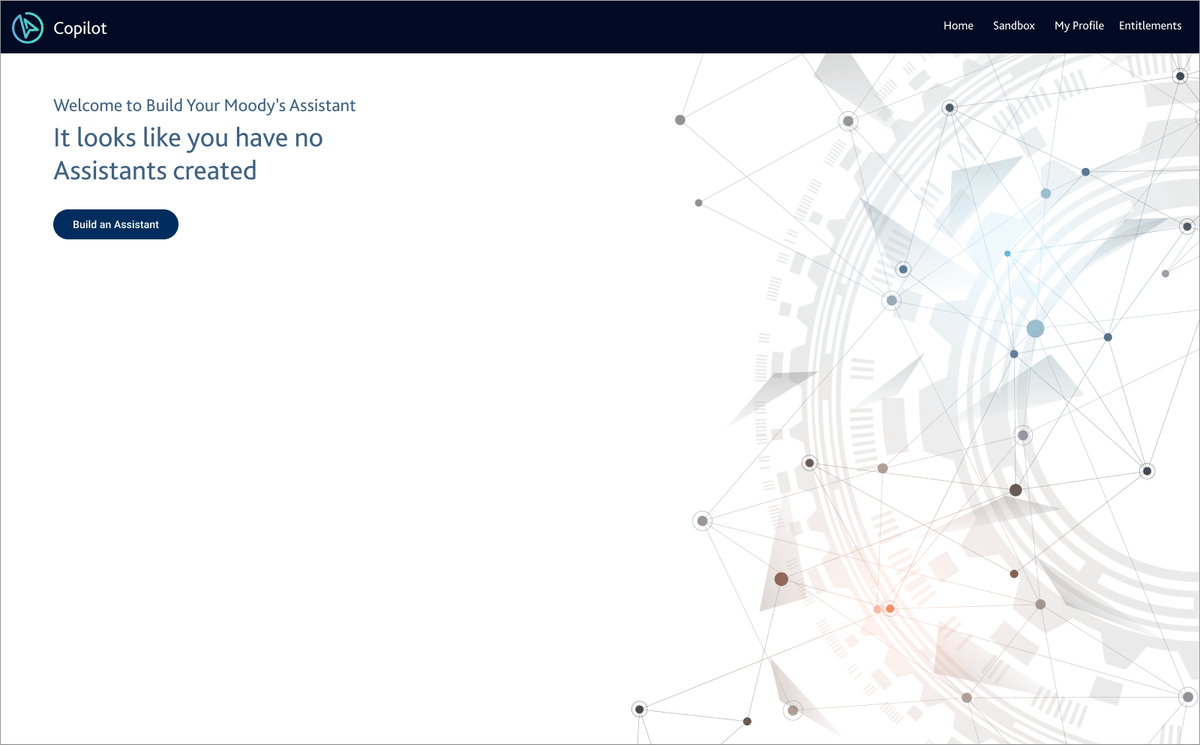
If user has no Assistants, the button takes them to the Assistant Builder section, to create some Assistants to chat with.
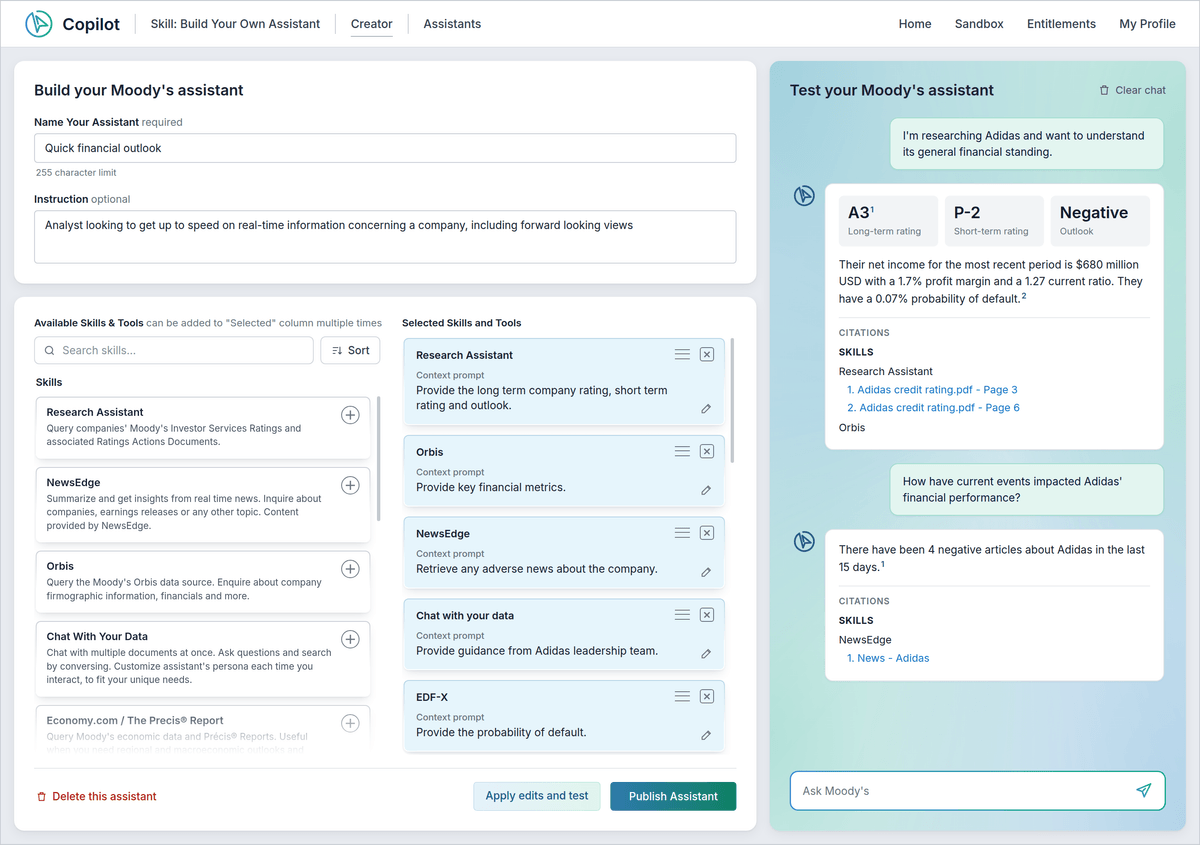
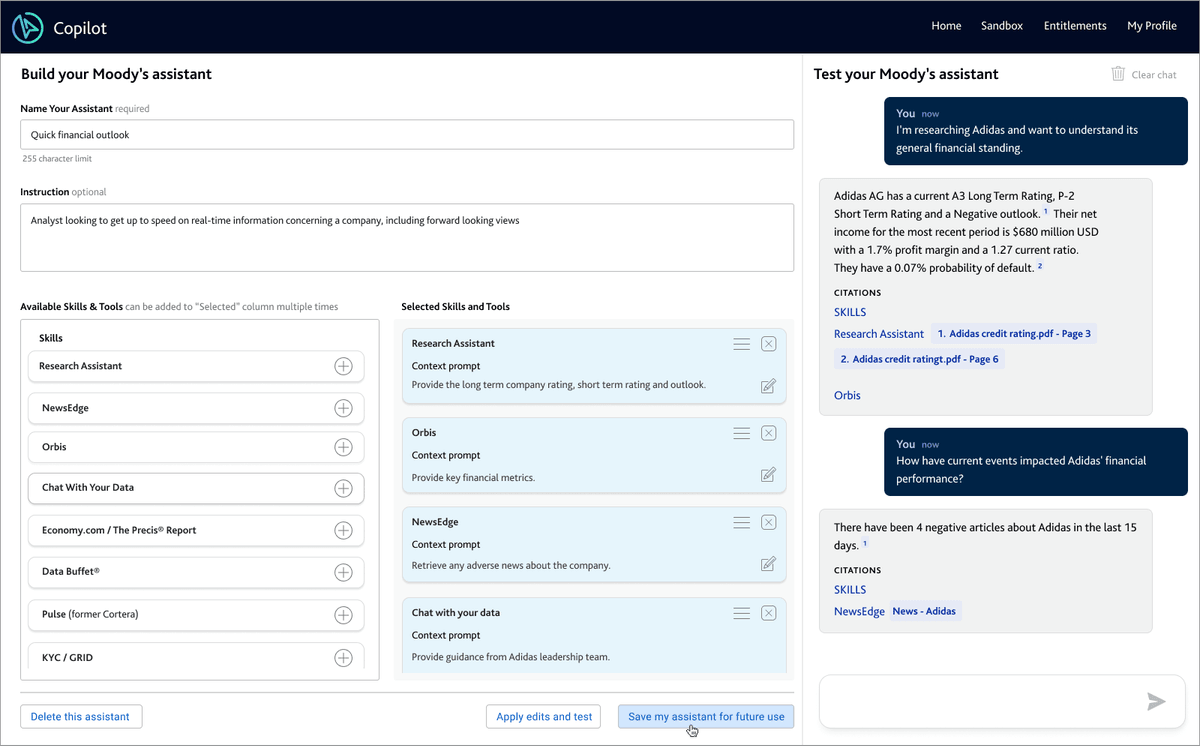
The Builder and testing section.
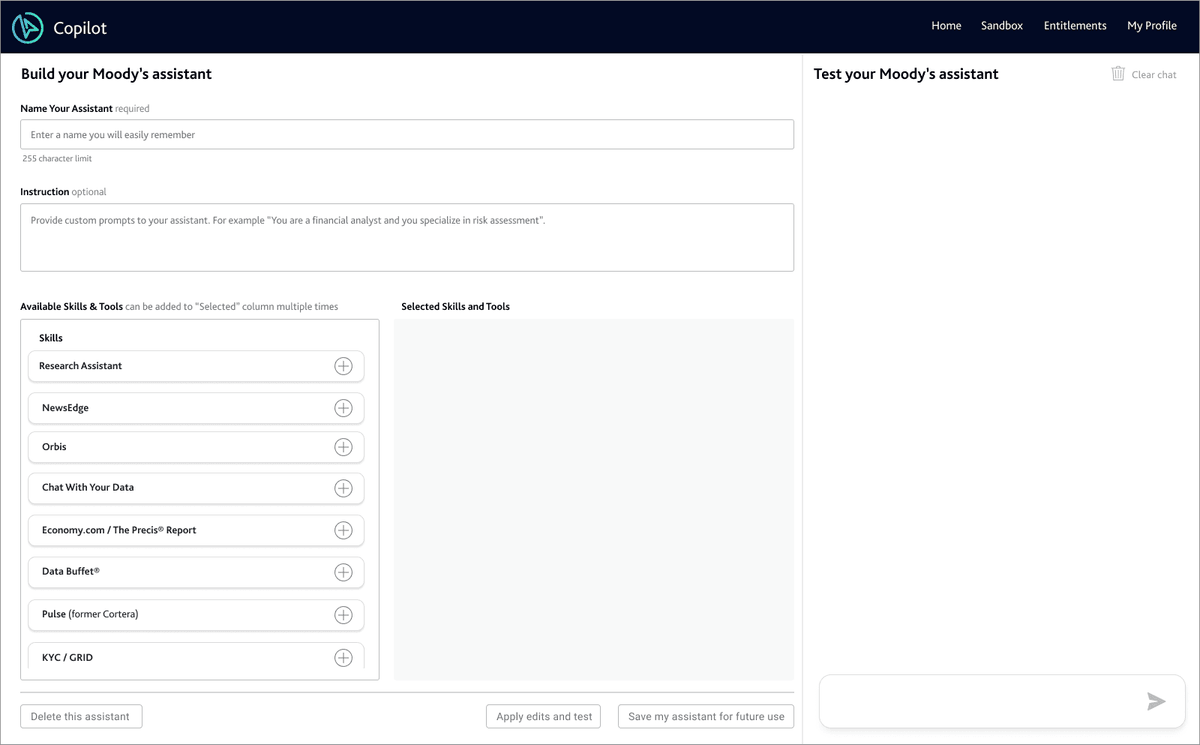
User adds Skills, Tools and Datasets, in order to build their Assistant.
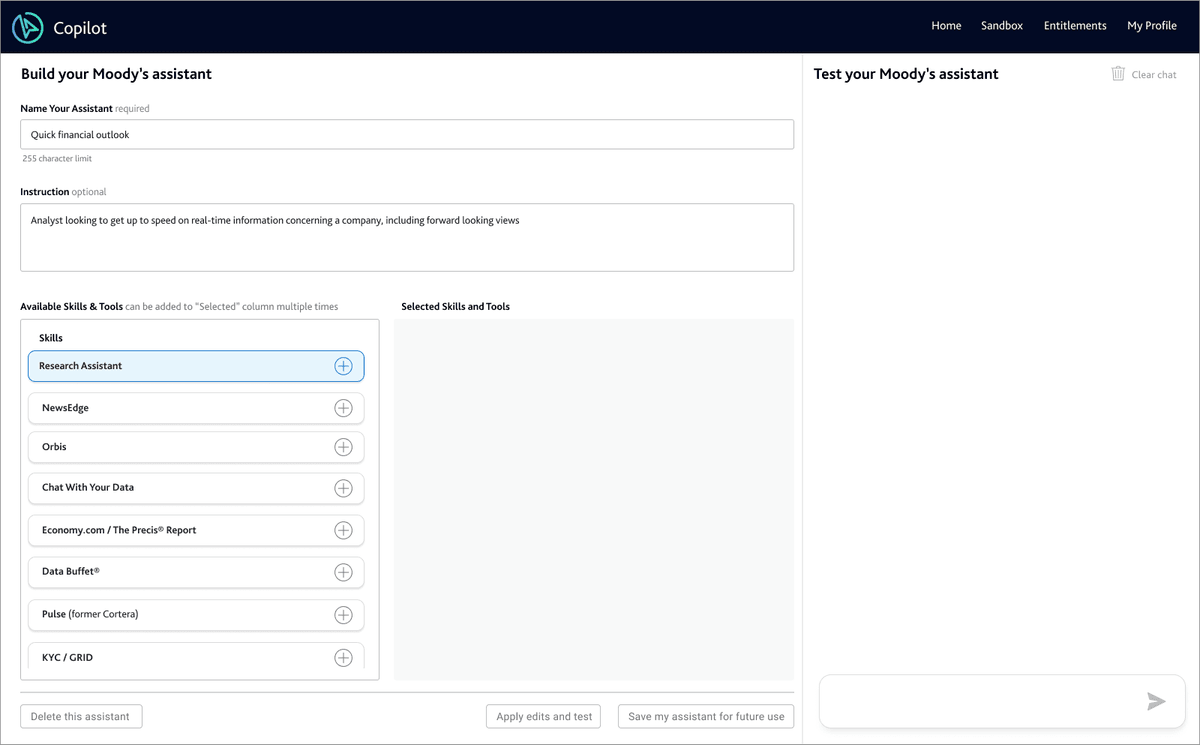
Skills have Context Prompts. In a Context Prompt, user gives instructions to the Assistant, how to use the Skill. What you see here, is a default instructional text, explaining how to write a sample prompt.
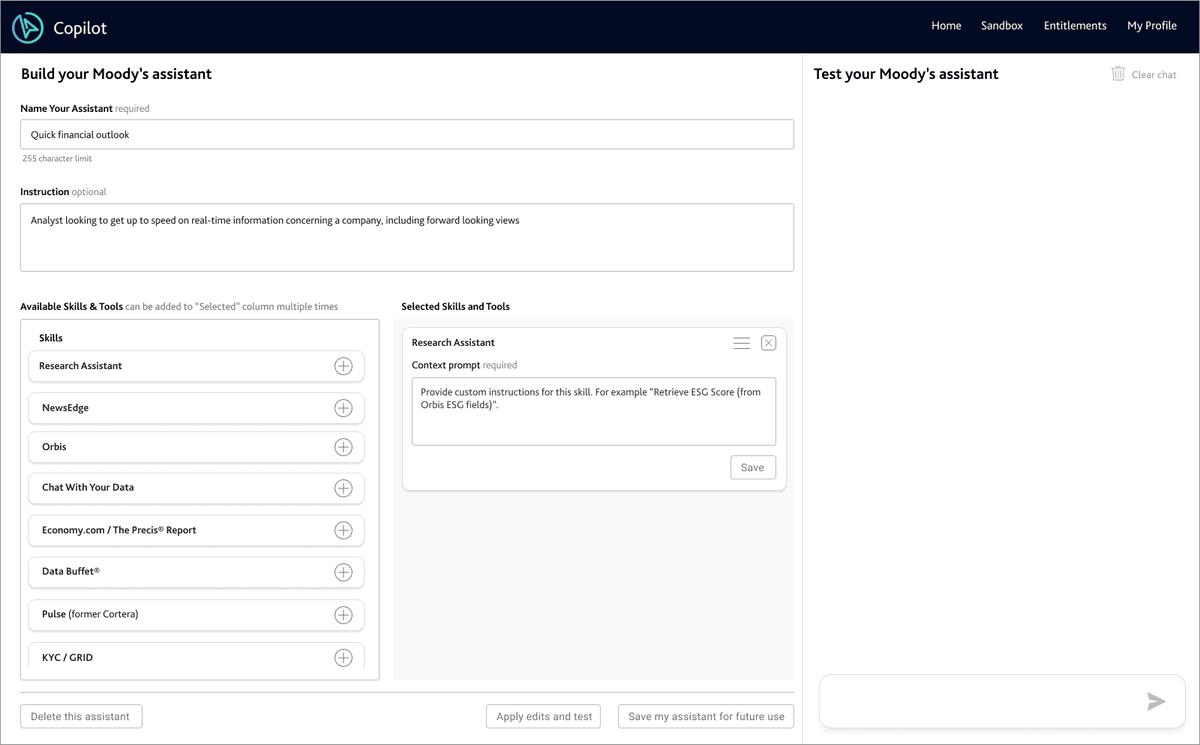
Now user has added a few Skills, and is ready to test their Assistant, in the testing panel. They save and test (next screen). Saving is temporary, just to enable user to test.
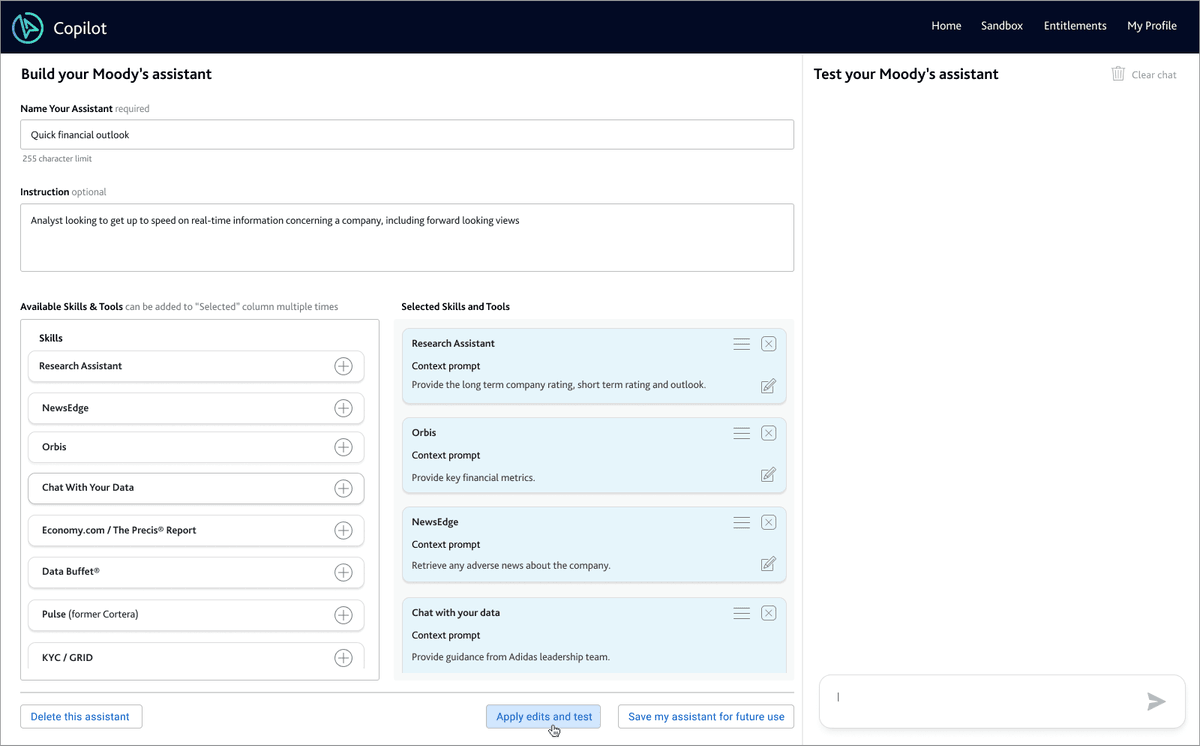
While testing, user has the opportunity to fine-tune their prompts, to optimize performance and utilization of Skills. When they are happy with the results, user saves their Assistant permanently. The same CTA takes the user to the Chat section (next screen).
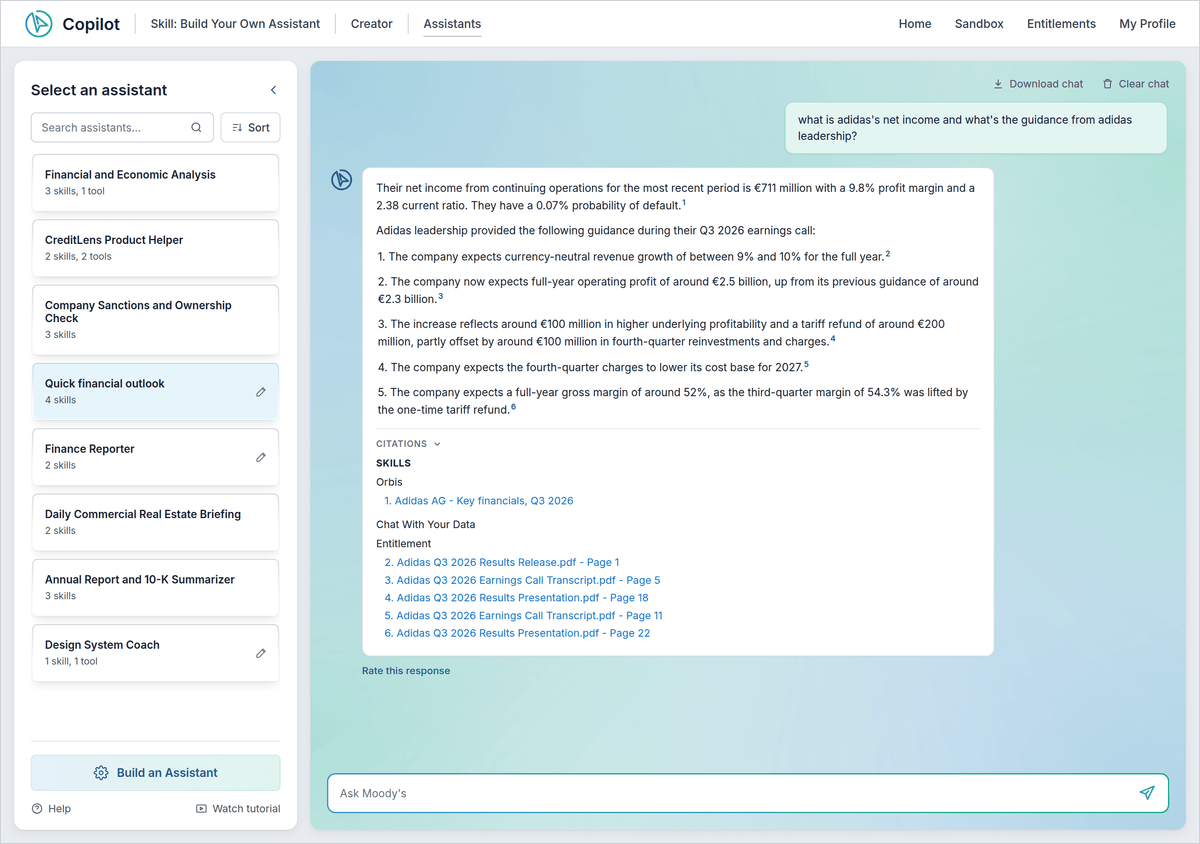
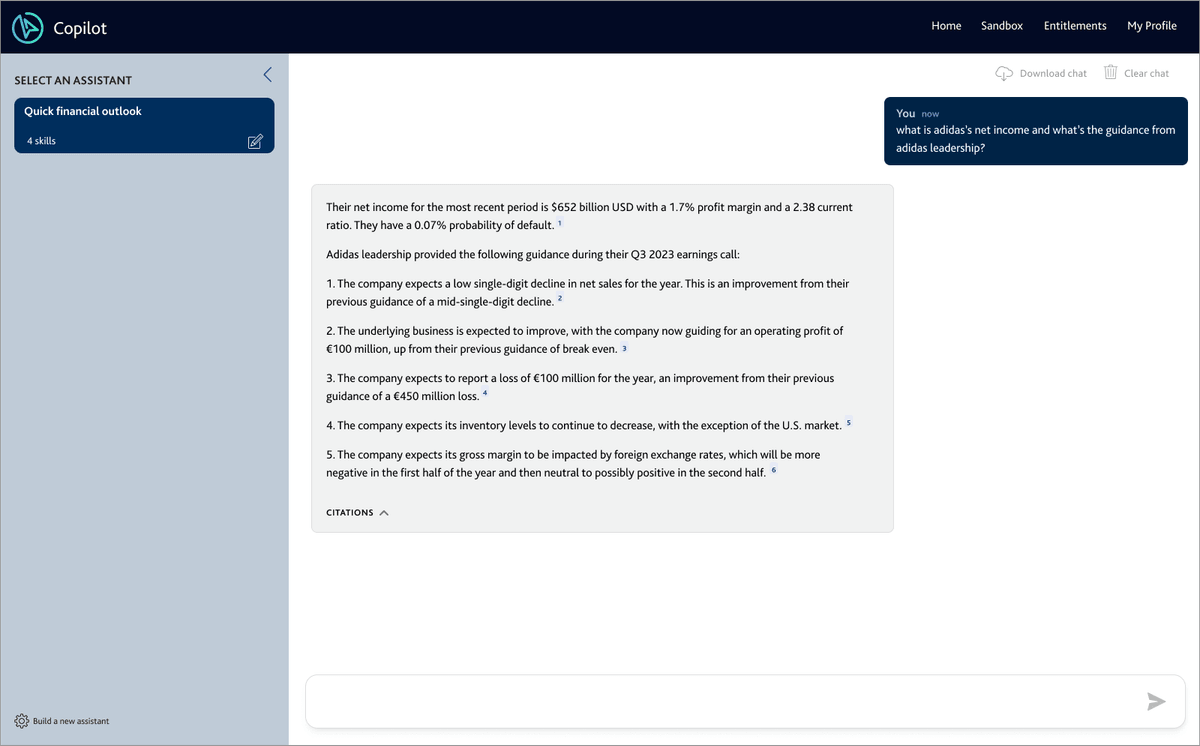
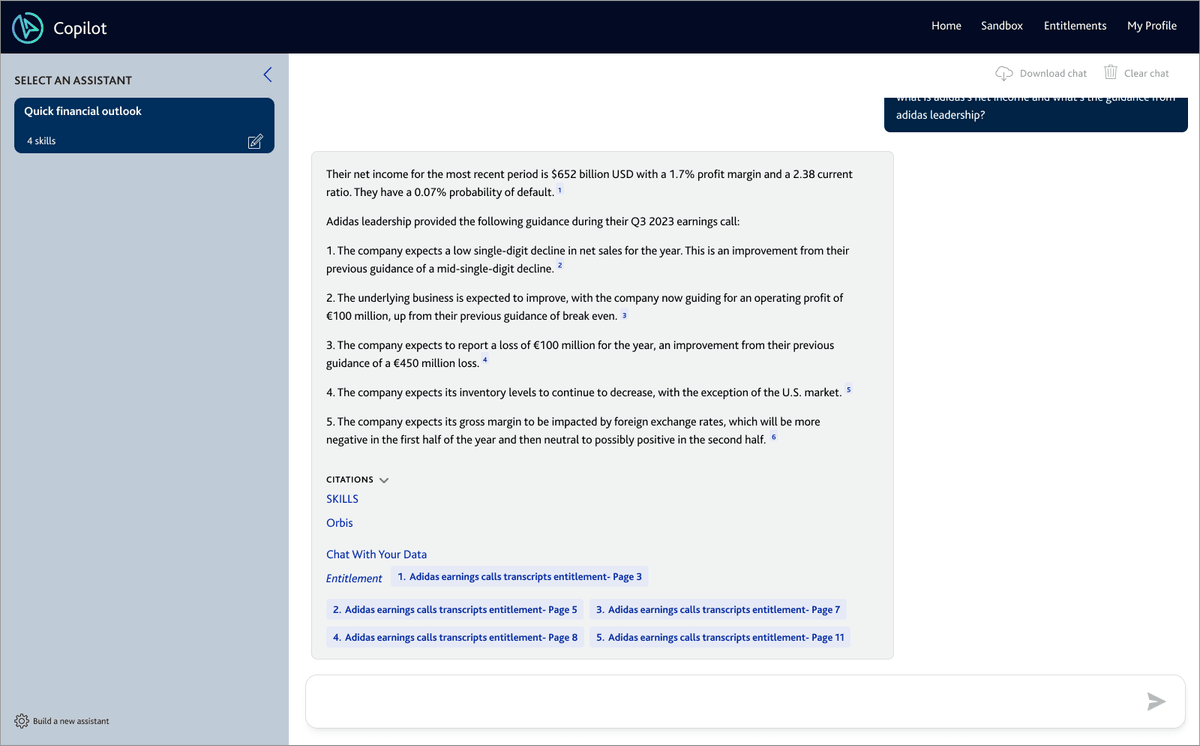
This is the Chat section. Now the Assistant is permanently saved. Note that the Citations are collapsed by default. This is because they can get quite lengthy (next screen), due to the complexity. One of the Skills that can be utilized here is Chat With Your Data, that has in itself - Entitlements. There can be many Entitlements. And each Entitlement can have multiple Documents in itself.
Sample expanded Citation.
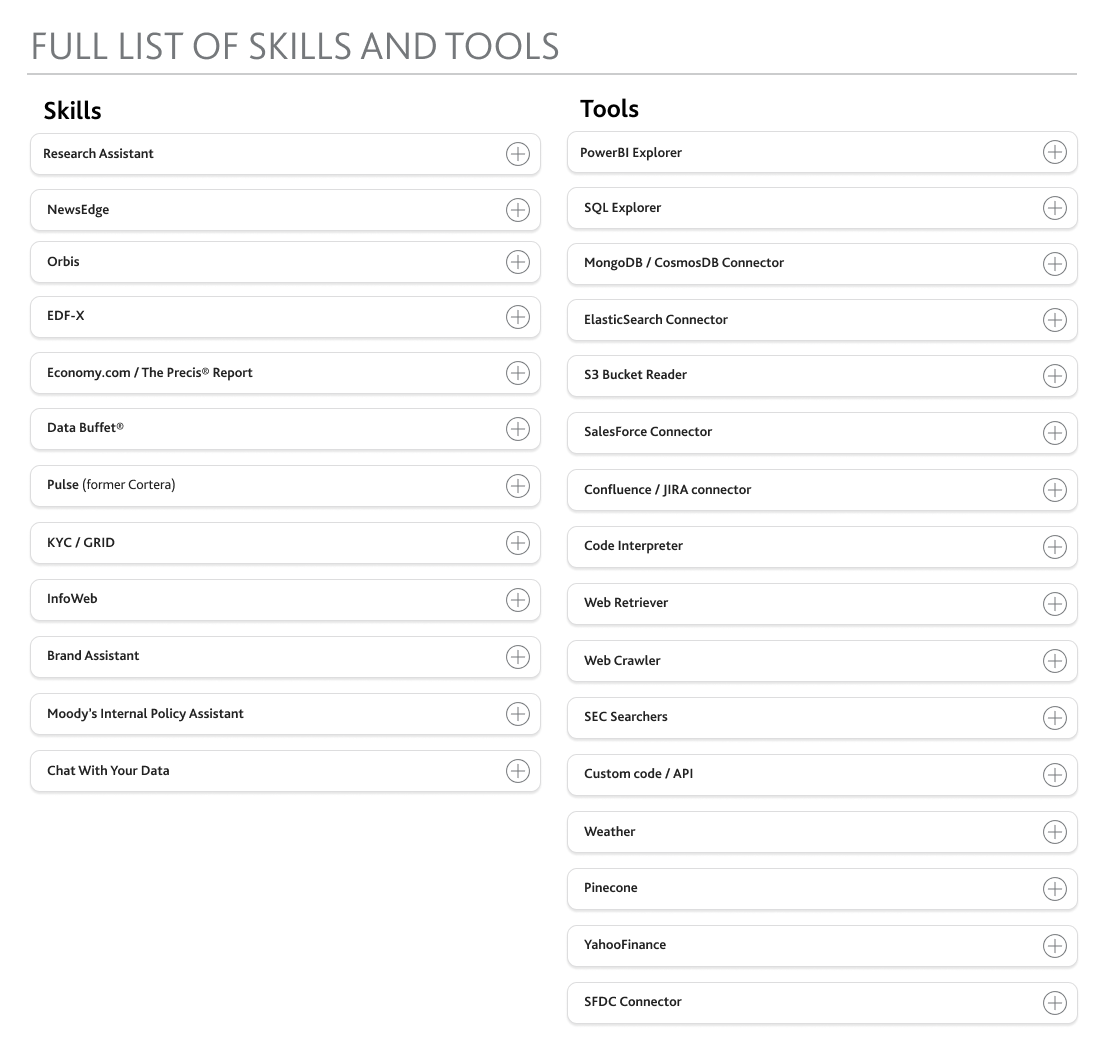
Full list of Skills, Tools and Datasets that we were thinking of adding, at the time of Build Your Own Assistant MVP creation.
Results of testing this prototype with users, in user research sessions. I extracted UX feedback, while my counterpart, Head of User Research focused on business and product insights. We presented this feedback to the Moody's Copilot team and leadership, in an onsite meeting.
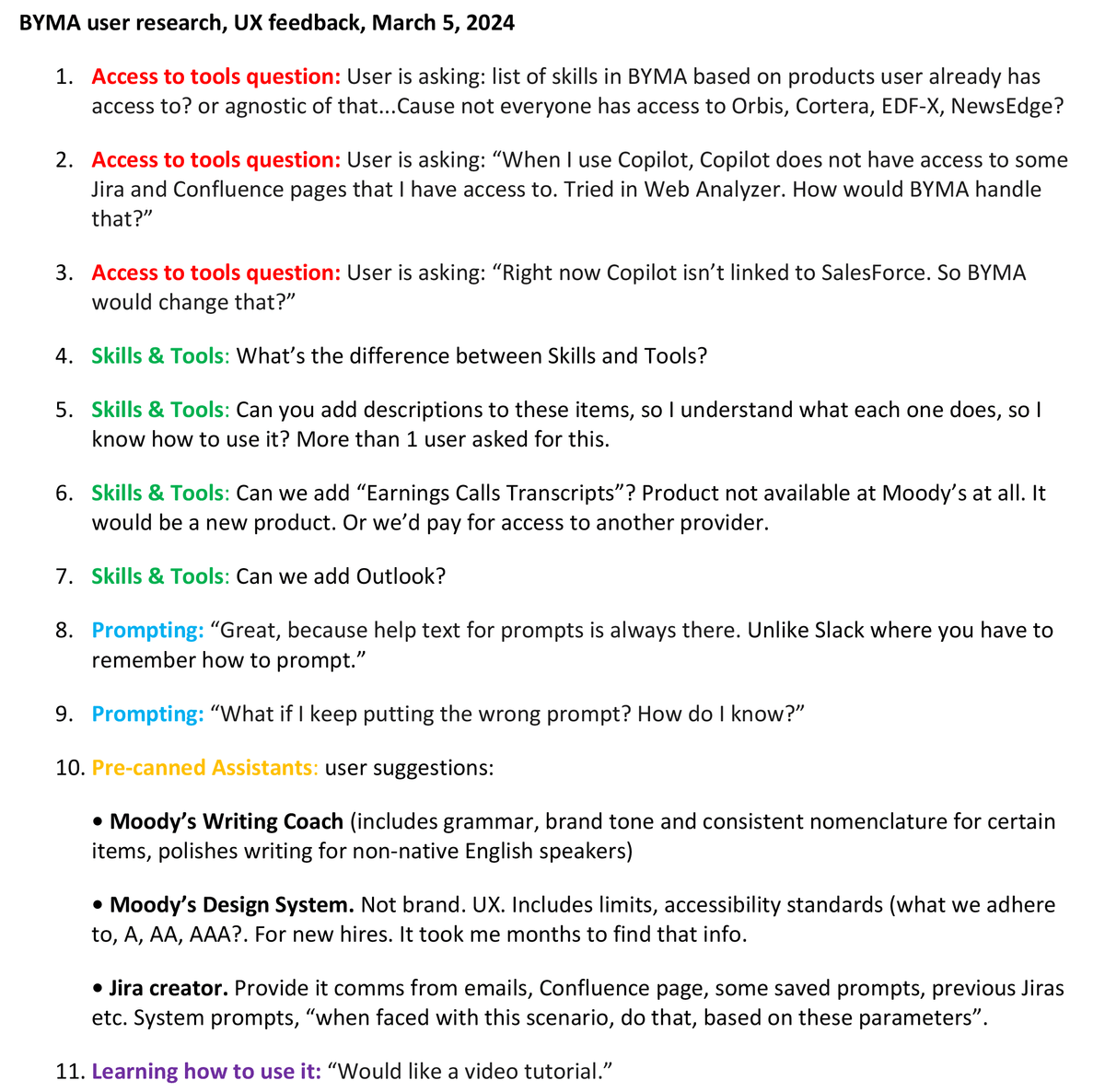
Build Your Moody's Assistant in UAT, and tested by the Moody's Copilot team.
The very first prototype I built, for testing in user research interviews. Quick financial analysis of Adidas.
The next, more data-rich prototype that was used in MD Connect event. "Financial and Economic Analysis of Example Company" + "CreditLens Product Helper" (CreditLens is a Moody's Analytics product).
Another video, with different content and context, about "Sanctions & Company Ownership" check. This video was used at Moody's Summit.
User feedback: for the whole flow, or by evaluating individual skills.
Skill in UAT in the video below. With my voiceover. Video is 8 minutes long.
2026 redesign
When I designed these UIs for Moody's, in 2023-2025, we were moving at break-neck speed, and I had no time to spend on visual design. The visual design help I was receiving was sporadic. So I decided to redesign these in November 2026.
What I would have done now diferently and applied here:
1. Make overall design less heavy-handed and more airy and light.
2. Separate content from background.
2. Modernize the page header.
3. Bring in the gradient, as it is sinonimous with AI now.
4. Utilize the modern framing of the cards: border on top, drop shadow on bottom.
5. Format the text in the responses.
6. Tone down the color of the prompts.
7. Utilize the gradient on the buttons.
8. Differentiate a distructive action.
9. Utilize the gradient on the chat input box and submit icon.
10. Use the Copilot logo as the Moody's avatar.
11. In terms of interaction design, enable moving through the app navigationally, and not just contextually, by adding the navigation / breadcrumb in the page header. Also, this request to know what skill user is in, came from user research.